Mr. Transcription Delete and Bulk Delete: How to Use and Notes
How to Issue Quotes and Invoices with Mr. Transcription
Oct. 15, 2026

For people who
- cannot pay by credit card or debit card
- cannot use PayPal
Mr. Transcription offers an annual contract that you can pay for by direct bank transfer.
You can easily issue an invoice or a quote from the settings page of Mr. Transcription.
Please note that we do not handle documents by postal mail.
How to Issue a Quote or Invoice with Mr. Transcription
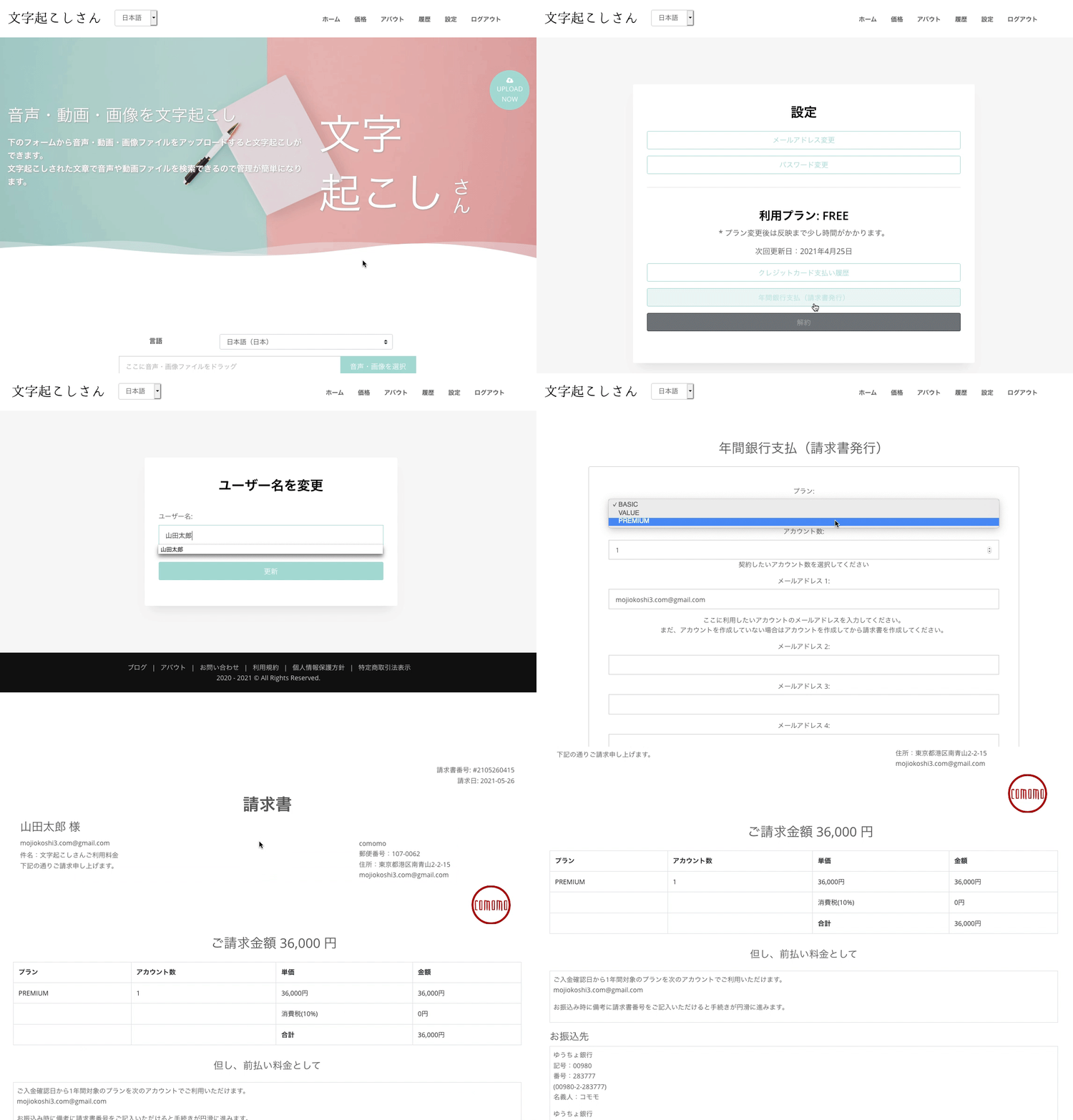
Issuing a quote or invoice with Mr. Transcription is very easy.
- Complete a free member registration with Mr. Transcription.
- From the Mr. Transcription settings, go to "Payment → Annual Bank Payment" to issue a quote and an invoice.
(The quote and the invoice are issued at the same time.) - Please check the contents of the invoice, then transfer the billed amount to the designated bank account.
* Invoices can be issued only when the site is displayed in Japanese (Japan).
* Bank transfer fees are to be borne by the customer.
Annual Contract Pricing
[Paid Plan Prices]
- Basic Plan: 1,000 yen × 12 months = 12,000 yen
Annual audio: 48 hours
Images: 6,000 - Value Plan: 2,000 yen × 12 months = 24,000 yen
Annual audio: 120 hours
Images: 14,400 - Premium Plan: 30,000 yen × 12 months = 36,000 yen
Annual audio: 240 hours
Images: 36,000
For details about the annual contract, please see the article below.

Payment Methods and Receipts for Mr. Transcription: Credit Card and Bank Transfer Supported!
Mr. Transcription offers two payment methods: 1. credit card, debit card, or Link and 2. direct bank transfer. This article explains payment methods, receipts, and more in detail.
The Invoice Is Addressed to Your Username
Your username is used as the addressee of the invoice.
If you registered an incorrect username, you can change it as follows:
- Click Change Username
- Enter the username you want
- Click Register
Following these steps lets you change your username.
A quote is issued together with the invoice, so even when you need a quote for an internal approval process, you can download it very easily.
Designated Bank Account for Transfers
The designated bank is Sumishin SBI Net Bank.
Other accounts are currently being prepared.
Because the branch name and account number are provided, you can transfer from other banks. Of course, transfers between Sumishin SBI Net Bank accounts are also easy.
Accounts other than Sumishin SBI Net Bank are currently in preparation. Thank you for your understanding.
When Your Plan Becomes Active
In principle, your plan is activated within 24 hours after the transfer is confirmed.
If your username differs from the name of the person making the transfer, we cannot confirm the payment. Please be sure to let us know through the contact form.
* If you are in a hurry, we can activate your plan even before the money arrives if you tell us the approximate payment date.
In that case, please issue an invoice first and then contact us through the contact form.
What the Status Means
The status shows the payment situation after the invoice is issued.
- Awaiting payment: The invoice has been issued and no payment has been made.
- Unpaid: You have told us the expected payment date and the plan has been activated, but payment has not yet been made.
- Paid: Payment has been confirmed and the plan is active.
Once the status becomes Paid, you can download a receipt.
After the plan is activated, you can download the receipt from the invoice issue history.
If You Created an Invoice by Mistake
Because an invoice can be created with a single click, you may sometimes create one by mistake.
In that case, please be sure to request that the invoice be deleted.
Please note that users cannot delete invoices themselves.
Please contact us through the contact form with the following:
Subject: Request to delete an invoice
Please delete the invoice I created by mistake.
Invoice number:
Please send us a message like this.
If You Want to Handle Documents by Postal Mail
We do not handle any document procedures by postal mail.
If necessary, we can provide PDFs attached to emails only.
We accept CloudSign and other electronic signatures only when you are able to prepare them.
Enjoy Mr. Transcription Even More Comfortably!
With Mr. Transcription, you can check all of your quotes, invoices, and receipts from your settings page, so there is no need to inquire by email.
Direct bank transfer payment is popular with many companies, organizations, and schools.
When you are busy every day, waiting for an email reply can be frustrating because you cannot move your work forward right away.
Being able to issue quotes, invoices, and receipts easily means you no longer have to think "I want to get this approved, but I can't yet!"
It saves a great deal of time for people who use Mr. Transcription.
We take pride in being the most convenient transcription service for you.
Please continue to make good use of Mr. Transcription!
■ AI transcription service "Mr. Transscription"
"Mr. Transcription" is an online transcription tool that can be used from zero initial cost and 1,000 yen per month (* free version available).
- Supports more than 20 file formats such as audio, video, and images
- Can be used from both PC and smartphone
- Supports technical terms such as medical care, IT, and long-term care
- Supports creation of subtitle files and speaker separation
- Supports transcription in approximately 100 languages including English, Chinese, Japanese, Korean, German, French, Italian, etc.
To use it, just upload the audio file from the site. Transcription text is available in seconds to tens of minutes.
You can use it for free if you transcribe it for up to 10 minutes, so please try it once.

It is "Mr. Transcription" who can easily transcribe from audio, video, and images.
Transcription allows you to transcribe for up to 10 minutes for free.
You can copy, download, search, delete, etc. the transcribed text.
You can also create subtitle files, which is ideal for transcription of interview videos.
HP: mojiokoshi3.com
Email: mojiokoshi3.com@gmail.com
Email: mojiokoshi3.com@gmail.com
Related article
Transcription for audio / video / image transcription. It is a transcription service that anyone can use for free without installation.
- What is Mr. Transcription?
- Transcript images, sounds, and videos with Mr. Transcription
- Free registration
- Rate plan
- manual
- Try other free services






