How Secure Is Mr. Transcription? Servers and More, Explained
Create Minutes for Morning Meetings Easily with AI Transcription
Oct. 12, 2026

Taking notes at morning assemblies and regular meetings is such a hassle... I wish I could make minutes easily!
Are you struggling with writing minutes for morning assemblies and regular meetings?
Web conferencing tools such as ZOOM and Microsoft Teams come with handy automatic transcription features, but you can't use those features at in-person morning assemblies and regular meetings.
Many people have probably taken notes during a morning assembly or regular meeting and found themselves thinking, "I missed that!" or "I can't concentrate on the meeting!"
In fact, there is a free way to solve all of these problems at once!
It is creating minutes with an AI transcription service.
This article explains in detail how to create minutes efficiently with a free AI transcription service, so that in-person morning assemblies and regular meetings can be as convenient as web meetings.
We introduce the concrete steps and tips from recording to finished minutes. Why not try it for free at your next morning assembly or regular meeting?
[Free] Recommended AI service for transcribing morning assemblies and regular meetings and creating minutes

For transcribing morning assemblies and regular meetings, we recommend "Mr. Transcription"!
"Mr. Transcription" is an AI service that can convert speech to text with high accuracy using the latest AI.
No installation is required, and you can use it right away.
Once you upload an audio file, it is converted to text in only about 1 minute, so you can start writing the minutes as soon as the morning assembly or regular meeting is over.
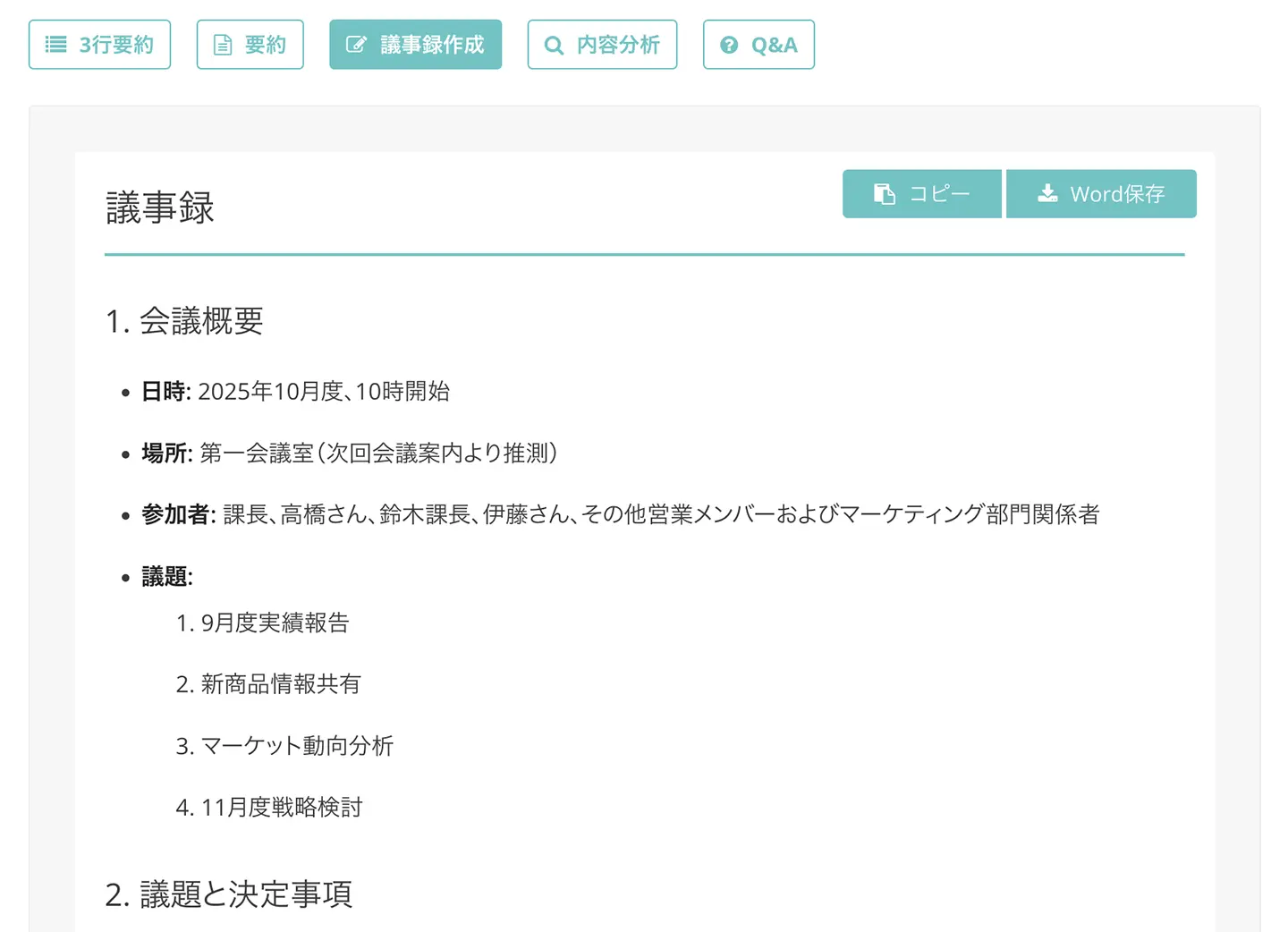
With the minutes creation feature, you can even complete the minutes automatically from the transcribed content!
What's more, "Mr. Transcription" is free to use!
No registration or login is required, so why not try "Mr. Transcription" for creating minutes of your morning assemblies and regular meetings?
Key points for transcribing morning assemblies and regular meetings: how to create minutes efficiently

First, let's look at the key points of transcribing morning assemblies and regular meetings and creating minutes.
Characteristics of morning assemblies and regular meetings: why are minutes hard to create?
A morning assembly is a short meeting held before work begins.
Its main purposes are to share the day's goals, pass on information and raise team motivation, and at many companies it is held in person in a meeting room or at the workplace.
A regular meeting, on the other hand, is a meeting held periodically to check project progress and solve problems.
Like morning assemblies, regular meetings are generally held in person in a meeting room.
Unlike web meetings, morning assemblies and regular meetings are mostly held in environments where dedicated transcription features like those of Zoom or Teams are unavailable.
Therefore, to create minutes of a morning assembly or regular meeting, you need to transcribe by some other means.
Why do you need to keep records of morning assemblies and regular meetings?
"Morning assemblies are short, so there's no need to keep records, right?"
Do you think that way?
In fact, records of morning assemblies and regular meetings are very important.
Records are essential to share the decisions made at a morning assembly reliably.
If information is conveyed only verbally, mishearing and misremembering tend to occur.
Minutes are also needed to pass information to people who couldn't attend because they were unwell or on a business trip.
The same goes for regular meetings.
By recording important decisions and progress accurately, you can easily look back on them later.
When you wonder, "What happened with that matter we decided at last month's regular meeting?", a record lets you check right away.
From the viewpoint of compliance and stronger governance, too, keeping records of morning assemblies and regular meetings is considered important.
In particular, for in-person meetings where you can't rely on automatic features as in web meetings, you need a system for deliberately leaving records.
Recording used to be very hard, but now there are free AI transcription services, so you can start keeping records at no cost.
Problems with conventional ways of creating minutes for morning assemblies and regular meetings

Until now, however, it was difficult to create minutes of morning assemblies and regular meetings.
In many cases, you probably wanted to leave minutes but couldn't.
The reality that the automatic features of web conferencing tools can't be used
Many web conferencing tools, such as ZOOM and Microsoft Teams, are equipped with a transcription feature.
It is a very convenient feature that turns the content of a meeting into text with a single button.
However, at in-person morning assemblies and regular meetings, the transcription feature cannot be used at all.
To record and transcribe morning assemblies and regular meetings held in a meeting room, you need dedicated tools.
*For recommended ways to transcribe ZOOM and Microsoft Teams meetings, please also see these articles.
How to transcribe ZOOM meetings to create minutes easily: recommended efficiency techniques for online meetings
We explain how to transcribe the content of ZOOM web meetings, covering both the method using ZOOM's standard features and the method of combining them with recommended transcription tools.
How to transcribe and record Microsoft Teams web meetings: easy minutes with AI transcription
We explain three ways to transcribe and create minutes when you hold a web meeting in Microsoft Teams.
Problems with handwritten notes at morning assemblies
At morning assemblies and regular meetings, most people take notes by hand or on a keyboard.
However, taking notes yourself on the content of morning assemblies and regular meetings has its problems.
First, there is the risk of missing things or leaving them out of the record.
Morning assemblies are short and packed with information, so you often can't keep up with the speaking speed and miss important content.
Another problem is that you can't concentrate on the content of the morning assembly or regular meeting.
You get distracted by typing on the keyboard, and the essential content of the discussion doesn't sink in.
There is also the problem that you can't type fast enough.
This is because people generally speak much faster than the typical typing speed.
If you want to keep a record, writing up a clean copy after the morning assembly or regular meeting is also a lot of work.
To turn handwritten notes into minutes, you need to type them all over again on a computer.
Even more serious is the problem of illegible handwriting.
Notes scribbled in a hurry at a morning assembly or regular meeting are sometimes impossible to understand when you look back at them later, aren't they?
Challenges of a dedicated minute-taker
"Then let's have someone take the minutes at the morning assembly or regular meeting."
Some companies consider this solution, but it has problems too.
Assigning staff solely to create minutes incurs labor costs.
There is also the risk of absence due to the person's circumstances.
If the dedicated person is off or on a business trip, minutes cannot be created for that day's morning assembly or regular meeting.
Summarizing text clearly is, in fact, a highly specialized skill.
It is not easy to find a replacement for someone who is good at writing minutes.
With a free AI transcription service, you can solve these problems as well.
[Free] The solution using an AI transcription service

For creating minutes of morning assemblies and regular meetings, we recommend using an AI transcription service!
Next, we explain the features of AI transcription services.
What are "transcription" and "tape transcription"?
Have you ever heard the terms "mojiokoshi" (transcription) and "tape-okoshi" (tape transcription)?
They refer to converting the content of audio or video files into text that can be handled on a computer.
By recording the morning assembly or regular meeting and transcribing it afterward, you can create accurate and detailed minutes.
In the past, the only way was to listen to the audio of a morning assembly or regular meeting and type it out by hand. Today, with the latest AI technology, it is possible to transcribe automatically for free.
Why we recommend AI transcription services
With an AI transcription service, you can turn the content of morning assemblies and regular meetings into text as conveniently as with the automatic transcription features of web conferencing tools.
The greatest strength of the latest AI transcription services is that they can convert with high accuracy and at high speed!
With accuracy equal to or better than a human listener, transcription of a morning assembly or regular meeting is completed in a short time.
Since everything can be recorded, you can also avoid missing things at morning assemblies and regular meetings.
You can concentrate on the discussion during the morning assembly or regular meeting, and as long as you have recorded it, you can create perfect minutes afterward.
The recording conditions at morning assemblies and regular meetings vary greatly with the size of the meeting room and the number of participants, but the latest AI, which recognizes speech with high accuracy, can deliver high-quality transcription in any environment.
Another important point is that anyone can use it.
All you do is upload an audio file, so anyone can learn how to use it right away.
Because creating minutes no longer requires specialized skills, you can avoid making the work dependent on particular individuals.
Of course, there is no cost.
AI transcription services can be used for free.
You can create high-quality minutes at a much lower cost than assigning a dedicated minute-taker.
[Free] How to create minutes of morning assemblies and regular meetings with "Mr. Transcription"
For creating minutes of morning assemblies and regular meetings, we recommend "Mr. Transcription"!
"Mr. Transcription" is a transcription service that uses the latest speech recognition AI to transcribe audio files and videos with high accuracy and speed.
Just upload the meeting's recording file, and transcription is completed in only about 1 minute.
It also comes with a minutes creation feature, so you can complete the minutes automatically from the transcription result!
You can easily turn the content of your daily morning assemblies and regular meetings into minutes on the same day.
1. Preparing to transcribe morning assemblies and regular meetings with "Mr. Transcription"
Let's start by preparing for the recording.
Unlike web meetings, in-person meetings require dedicated recording equipment.
Prepare a recording app on your smartphone or an IC recorder.
Recent smartphones have very good sound quality, so a smartphone is enough without any special equipment.
Before you start recording, get permission from the participants.
Simply saying, "We'll be recording this to create the minutes," is enough.
Tips for improving sound quality in a meeting room:
- Place the recording device in the center of the participants
- If possible, put it on a dedicated stand so it doesn't pick up keyboard typing noise
- Keep it as far as possible from noise sources such as air conditioners
These points are important.
We explain recording tips in this article.
Please take a look.
[AI transcription] 6 recording tips for highly accurate transcription
To get highly accurate AI transcription, a few techniques matter when recording. This article introduces the best recording tips for AI transcription. A high-quality microphone, a well-placed microphone, a quiet recording environment, clear speech from speakers, one person ...
2. [Free] Transcribe an audio file with "Mr. Transcription"
Once the recording is done, it's time to transcribe it with "Mr. Transcription".
First, open the top page of "Mr. Transcription".
Drag and drop the recorded audio file, or click the "Select file" button and choose the file.
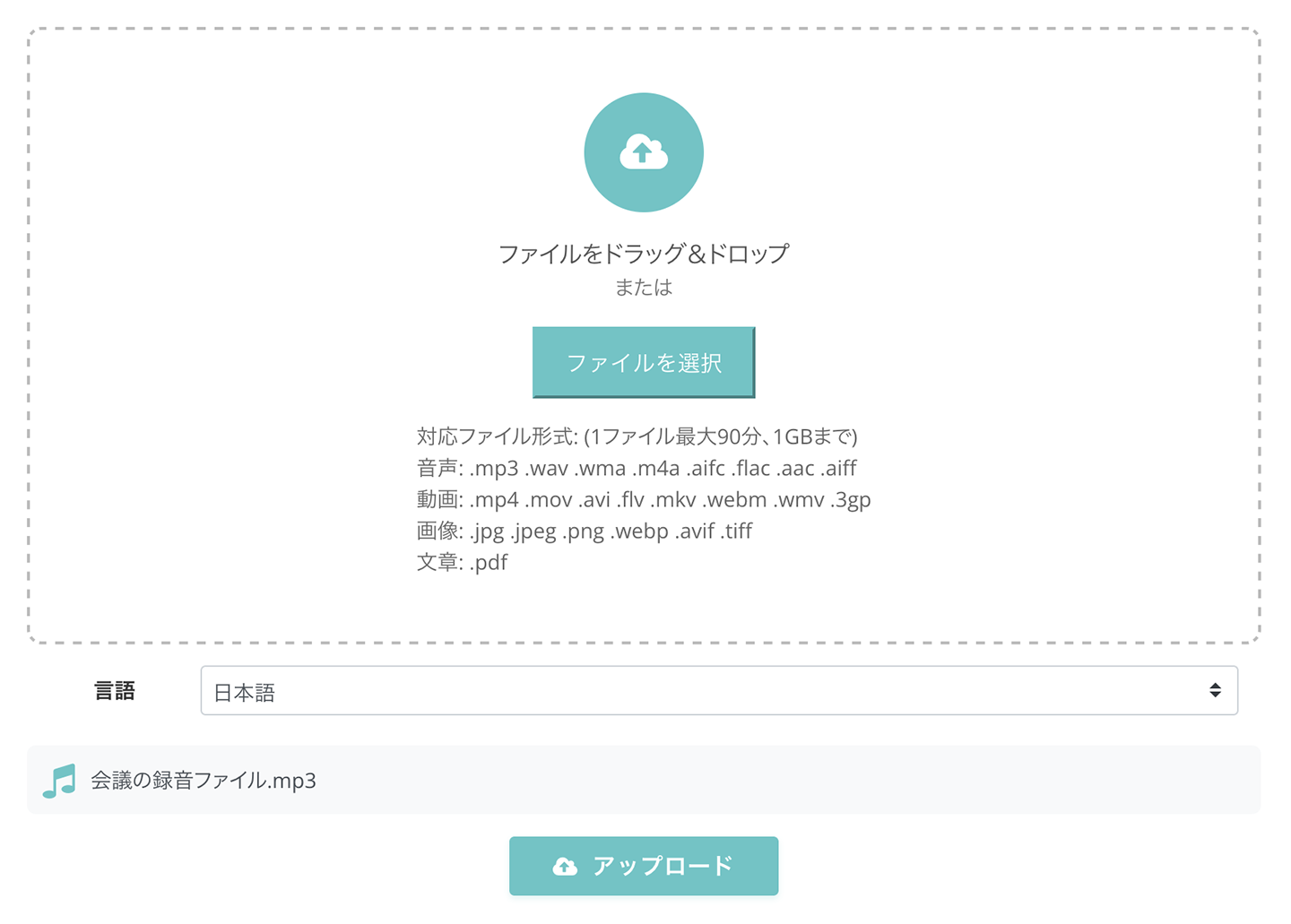
Now you're ready.
Click the "Upload" button to start transcription.

Even for a long audio file, transcription is completed in about 1 minute.
If you use the service for free without registering an account, keep the screen open.
*If you have registered an account, you will be notified by email when the transcription is complete, so you can close the screen.
When transcription is complete and the screen is still open, the display switches and the transcription result appears.
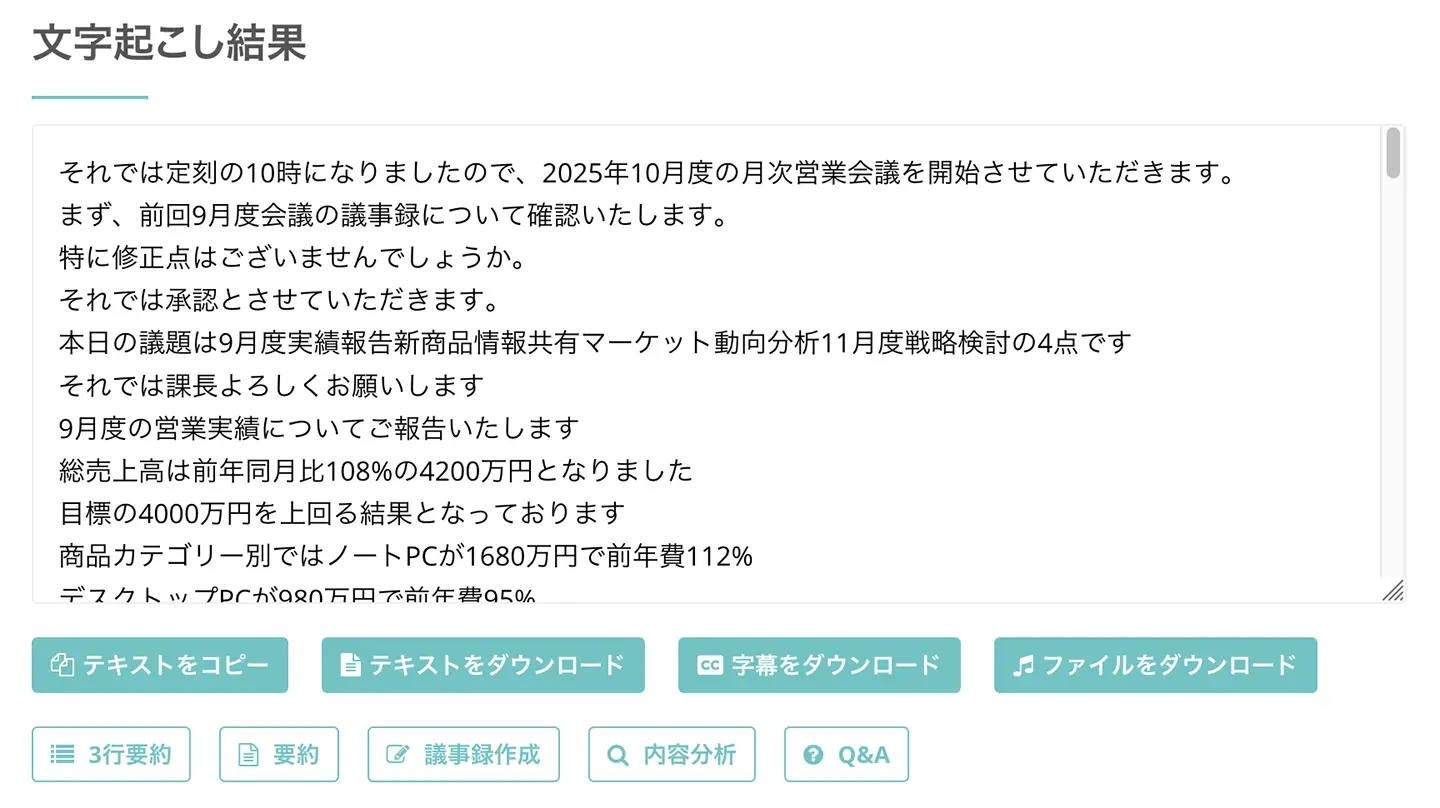
You can check the transcription result section by section.
You can also play the audio section by section with the play button next to each utterance.
When you play it with the player at the bottom of the screen, the displayed text switches to match the part being played.
*If you have closed the screen, you can check the result from the history page.
3. Create the meeting minutes automatically with "Mr. Transcription"
Once transcription is complete, use the minutes creation feature to create the meeting minutes.
Buttons such as "Summary" and "Create minutes" appear below the transcription result.

Click "Create minutes" from these, and the minutes creation starts.
Processing is completed in only a few seconds!
The screen switches, and the content of the minutes is displayed like this.
With "Mr. Transcription", you can create minutes this easily!
The minutes you create can be downloaded in Word format.
That completes the flow of creating minutes of a morning assembly or regular meeting with "Mr. Transcription".
It is so easy that you should try "Mr. Transcription" for free first!
How can you get even more out of an AI transcription service at morning assemblies and regular meetings?

Tips for using an AI transcription service for free to record morning assemblies
A morning assembly is a short meeting, so efficient recording is important.
With "Mr. Transcription", you can record the content of a morning assembly without omissions.
Keeping the daily goals and issues shared at the morning assembly as minutes helps with progress management for the whole team.
By transcribing the content of morning assemblies for free and recording it continuously, you can turn the daily accumulation into a valuable company asset.
Detailed records and analysis at regular meetings
Regular meetings call for more detailed records.
To record project progress at regular meetings in detail, the high-performance speech recognition AI of "Mr. Transcription" is ideal.
By documenting the problem-solving process at regular meetings, you can use it as reference material when similar problems occur.
Minutes of regular meetings are also very valuable as material for long-term review.
With "Mr. Transcription", you can easily record the content of regular meetings as minutes, so you can keep improving your work continuously.
Use the minutes creation feature of "Mr. Transcription" for remote and hybrid meetings too!
A recent trend is hybrid morning assemblies and regular meetings, where some people are in the meeting room and some join remotely.
In such cases as well, you can easily create minutes with "Mr. Transcription".
The tip for recording remote and hybrid meetings is to use it together with the recording feature of meeting tools such as ZOOM or Teams.
To ensure good sound quality, also pay attention to your microphone settings.
With "Mr. Transcription", you can record all the audio, including that of people other than the remote participants.
Sharing minutes among multiple locations is also easy because they are text data.
"Mr. Transcription" is also handy for transcribing web conferencing tools such as ZOOM and Teams!
For details, please also see these articles.
How to transcribe ZOOM meetings to create minutes easily: recommended efficiency techniques for online meetings
We explain how to transcribe the content of ZOOM web meetings, covering both the method using ZOOM's standard features and the method of combining them with recommended transcription tools.
How to transcribe and record Microsoft Teams web meetings: easy minutes with AI transcription
We explain three ways to transcribe and create minutes when you hold a web meeting in Microsoft Teams.
Points for security and privacy when creating minutes

What to keep in mind when recording morning assemblies and regular meetings
When recording morning assemblies and regular meetings, consideration for the participants is important.
The first thing to keep in mind is to obtain clear consent from all participants.
Clearly tell them the purpose of the recording (to create minutes), how long the recording data will be kept, and how it will be used.
In particular, when there are participants from outside the company, it is safer to obtain not only verbal consent but also, where possible, written consent.
Be careful when handling confidential information
At morning assemblies and regular meetings, highly confidential information is sometimes discussed.
Examples include internal sales figures, personnel matters and the development status of new products.
Particular care is needed when transcribing meetings that contain such confidential information.
First, choose the storage location for recording files carefully.
It is safer to save them on a company-managed server rather than on a personal smartphone or computer.
For the transcription results as well, set access permissions appropriately so that people outside the relevant group cannot view them.
Pay attention to the security of the AI transcription service!
When choosing an AI transcription service, we recommend also checking its security measures.
"Mr. Transcription" is designed with a focus on security, including encryption of uploaded files and privacy protection.
This article explains the security of "Mr. Transcription".
Please take a look.
How secure is Mr. Transcription? Detailed answers, including about servers
Is it safe to upload data to Mr. Transcription? Could it be misused? Since files may contain confidential company information, it is natural to be cautious. How is the security of Mr. Transcription handled?
How to make even more use of the transcription results of morning assemblies and regular meetings
Tips for compiling minutes yourself
If you create minutes yourself without using the minutes creation feature of Mr. Transcription, there are a few tips.
Files downloaded from "Mr. Transcription" are transcribed with meaningless parts such as "um" and "uh" already omitted.
If necessary, adjust the structure of the text to finish more readable minutes.
There are several styles of transcription: "suokoshi" (verbatim), "kebatori" (removal of filler words) and "seibun" (edited text).
Knowing these three styles lets you create minutes of morning assemblies and regular meetings more smoothly.

What is the difference between suokoshi, kebatori and seibun? The three styles of transcription explained in depth
The differences between suokoshi, kebatori and seibun explained in depth! Choose the right transcription style to work more efficiently. Use AI to cut work time significantly. The best method for each purpose, introduced in detail.
The key to organizing information specific to morning assemblies and regular meetings is to write down
- decisions
- issues
- tasks
clearly and separately.
Organize them so that "what was decided today," "issues going forward" and "who does what" are clear at a glance.
Create a minutes template for morning assemblies and regular meetings
We also recommend creating a template to make efficient use of the transcription results of morning assemblies and regular meetings.
For a morning assembly format, items such as
- Today's announcements
- Reports from each department
- Today's goals
are important.
For a regular meeting format, we recommend a structure such as
- Progress since last time
- Agenda for this meeting
- Decisions
- Actions until the next meeting
and so on.
If you prepare templates for morning assemblies and regular meetings in advance, you can quickly extract the important information from the transcription results and easily create minutes and materials for the next meeting.
Share information from morning assemblies and regular meetings efficiently
Once the minutes of a morning assembly or regular meeting are ready, it is also important to share them efficiently.
The best approach is to use your company's internal sharing system so that everyone concerned can access them right away.
Because they are text data, you can easily share the minutes with absentees by email or chat.
Transcribing audio makes it easier to search, so you can find the part you need right away.
Even when you ask yourself, "When did we discuss that matter?", a keyword search will find it immediately.
Improve the quality of morning assemblies and regular meetings by keeping minutes
Transcribed minutes also help improve the quality of morning assemblies and regular meetings.
By making what was said visible, you can gain the realization, "Oh, so this is what I always say."
By analyzing trends in what is said, you can also find hints for running meetings more efficiently.
Past minutes are also very important for finding improvements for the next meeting.
Make creating minutes for morning assemblies and regular meetings more efficient with a free AI transcription service!
At in-person morning assemblies and regular meetings, you can't use the handy automatic transcription features of web conferencing tools.
In that case, by using the free AI transcription service "Mr. Transcription", you can get the same level of convenience.
Just upload the recording file of the morning assembly or regular meeting, and transcription is done in only about 1 minute.
The minutes creation feature produces high-quality minutes!
Because you don't need to take notes by hand or on a keyboard, you can concentrate on the content of the morning assembly or regular meeting.
"Mr. Transcription" can be tried for free, so why not try it at your next morning assembly or regular meeting?
■ AI transcription service "Mr. Transscription"
"Mr. Transcription" is an online transcription tool that can be used from zero initial cost and 1,000 yen per month (* free version available).
- Supports more than 20 file formats such as audio, video, and images
- Can be used from both PC and smartphone
- Supports technical terms such as medical care, IT, and long-term care
- Supports creation of subtitle files and speaker separation
- Supports transcription in approximately 100 languages including English, Chinese, Japanese, Korean, German, French, Italian, etc.
To use it, just upload the audio file from the site. Transcription text is available in seconds to tens of minutes.
You can use it for free if you transcribe it for up to 10 minutes, so please try it once.

It is "Mr. Transcription" who can easily transcribe from audio, video, and images.
Transcription allows you to transcribe for up to 10 minutes for free.
You can copy, download, search, delete, etc. the transcribed text.
You can also create subtitle files, which is ideal for transcription of interview videos.
HP: mojiokoshi3.com
Email: mojiokoshi3.com@gmail.com
Email: mojiokoshi3.com@gmail.com
Related article
Transcription for audio / video / image transcription. It is a transcription service that anyone can use for free without installation.
- What is Mr. Transcription?
- Transcript images, sounds, and videos with Mr. Transcription
- Free registration
- Rate plan
- manual
- Try other free services






