【無料あり】画像・PDF・写真から文字起こし・テキスト化するOCRアプリおすすめ7選【2026年版】
Notta Transcription Tool: Features, Pricing & Free Use 2026
Oct. 12, 2026
What kind of transcription app is Notta?

Notta is an application that uses AI to automatically transcribe audio and video.
In this article, we will explain Notta's features, how to use it, and its pricing plans with the latest information for 2026.
We will also introduce recommended AI transcription sites that you can use for free without registration, so if you're wondering about transcription methods, please refer to this article.
What is Notta? Explaining the Features and Characteristics of this AI Transcription App
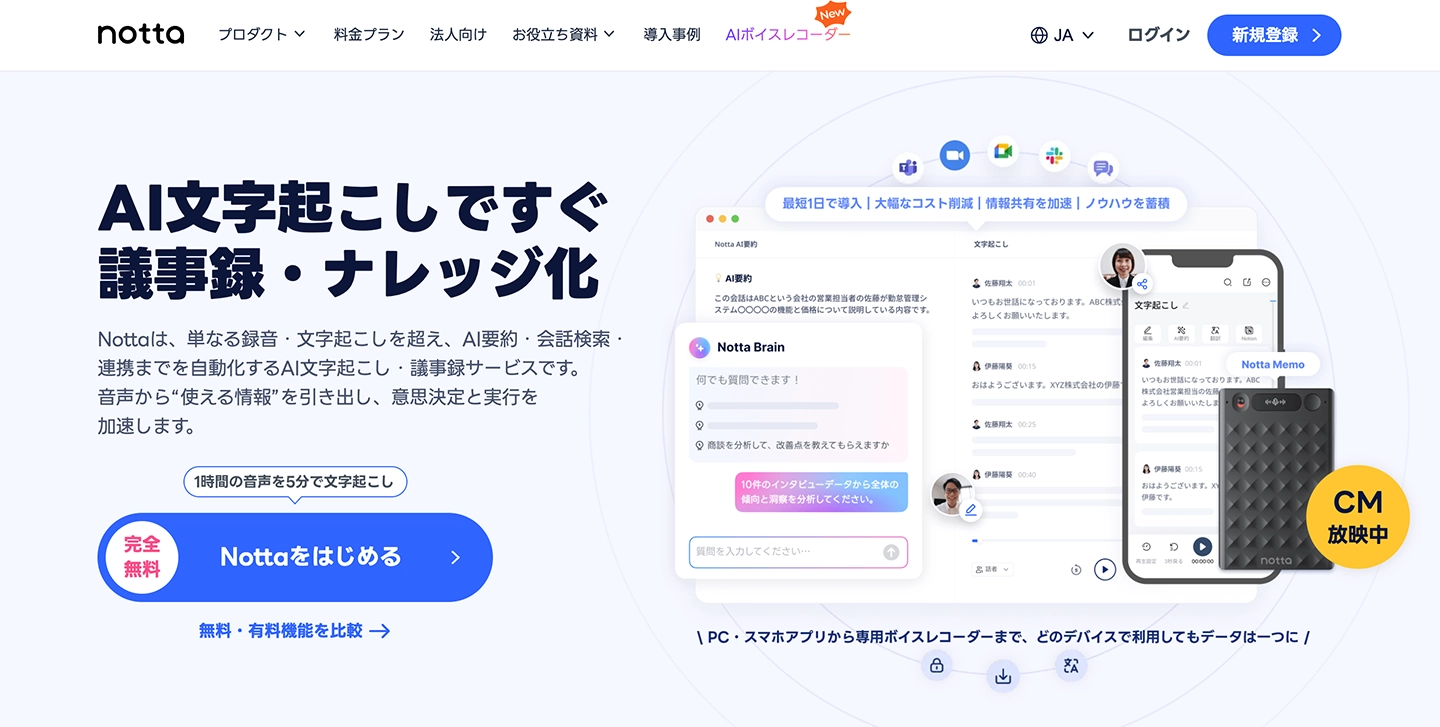
Notta is an AI transcription app operated by Notta Inc. in Japan.
It is a service that uses AI speech recognition to transcribe audio and video from websites and apps, and it has been adopted by various companies.
By using Notta, you can streamline the creation of meeting minutes and business negotiation records, and share information smoothly.
Notta's Transcription Features (AI Summary, Speaker Separation, Web Conferencing Integration)
Notta offers the following features:
- File Transcription: Upload audio/video files and convert them to text
- Real-time Transcription: Transcribe on the spot using a microphone
- Web Conferencing Integration: Integrate with Zoom, Google Meet, Microsoft Teams, and Webex, with a bot automatically joining and transcribing
- AI Summary: Automatically summarize transcription results and extract action items
- Speaker Separation: Automatically identify up to 10 speakers
- Supports 58 Languages: Transcribe in multiple languages including Japanese, English, and Chinese
- Export: Output in formats such as TXT, DOCX, PDF, SRT
It boasts a rich set of features useful for team meeting minute creation, such as automatic web conference transcription and AI summarization.
How to Use the Notta App (PC, Smartphone, Tablet Compatible)
Notta can be used on various devices including PCs, smartphones, and tablets.
On PCs, you can transcribe from browsers or Chrome extensions, and on smartphones and tablets, you can use the iOS and Android apps.
Notta's Supported File Formats (Audio/Video) and Languages
Notta supports the following file formats for transcription:
- Audio files: WAV, MP3, M4A, CAF, AIFF, OGG, WMA
- Video files: AVI, MP4, RMVB, FLV, MOV, WMV, WebM, 3GP
It supports major audio and video file formats, allowing you to upload files recorded on your smartphone or IC recorder directly for transcription.
※However, it does not have features to read text from images or perform OCR (Optical Character Recognition) on PDFs.
Notta supports 58 languages, including Japanese and English, making it a multilingual solution.
※The number of supported languages and file formats is as of March 2026.
Notta Pricing Plans: Free vs. Paid Features
Next, we will introduce the plans available when using Notta for transcription.
How to Use Notta for Free? What You Can Do with the Free Plan
Notta can be tried for free.
However, the free plan has the following limitations:
- Transcription time: Up to 3 minutes per session (up to 120 minutes per month)
- File download (export): Limited
- AI Summary: Up to 10 times per month
- Custom vocabulary: Up to 3 Japanese words and 3 English words
- Transcription of web conferences (Zoom, Google Meet, Microsoft Teams, Webex): Available (with the same transcription time limits as above)
Since this is a trial plan, a paid subscription is required for serious transcription use.
Notta Paid Plan Pricing (Premium, Business, Enterprise)
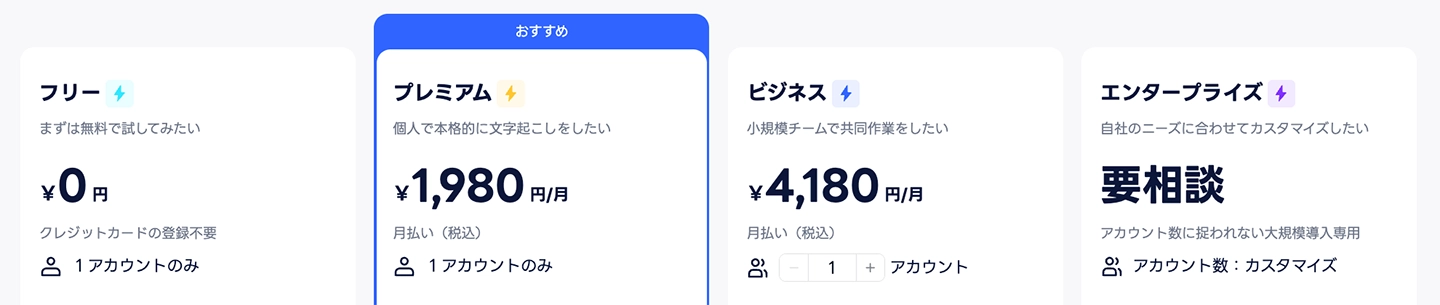
Notta's paid plans are as follows:
*Information as of March 2026.
Premium Plan (for individuals)
- Monthly payment: 1,980 yen/month
- Annual plan: 1,185 yen/month (total 14,220 yen, tax included)
Business Plan (for teams)
- Monthly payment: 4,180 yen/month
- Annual plan: 2,508 yen/month (total 30,096 yen, tax included)
Enterprise Plan (for corporations)
- Price by consultation
- Supports security features like SSO and audit logs
Choosing an annual plan offers a discount, but monthly payments start from 1,980 yen/month, which is slightly more expensive.
*Prices are based on information from the Notta official website.
Please check the Notta official website for the latest pricing.
How to Use Notta: File Transcription Method
So, how do you transcribe using Notta?
We will explain in detail how to upload audio files and transcribe them!
1. Register and Log In to Notta
Registration is required to use Notta.
※Registration is also required for free transcription.
Access the Notta website and register an account from "Sign Up".
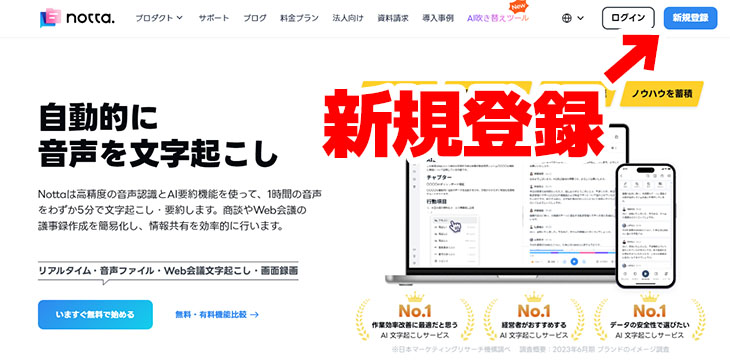
Clicking "Sign Up" opens the registration screen.
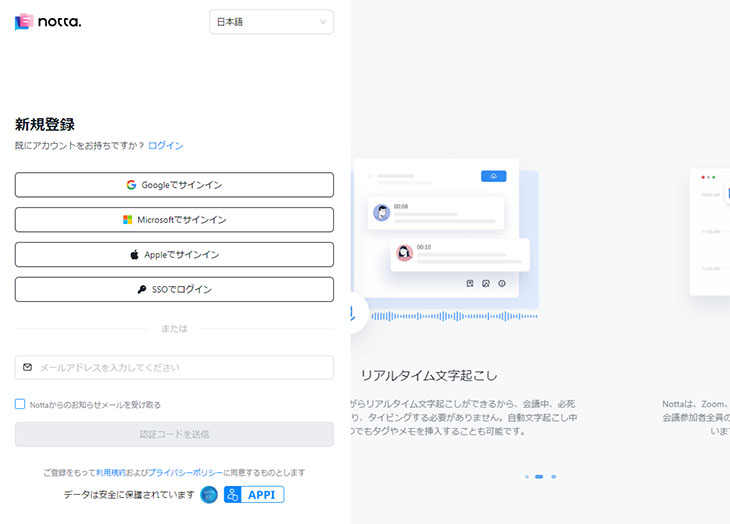
There are 5 ways to register for a Notta account:
- Link with Google account
- Link with Apple account
- Link with Microsoft account
- Log in with SSO (Single Sign-On)
- Register with email address
For this guide, assuming transcription for company work, we registered by entering an email address.
After entering your email address, a verification code will be sent to your email.
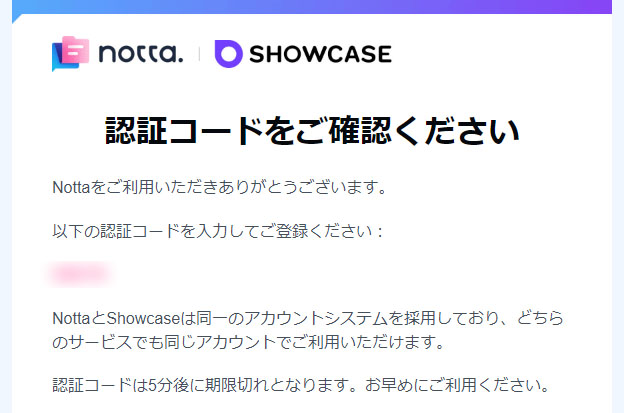
Entering the verification code allows you to proceed with registration.
After registering, a survey screen will open (you can skip it without answering).
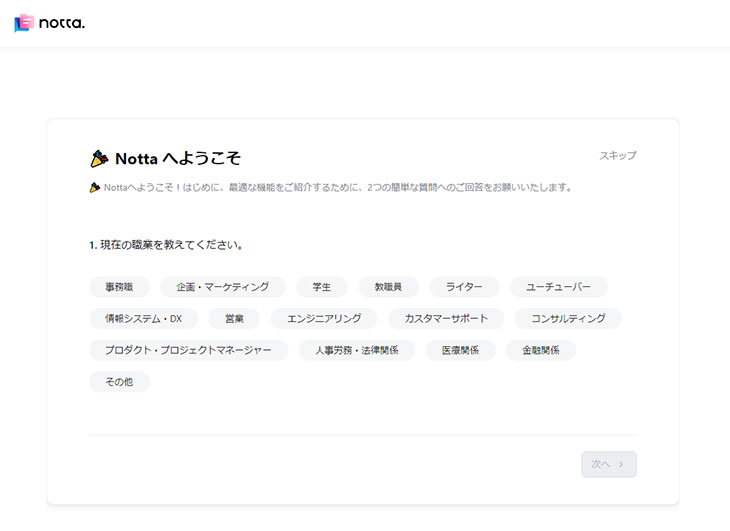
After completing the survey screen, the "Create New Workspace" screen will open.
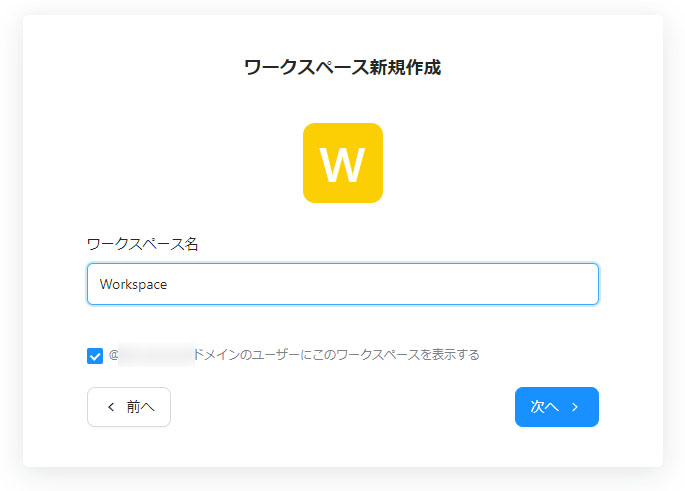
Enter the workspace name and click "Next".
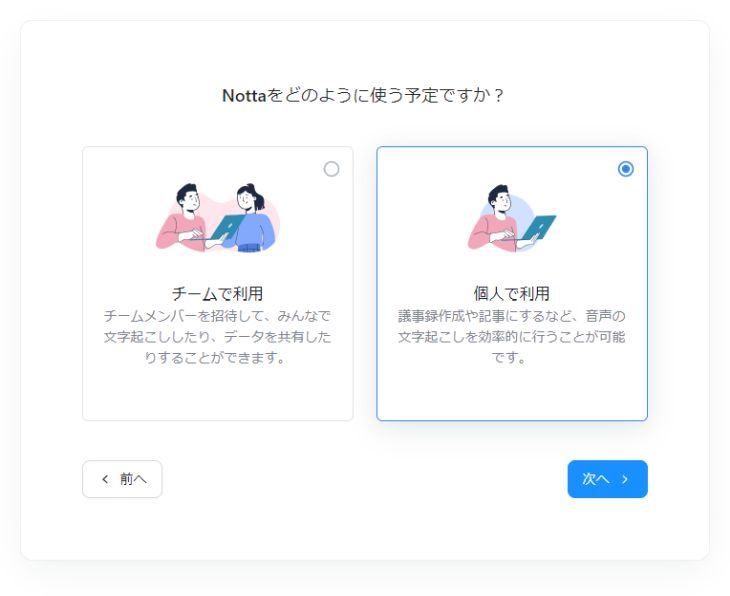
You will be asked "How do you plan to use Notta?", so select whether you will transcribe as a team or individually.
The Notta management screen will open.
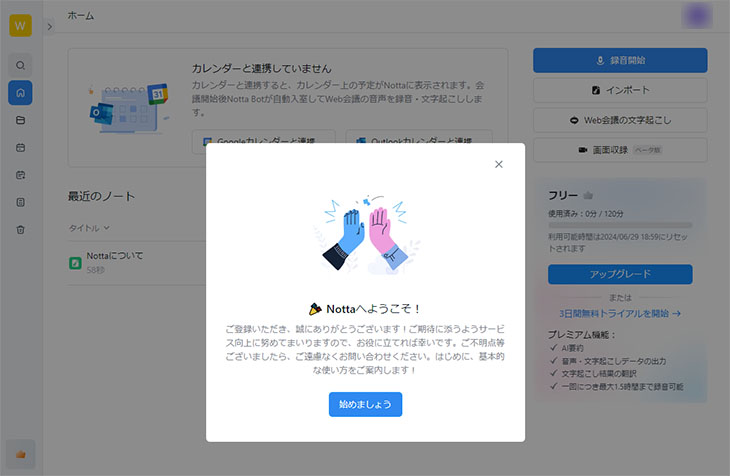
Your registration to transcribe with Notta is now complete.
2. Upload Audio/Video Files for Transcription
Upload files to Notta for transcription.
Click the "Import" button on the management screen.
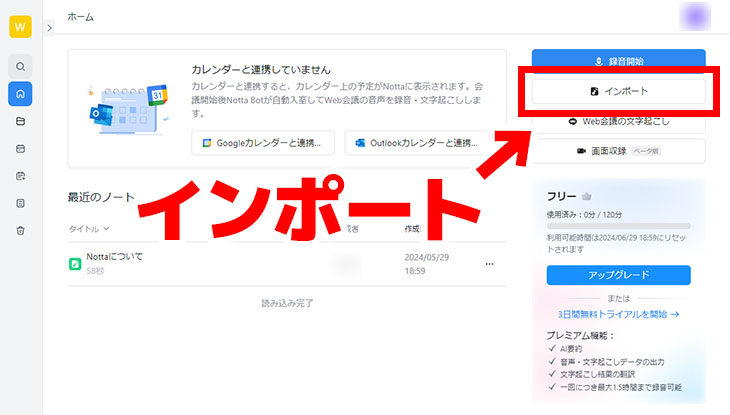
This will open the file upload screen.
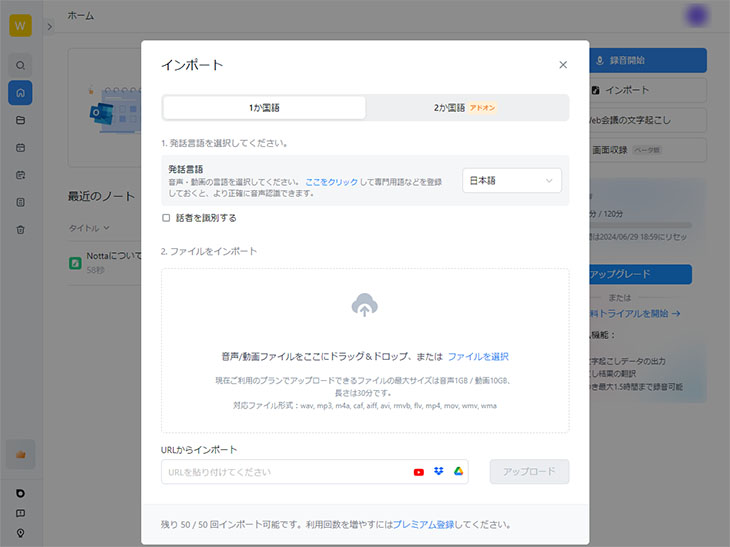
Drag and drop the file you want to transcribe, or click the upload area to select the file.
Once you select a file, it will be automatically uploaded.
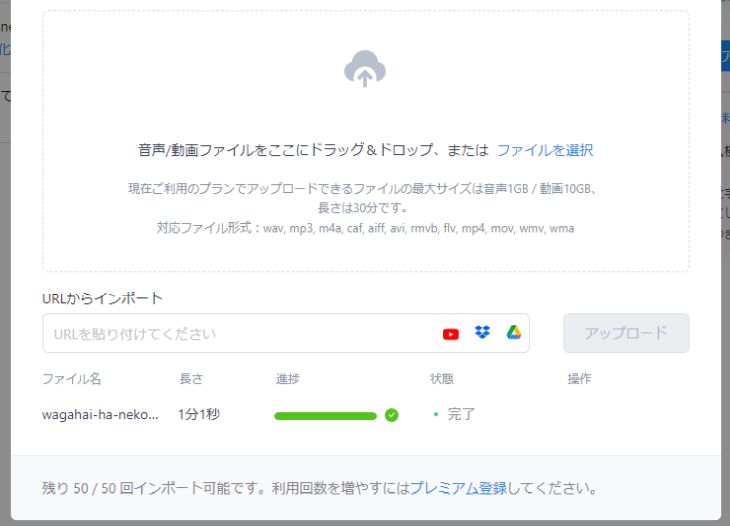
Once the upload is complete, the transcription process will also run automatically.
3. Review and Download Transcription Results
Review the transcription results.
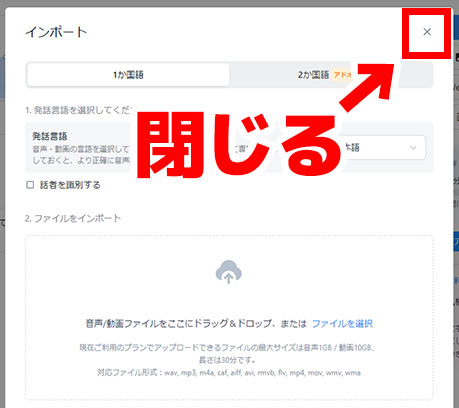
Close the upload screen by clicking the 'x' in the top right corner.
You are now back on the Notta dashboard.
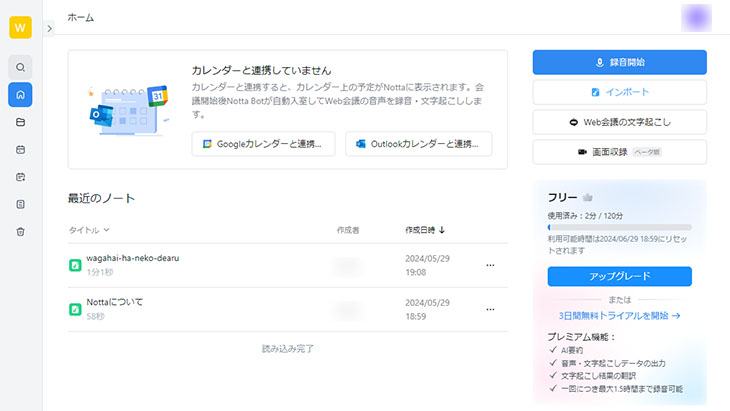
In the dashboard, under "Recent Notes," you will see the name of the file you uploaded.
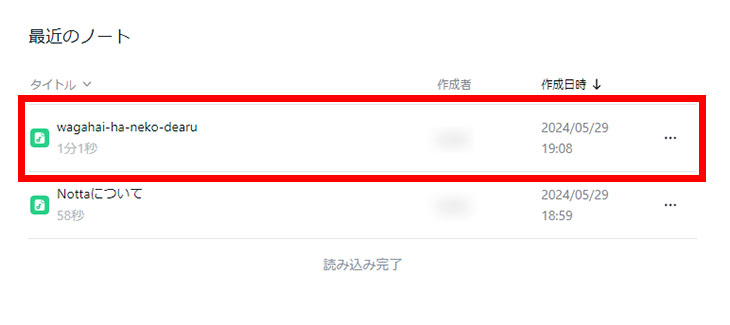
Click to open the transcription results screen.
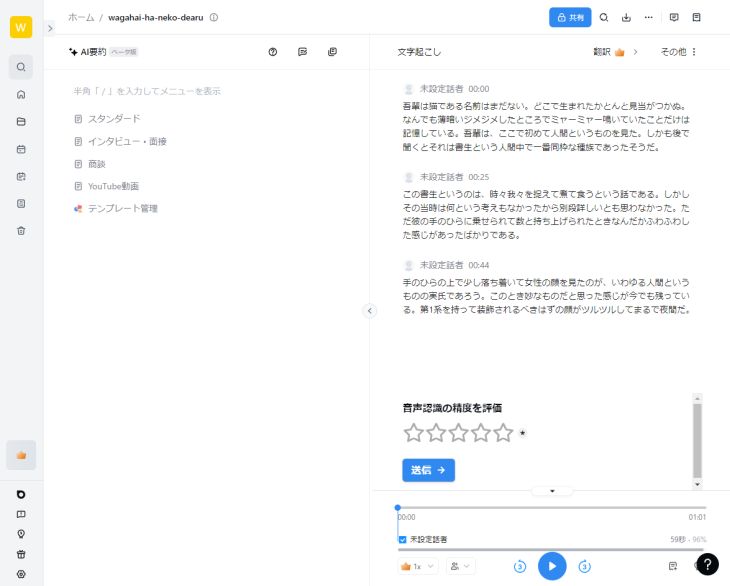
On the Notta transcription results screen, you can review the transcribed text and play back the original audio.
Paid Plan Required for Downloads
When you click the "Download" button in the top right corner of the transcription results screen,
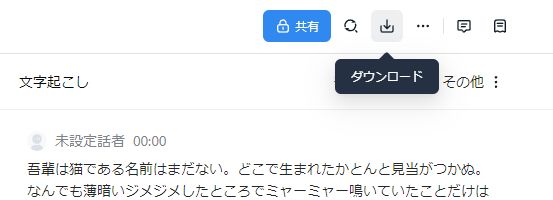
the download screen will open, like this.
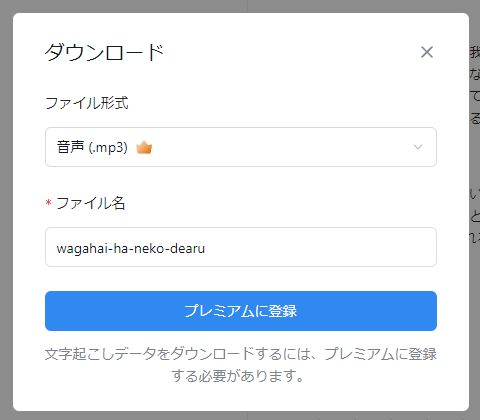
However, to download the transcription results as text, you need to subscribe to a paid plan.
If you want to save the transcription in formats like SRT files for subtitles or PDF, a paid plan subscription is also required.
How to Create Meeting Minutes with Notta for Web Conferences (Zoom, Teams, Google Meet)
Notta is equipped with features ideal for creating meeting minutes.
By using the integration feature with web conferencing apps like Zoom, Google Meet, and Microsoft Teams, Notta's bot can automatically join your web conference and transcribe it.
Furthermore, you can use the AI summary feature to automatically generate meeting summaries and action items from the transcription results.
It also includes a speaker separation feature, allowing you to create minutes that distinguish who said what.
*Web conference transcription and AI summarization are available even with the free plan (transcription up to 3 minutes per session, 120 minutes per month; AI summarization up to 10 times per month). Please check the official Notta website for more details.
Important Points to Note When Using Notta for Transcription
Here are some important points to know before using Notta.
Notta's Free Plan Has Feature Limitations
Notta's free plan only allows transcription for up to 3 minutes per session.
The monthly limit is also 120 minutes, and there are restrictions on download features, so the free plan is primarily for trial purposes.
For full use, a paid plan (starting from ¥1,980/month) is required.
Notta Does Not Support Image/PDF Transcription (OCR)
Notta supports audio and video transcription, but it does not have OCR functionality to extract text from images or PDFs.
If you need to transcribe images or PDFs, we recommend using an AI transcription site that supports OCR, such as Mr. Transcription.
Registration and Login Required to Use Notta
Notta requires registration for all plans, including the free plan.
Notta vs. Mr. Transcription: A Comparison of Pricing, Features, and Free Plans
We compared Notta with Mr. Transcription, another AI-powered transcription service.
Scroll horizontally
| Mr. Transcription | Notta | |
|---|---|---|
| Free Transcription | 10 min/day | Registration required, 3 min/session (120 min/month) |
| Free
Download | Available | Limited (Paid plan required) |
| Supported Files | Audio, Video
Images, PDFs | Audio, Video |
| Number of Supported Languages | 100 languages | 58 languages |
| Real-time
Transcription | ― | Supported |
| Web Conferencing Integration | ― | Zoom, Meet, Teams, Webex (Transcription available even with free plan) |
| AI Summarization | Supported | Supported (10 times/month for free plan) |
| Speaker Separation | Supported | Supported |
| Paid Plan Cost | From ¥1,000/month | From ¥1,980/month (for monthly payment) |
While each has its own features, the key is to choose based on your specific needs.
For Audio and Video File Transcription, 'Mr. Transcription' is Recommended
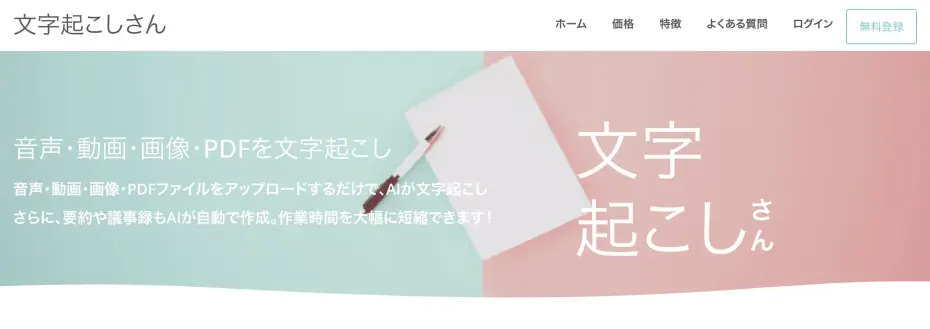
If you're looking to transcribe audio or video files, 'Mr. Transcription' comes highly recommended.
'Mr. Transcription' allows you to transcribe simply by uploading your files directly from the top page.
No registration is required for up to 3 minutes of free transcription per day. If you create an account, you get up to 10 minutes free per day (with a 10-minute limit per file)!
Downloading the results is, of course, also free.
Utilize the latest AI for convenient transcription results, including summarization, analysis, meeting minute creation, and audio playback & editing for specific sections!
It also supports speaker separation, allowing you to transcribe meeting or interview audio by individual speaker.
Unlike Notta, it also supports transcription from images and PDFs.
With support for 100 languages, it's perfect for transcribing foreign language content.
Paid plans start from just 1,000 yen per month, offering simple and clear pricing.
This service is ideal for those who want a simple and affordable way to transcribe files.

Notta excels in web conference integration, while 'Mr. Transcription' is strong for file transcription! It's best to choose based on your specific needs.
If you're unsure about how to transcribe, why not try 'Mr. Transcription' for free, no registration required?
Summary: How to Use Notta, Pricing, and Recommended Transcription Methods
This article explained the features, usage, and pricing plans of Notta.
Notta is a versatile AI transcription app with features like web conference integration and real-time transcription.
If you want to transcribe audio and video files simply and affordably, Mr. Transcription is recommended, as it's free to use and requires no registration.
If you tried to transcribe audio files with ChatGPT and it didn't work, please also refer to this article:
[Latest 2026] Solutions and 3 Recommended Tools When ChatGPT Can't Transcribe
ChatGPT does not support audio file transcription. This article explains why it can't transcribe and offers solutions! We introduce 3 recommended free AI transcription tools, perfect for creating meeting minutes.
■ AI transcription service "Mr. Transscription"
"Mr. Transcription" is an online transcription tool that can be used from zero initial cost and 1,000 yen per month (* free version available).
- Supports more than 20 file formats such as audio, video, and images
- Can be used from both PC and smartphone
- Supports technical terms such as medical care, IT, and long-term care
- Supports creation of subtitle files and speaker separation
- Supports transcription in approximately 100 languages including English, Chinese, Japanese, Korean, German, French, Italian, etc.
To use it, just upload the audio file from the site. Transcription text is available in seconds to tens of minutes.
You can use it for free if you transcribe it for up to 10 minutes, so please try it once.

It is "Mr. Transcription" who can easily transcribe from audio, video, and images.
Transcription allows you to transcribe for up to 10 minutes for free.
You can copy, download, search, delete, etc. the transcribed text.
You can also create subtitle files, which is ideal for transcription of interview videos.
HP: mojiokoshi3.com
Email: mojiokoshi3.com@gmail.com
Email: mojiokoshi3.com@gmail.com
Related article
Transcription for audio / video / image transcription. It is a transcription service that anyone can use for free without installation.
- What is Mr. Transcription?
- Transcript images, sounds, and videos with Mr. Transcription
- Free registration
- Rate plan
- manual
- Try other free services