1 Hour Transcription: How Long? Costs & Time Explained!
Split MP3s: Maximize Mr. Transcription Time & Save Big!
Oct. 16, 2026

With Mr. Transcription's paid plans, you purchase several hours of transcription time upfront.
The validity period is 30 days from the date of purchase.

Having to buy several hours at once initially, isn't that a waste?
No, not at all!
If you're transcribing audio longer than 31 minutes, it's more cost-effective than other sites!

However, since you've got the time, let's make the most of it and get even more value out of your transcription time!
This time, we'll show you how to split audio files like MP3s and effectively use up your available audio transcription time to get even more out of Mr. Transcription.
Mr. Transcription offers 24 hours of transcription for 1,100 yen (approx. 0.4 yen per minute)
Mr. Transcription allows for 24 hours of transcription with its 1,100 yen Basic Plan.
- After transcribing files totaling 23 hours, only 1 hour remains.
- A 2-hour file can't be transcribed because it says "insufficient remaining time."
- I want to transcribe just 1 hour!
In such cases, an odd remaining hour can be difficult to use effectively with an audio file (e.g., 2 hours) that's longer than the remaining time.
If you decide to change your plan, your remaining transcription time and page count will not carry over.
"I want to transcribe a 2-hour file, but I only have 1 hour of transcription time left!"
In such situations, we recommend:
Splitting the MP3 file to match your remaining transcription time and then transcribing it.
This time, we'll introduce how to split MP3 files to match your remaining transcription time and upload them to Mr. Transcription for transcription, so you can use Mr. Transcription more efficiently.
How to effectively use Mr. Transcription's remaining transcription time
"I want to transcribe a 2-hour file, but I only have 1 hour of transcription time left!"
In such cases,
"Split the MP3 file to match the remaining transcription time, upload, and transcribe."
This method is the best.
1. Check your remaining transcription time

First, let's check your remaining transcription time.
You can check your remaining time from your history.
Mr. Transcription: Click here for history page
The remaining time is displayed as:
01 (hour):00 (minute):00 (second)
In this image, 1 hour remains.
2. Splitting MP3 Files
If the audio file you want to transcribe is longer than your available transcription time, uploading it will result in a "Not enough remaining time" error, preventing transcription.
In such cases, split the audio file to match your remaining time.

In this example,
Split a 2-hour file into two 1-hour files.
By processing it this way, you can transcribe the remaining 1 hour.
Splitting MP3s is easy using online tools or free downloadable software.
For online tools, MP3 Cutter is convenient, easy to use, and highly recommended.
3. Upload to Mr. Transcription
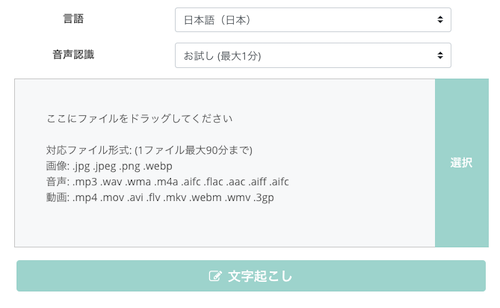
Once you've split your audio file, upload it to Mr. Transcription.
Select the language and speech recognition model, then click the "Transcribe" button.
By splitting the audio file, the "Not enough remaining time" error will no longer appear.
*Mr. Transcription's supported file formats are explained in detail on the Supported File Formats page.
4. Transcription Complete

After clicking the transcribe button, the transcription will be completed shortly.
By splitting the audio to match the remaining time, we were able to transcribe everything without waste!
Please give it a try.

Mr. Transcription User Guide: From Registration to Transcription Completion
A guide to using Mr. Transcription, from registration and uploading to checking results, with images. Also summarizes pricing plans and useful features like AI summarization and subtitle output.
Comparing Mr. Transcription's Pricing

Mr. Transcription is particularly affordable and budget-friendly among AI transcription services.
With Mr. Transcription's paid plans, you can get transcriptions for as low as 25 yen per hour (approximately 0.4 yen per minute).
That's an incredibly low price, isn't it?
The reason we can offer such low prices is because we don't spend on advertising!

If you search for "AI transcription," other services seem to offer transcription for 33 to 44 yen per minute.
In contrast, Mr. Transcription offers it for as low as 0.4 yen per minute.
Compared to others, using Mr. Transcription is significantly cheaper.
- AI transcription at 44 yen per minute: 44 yen/min × 60 min = 2,640 yen
- AI transcription at 33 yen per minute: 33 yen/min × 31 min = 1,860 yen
- Mr. Transcription: 1,100 yen (24 hours + 500 images available for transcription)
※For the latest pricing plan details, please check the Pricing Plans page.

How to Purchase Mr. Transcription's Paid Plans (Basic, Value, Premium)
Mr. Transcription offers both free and paid plans. We will explain how to purchase Mr. Transcription's paid plans with images.
Would you like to try transcribing with Mr. Transcription and save money?
This article provides a detailed explanation of how to transcribe all types of audio files. Please take a look.
[Beginner's Guide] How to Transcribe Recorded Audio Files? Easy Methods and Workflow Explained
For beginners, we explain how to transcribe recorded audio file data. We also introduce specific steps and workflows, such as how to use AI transcription services for easy transcription.
■ AI transcription service "Mr. Transscription"
"Mr. Transcription" is an online transcription tool that can be used from zero initial cost and 1,000 yen per month (* free version available).
- Supports more than 20 file formats such as audio, video, and images
- Can be used from both PC and smartphone
- Supports technical terms such as medical care, IT, and long-term care
- Supports creation of subtitle files and speaker separation
- Supports transcription in approximately 100 languages including English, Chinese, Japanese, Korean, German, French, Italian, etc.
To use it, just upload the audio file from the site. Transcription text is available in seconds to tens of minutes.
You can use it for free if you transcribe it for up to 10 minutes, so please try it once.

It is "Mr. Transcription" who can easily transcribe from audio, video, and images.
Transcription allows you to transcribe for up to 10 minutes for free.
You can copy, download, search, delete, etc. the transcribed text.
You can also create subtitle files, which is ideal for transcription of interview videos.
HP: mojiokoshi3.com
Email: mojiokoshi3.com@gmail.com
Email: mojiokoshi3.com@gmail.com
Related article
Transcription for audio / video / image transcription. It is a transcription service that anyone can use for free without installation.
- What is Mr. Transcription?
- Transcript images, sounds, and videos with Mr. Transcription
- Free registration
- Rate plan
- manual
- Try other free services