Google Speech Engine Discontinued by Mojimoji-san
Mr. Transcription Guide: Register & Transcribe Audio/Video Fast
Oct. 14, 2026

Mr. Transcription is a web application that uses AI to transcribe audio, video, images, and PDFs.
Since you can use it by simply uploading files from your browser, no installation is required.
You can start transcribing immediately on both computers (Windows/Mac) and smartphones (iPhone/Android).
In this article, we will explain how to use Mr. Transcription, from registration to transcription completion, with images.
What you'll learn in this article:
- What you can do with Mr. Transcription (supported files, AI summarization, subtitle output, etc.)
- Transcription steps (completed in 3 steps)
- Details of pricing plans and free tier
- How to register for a free account and purchase a paid plan
What You Can Do with Mr. Transcription
Mr. Transcription is a cutting-edge AI service that can convert audio, video, images, and PDFs into text.
Furthermore, it comes equipped with various convenient features.
Supported Files
A major feature is its support for video, image, and PDF files, not just audio files.
You can scroll horizontally
| Type | Supported Formats | Size Limit |
|---|---|---|
| Audio | .mp3 .wav .wma .m4a .aifc .flac .aac .aiff | Less than 1GB |
| Video | .mp4 .mov .avi .flv .mkv .webm .wmv .3gp | Less than 1GB |
| Image | .jpg .jpeg .png .webp | Less than 10MB |
| Document | Less than 50MB |
Since you can upload video files directly, there's no need to convert them to audio files.

Mr. Transcription's Supported Files and Sizes. How to Handle Incompatible Files
Learn about Mr. Transcription's supported file types and what to do if your files are not compatible.
AI Summarization and Meeting Minutes Creation
From the transcription results, AI can automatically generate summaries and meeting minutes.
Even long conference audio can be summarized with key points in one click.

[Free] Mr. Transcription Introduces AI Summarization and Meeting Minutes Creation! Detailed Usage Guide
Mr. Transcription has added AI summarization and meeting minutes creation features! This function allows you to easily summarize long texts transcribed from audio. You can also create meeting minutes with a simple button press! This makes daily tasks, learning, and information organization smoother...
SRT Subtitle File Output
You can download transcription results as SRT subtitle files.
This is very convenient when you want to add subtitles to videos.

[Free] How to Automatically Generate Video Subtitles? Create Captions with AI Transcription
Learn how to automatically generate video subtitles and captions. Simply upload your video to an AI transcription service to automatically generate high-quality SRT files directly in your browser, surpassing YouTube's auto-generated captions. Compatible with Adobe Premiere, DaVinci Resol...
100 Language Support
In addition to Japanese, it supports 100 languages including English, Chinese, Korean, Spanish, and French.
It's also useful when you need to transcribe audio in foreign languages.
Speaker Separation Function
When you upload with the speaker separation function enabled, it can distinguish who spoke and transcribe for each individual speaker.
This is convenient for creating meeting minutes from conferences or summarizing interview recordings.
The supported audio length is up to the per-file time limit of your plan.
You can find instructions on how to use it in this article: "How to Transcribe with Speaker Separation? Textualizing Meetings and Interviews by Speaker." Please take a look.
Dictionary Function (Registering Technical Terms)
By registering frequently used technical terms and proper nouns in the dictionary, you can improve the accuracy of your transcriptions.

[Feature] Announcing the Release of the Text Replacement Dictionary Function. Make Document Creation More Comfortable!
The new replacement dictionary feature makes it easy to input boilerplate text and correct inconsistencies in notation. You can securely manage your custom replacement rules for product names, technical terms, company-specific jargon, and more. Try this optimal feature to streamline your document creation.
History Management
You can check your transcription results from the history (for free and paid members only).
It is also possible to search and re-download past transcription results.
How to Use Mr. Transcription: Complete in 3 Steps

Using Mr. Transcription is very simple.
Transcription is completed in just 3 steps.
1. Select Language
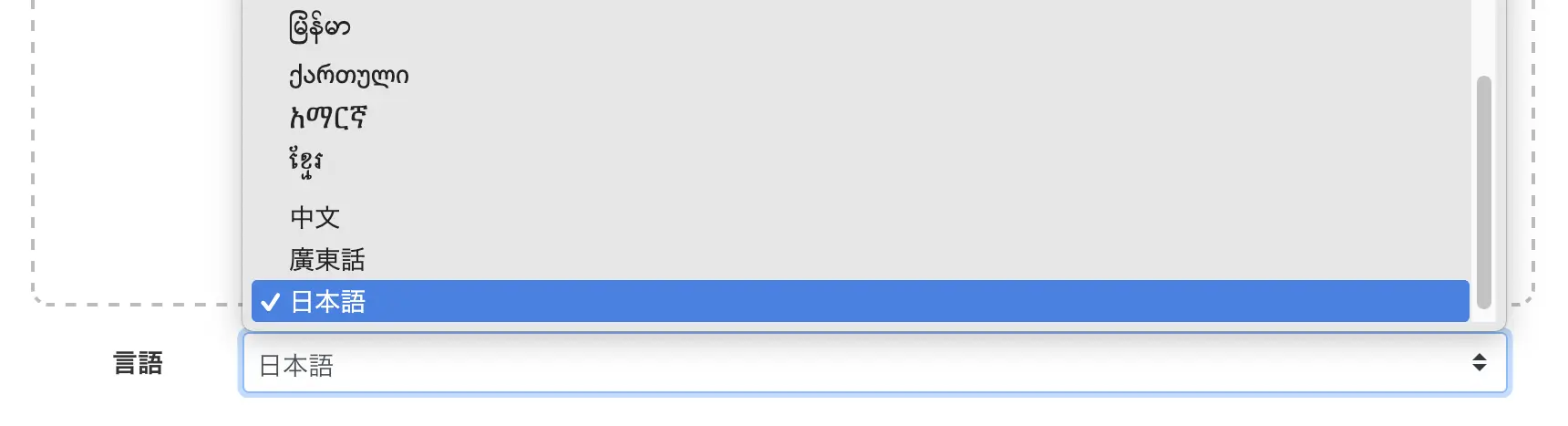
Select the language according to the content of your file.
Turning on "Speaker Separation" next to the language allows you to transcribe by individual speaker.
Speaker separation is useful for audio with multiple speakers, such as meetings or interviews.
2. Select the File
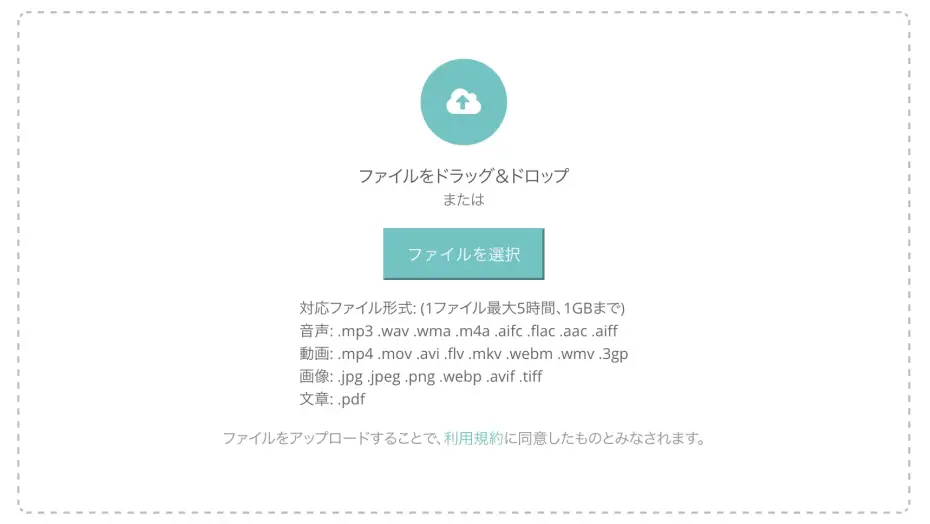
Drag and drop the file you want to transcribe or click the "Select" button to choose your file.
If using drag and drop, you can place the file anywhere on the screen.

Important notes on uploading
Simultaneous upload of multiple files is not supported.
Please upload files one by one.
Errors will occur if you upload files that exceed the supported file formats or time limits.
You can resolve this by reducing the file size or splitting the file.
For detailed instructions, please refer to "How to make unsupported files compatible".
Once you select a file, the file upload and transcription process will start automatically.
Cancellation during the process is not possible, and transcription time will be consumed even if you process the same file multiple times.
Also, audio containing multiple languages cannot be accurately transcribed.
3. Review and Utilize the Results
The estimated processing time for transcription is as follows:
- For images: Completes in a few seconds to a few minutes
- For audio/video: Approximately 5 minutes for 60 minutes of audio data
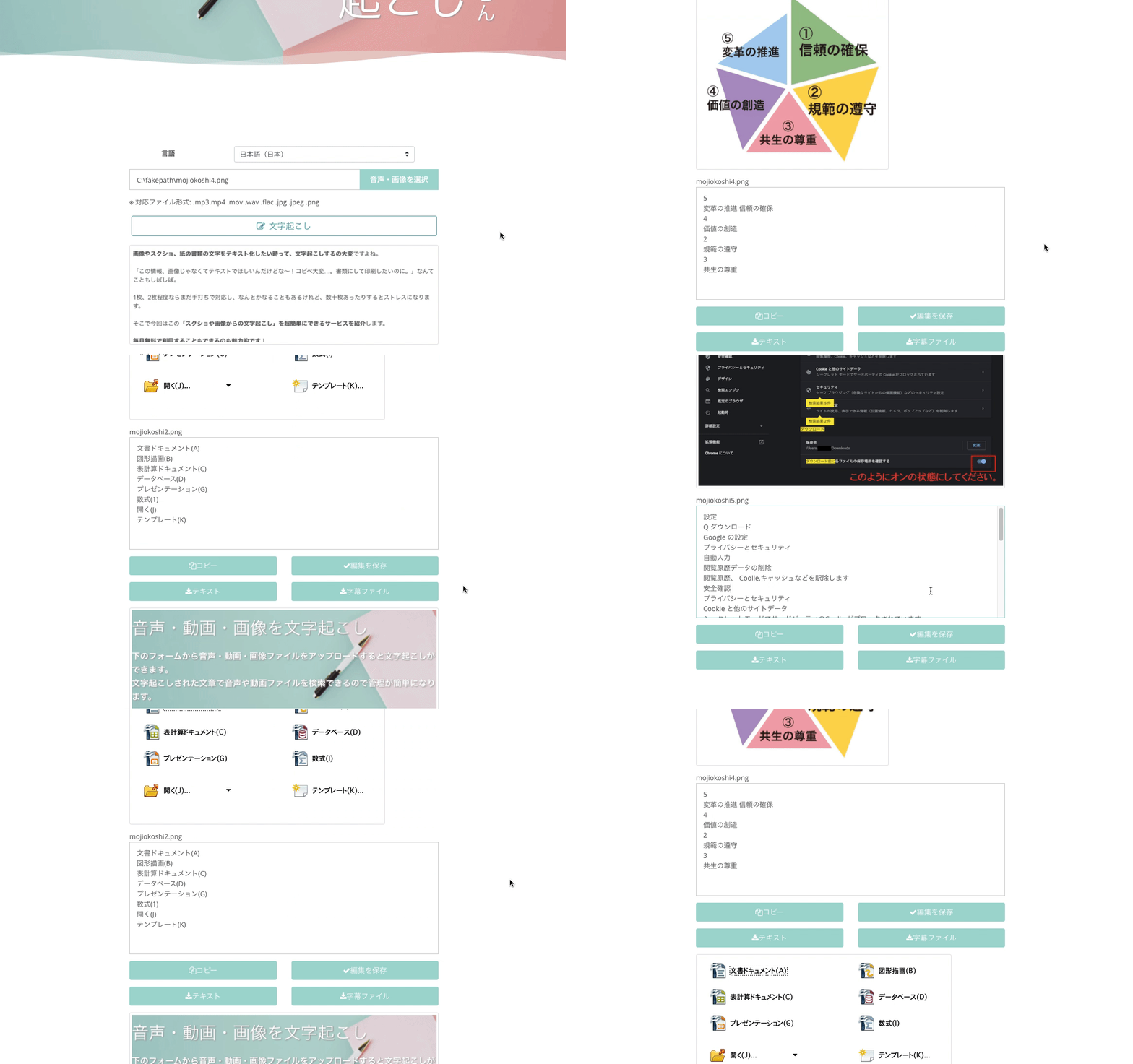
Image Transcription Results
Audio Transcription Results
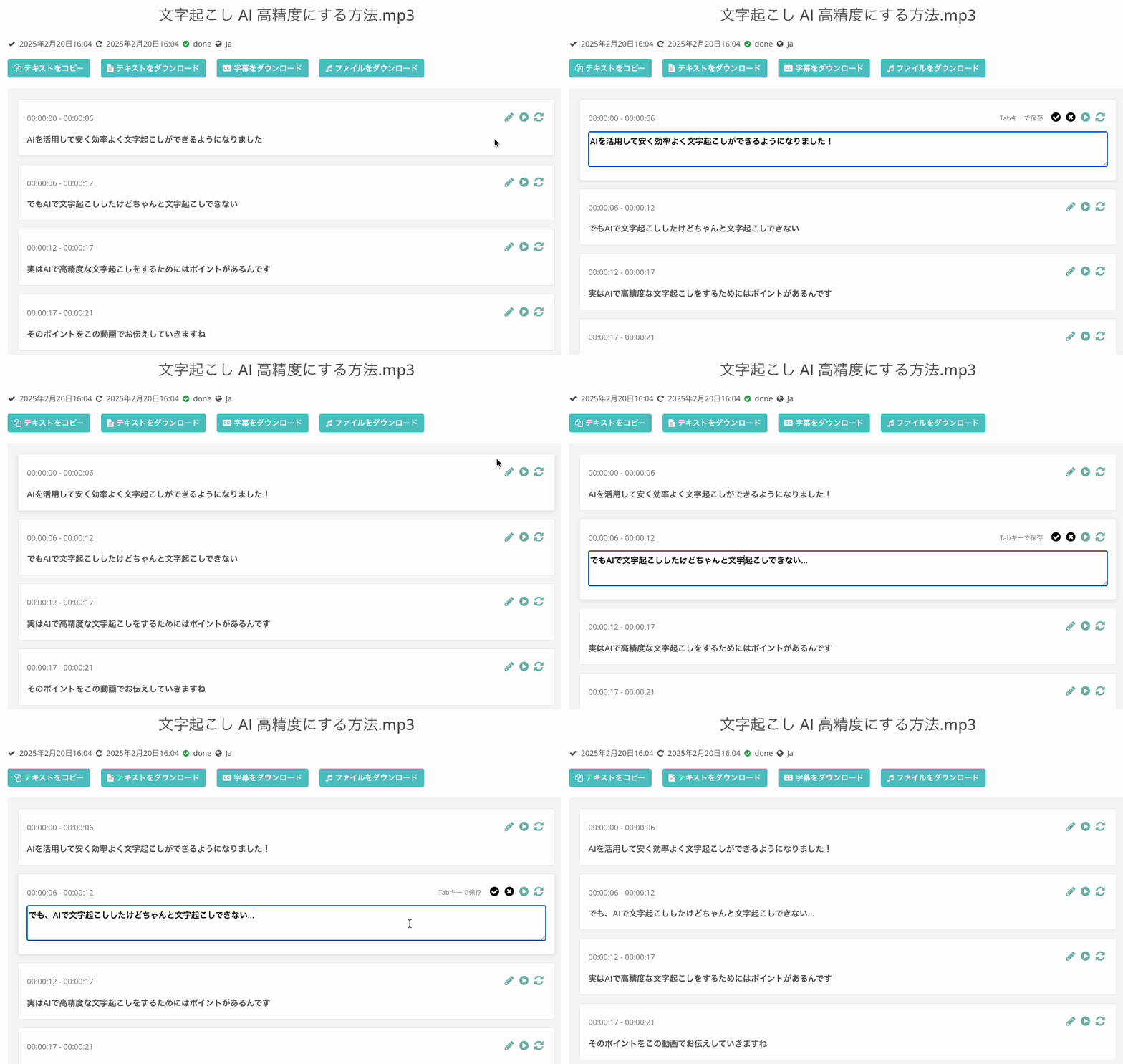
The transcribed text will be displayed in blocks.
On the results screen, you can do the following:
- Edit text: Correct transcription results on the spot
- Download text file: Save the transcription results as a text file
- Download SRT subtitle file: Use as subtitles for videos
- AI summarization and meeting minutes creation: AI automatically generates summaries from the transcription results
*Regarding subtitle file specifications
Even if you edit the content on the Mr. Transcription web page, the edited content will not be reflected in the subtitle file.
If you wish to edit the subtitle content, please directly edit the downloaded subtitle file using a notepad app or similar.
If an error occurs or if the upload is unsuccessful, please check the troubleshooting steps on the page below.

Troubleshooting when an error occurs in Mr. Transcription and transcription fails.
This article introduces troubleshooting methods when an error occurs in Mr. Transcription and transcription cannot be performed. The main causes are: reaching the transcription limit, unsuccessful upload, or errors due to network environment or browser issues.
Audio Files That AI Transcription Struggles With
For the following types of audio files, Mr. Transcription may not be able to achieve the desired results.
- Audio that is too quiet, or where the microphone is too far away, making it difficult to hear
- Audio with severe noise that drowns out the speech
- Audio that is muffled by room reverberation
- Audio containing music, such as song lyrics
- Audio with no sound
- Audio with strong dialects
- Audio that is difficult for humans to hear clearly
To achieve highly accurate transcription, recording with good sound quality is key.
For more details, please check " 6 Tips for High-Accuracy Audio Recording for Transcription ".
【AI Transcription】6 Tips for High-Accuracy Audio Recording for Transcription
To achieve highly accurate AI transcription, several recording techniques are crucial. This article introduces optimal recording tips for AI transcription. High-quality microphone Proper microphone placement Create a quiet recording environment Clear speaker articulation Single...
Mr. Transcription Pricing Plans and Free Tier
You can easily try AI transcription with Mr. Transcription even without free member registration.
You can scroll horizontally
| Plan | Monthly Fee (excl. tax) | Monthly Fee (Annual Contract) | Audio Time | Image Count | Max per File |
|---|---|---|---|---|---|
| Non-member (Free) | 0 JPY | - | 3 min/day | 3 images/day | 3 min |
| Free Member (Free) | 0 JPY | - | 10 min/day | 10 images/day | 10 min |
| Basic | 1,000 JPY | 917 JPY | 24 hours/month | 1,000 images/month | 90 min |
| Value | 2,000 JPY | 1,833 JPY | 60 hours/month | 2,500 images/month | 3 hours |
| Premium | 3,000 JPY | 2,750 JPY | 120 hours/month | 6,000 images/month | 5 hours |
With the Premium plan, you can transcribe for approximately 0.4 JPY per minute (about 25 JPY per hour)!
The annual plan offers an even better deal, with an additional discount of approximately 8%.
All plans include a security measure to "not retain logs".
For more detailed information on pricing and cancellation, please refer to the Frequently Asked Questions (FAQ).
How to Register for Free Membership and Purchase a Paid Plan
How to Register for Free Membership
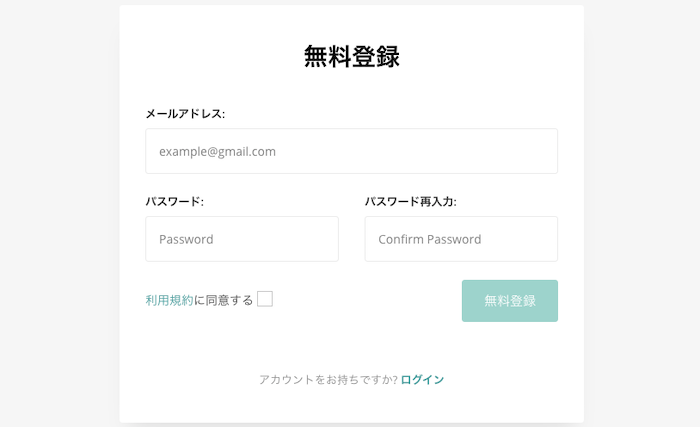
Only two things are required for free membership registration: your email address and password.
No other personal information, such as your name or address, is needed.
After registration, a confirmation email will be sent to your email address; please click the specified URL.
You can easily register for free membership in about 1 minute.
How to Purchase a Paid Plan
To purchase a paid plan, follow these steps:
- Complete free membership registration
- Select your desired plan from the pricing page
- Click the purchase button
- Make your payment (credit card, debit card, Apple Pay, Google Pay supported)
For annual contracts, direct bank transfers are also accepted.

Mr. Transcription payment methods and receipts. Supports credit card payments and bank transfers!
Mr. Transcription offers two payment methods: 1. Credit/Debit card/LINK, and 2. Direct bank transfer. This article explains Mr. Transcription's payment methods and receipts in detail.
Other Questions
Frequently asked questions about using Mr. Transcription are summarized on the following pages:
- About Usage (supported files, error handling, etc.)
- About Free and Paid Plans (cancellation, withdrawal, etc.)
- About Payments (receipts, invoices, etc.)
- About Specifications and Security (data deletion, AI engine, etc.)
- About Corporate Use

Mr. Transcription FAQ | Frequently Asked Questions about Pricing, Free Tier, and Security
This is a collection of frequently asked questions about 'Mr. Transcription', the AI transcription website. It covers pricing plans, free tier limits, security measures, cancellation methods, and more in a Q&A format. You can check all your questions before using the service.
Mr. Transcription Usage Summary
Mr. Transcription is a web application that automatically transcribes audio, video, images, and PDFs using AI simply by uploading them through your browser.
It also supports AI summarization, meeting minute creation, and SRT subtitle output, with transcription available in 100 languages.
By registering for a free membership, you can try out AI transcription for up to 10 minutes daily, free of charge.
Why not experience Mr. Transcription's AI transcription for free first?
■ AI transcription service "Mr. Transscription"
"Mr. Transcription" is an online transcription tool that can be used from zero initial cost and 1,000 yen per month (* free version available).
- Supports more than 20 file formats such as audio, video, and images
- Can be used from both PC and smartphone
- Supports technical terms such as medical care, IT, and long-term care
- Supports creation of subtitle files and speaker separation
- Supports transcription in approximately 100 languages including English, Chinese, Japanese, Korean, German, French, Italian, etc.
To use it, just upload the audio file from the site. Transcription text is available in seconds to tens of minutes.
You can use it for free if you transcribe it for up to 10 minutes, so please try it once.

It is "Mr. Transcription" who can easily transcribe from audio, video, and images.
Transcription allows you to transcribe for up to 10 minutes for free.
You can copy, download, search, delete, etc. the transcribed text.
You can also create subtitle files, which is ideal for transcription of interview videos.
HP: mojiokoshi3.com
Email: mojiokoshi3.com@gmail.com
Email: mojiokoshi3.com@gmail.com
Related article
Transcription for audio / video / image transcription. It is a transcription service that anyone can use for free without installation.
- What is Mr. Transcription?
- Transcript images, sounds, and videos with Mr. Transcription
- Free registration
- Rate plan
- manual
- Try other free services






