

Mr. Transcription Guide: Register & Transcribe Audio/Video Fast
ChatGPT Transcription Issues? Fixes & Top 3 AI Tools
Oct. 23, 2026

I can't transcribe audio with ChatGPT... what should I do?
ChatGPT is one of the most well-known AI tools.
Many people probably use it for work or hobbies.
When creating meeting minutes or summarizing interview content for work, many people would want to easily transcribe it using ChatGPT.
It would be incredibly convenient to transcribe audio or video files and then have ChatGPT summarize them or create meeting minutes.
However, it's important to note that some AI tools do not support voice recognition or cannot transcribe audio.
To transcribe audio files from meeting minutes or interviews, it's recommended to use a dedicated AI transcription tool.
This article will explain solutions for when ChatGPT can't transcribe audio and recommend transcription methods for those struggling with this issue!
Why not use this article as a guide to conveniently transcribe your meeting minutes or interview audio?
[Free] Recommended AI Tools When ChatGPT Can't Transcribe
When ChatGPT can't transcribe, we recommend a specialized AI transcription tool!
For AI transcription, Mr. Transcription is the optimal choice!

Mr. Transcription is an AI transcription tool that uses high-performance, cutting-edge AI to make transcription easy for anyone.
As a web application accessible via your browser, it's installation-free and ready to use immediately.
It also includes summarization and meeting minute creation features, allowing you to create meeting minutes in one go simply by uploading your audio.
What's more, Mr. Transcription is free!
Since it can be used without registration or login, when ChatGPT fails to transcribe, why not try Mr. Transcription?
【Conclusion】ChatGPT Alone Cannot Transcribe Audio
Can ChatGPT transcribe audio?

First, the conclusion.
ChatGPT cannot transcribe audio files.
ChatGPT Lacks Transcription and Audio Upload Features
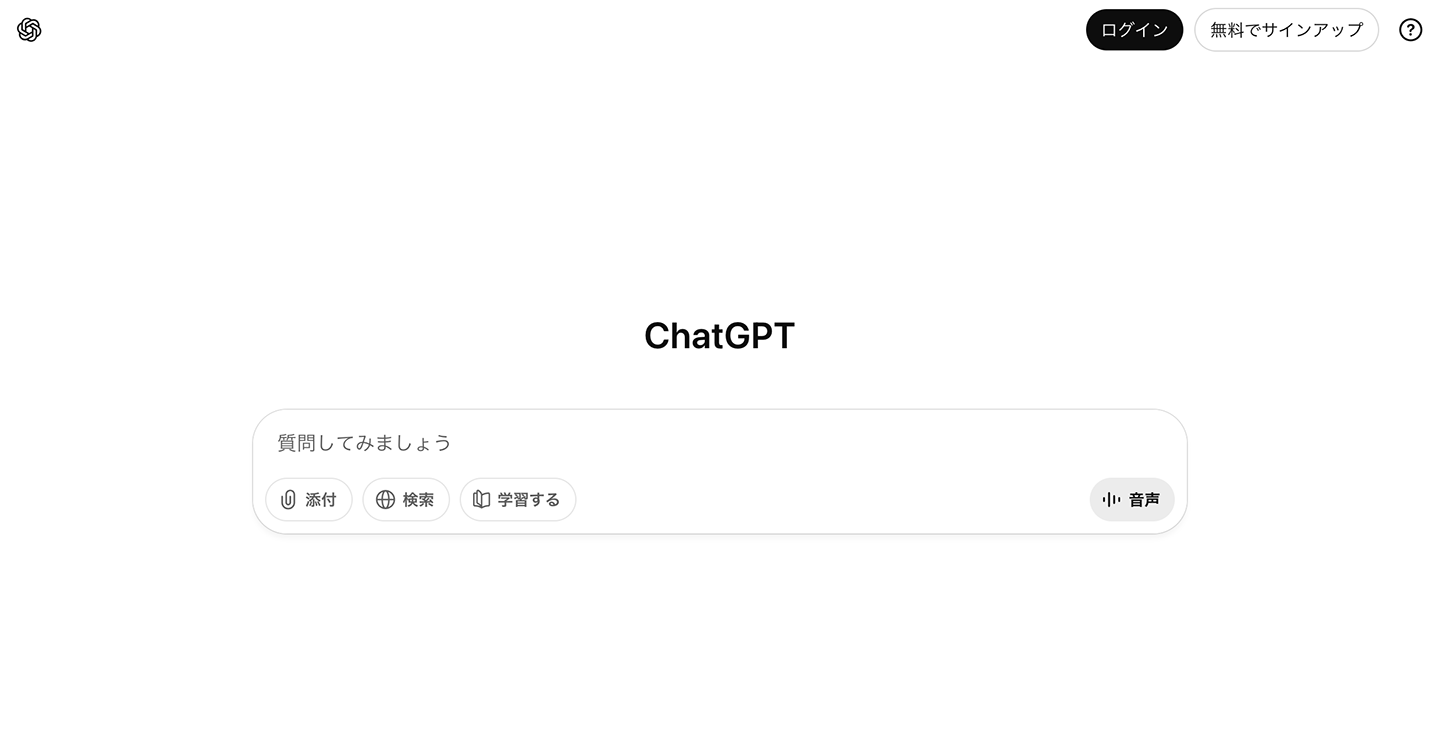
Since ChatGPT does not have the functionality to read audio or video files, it cannot transcribe audio files directly.
ChatGPT is a service where you interact with AI by providing text prompts.
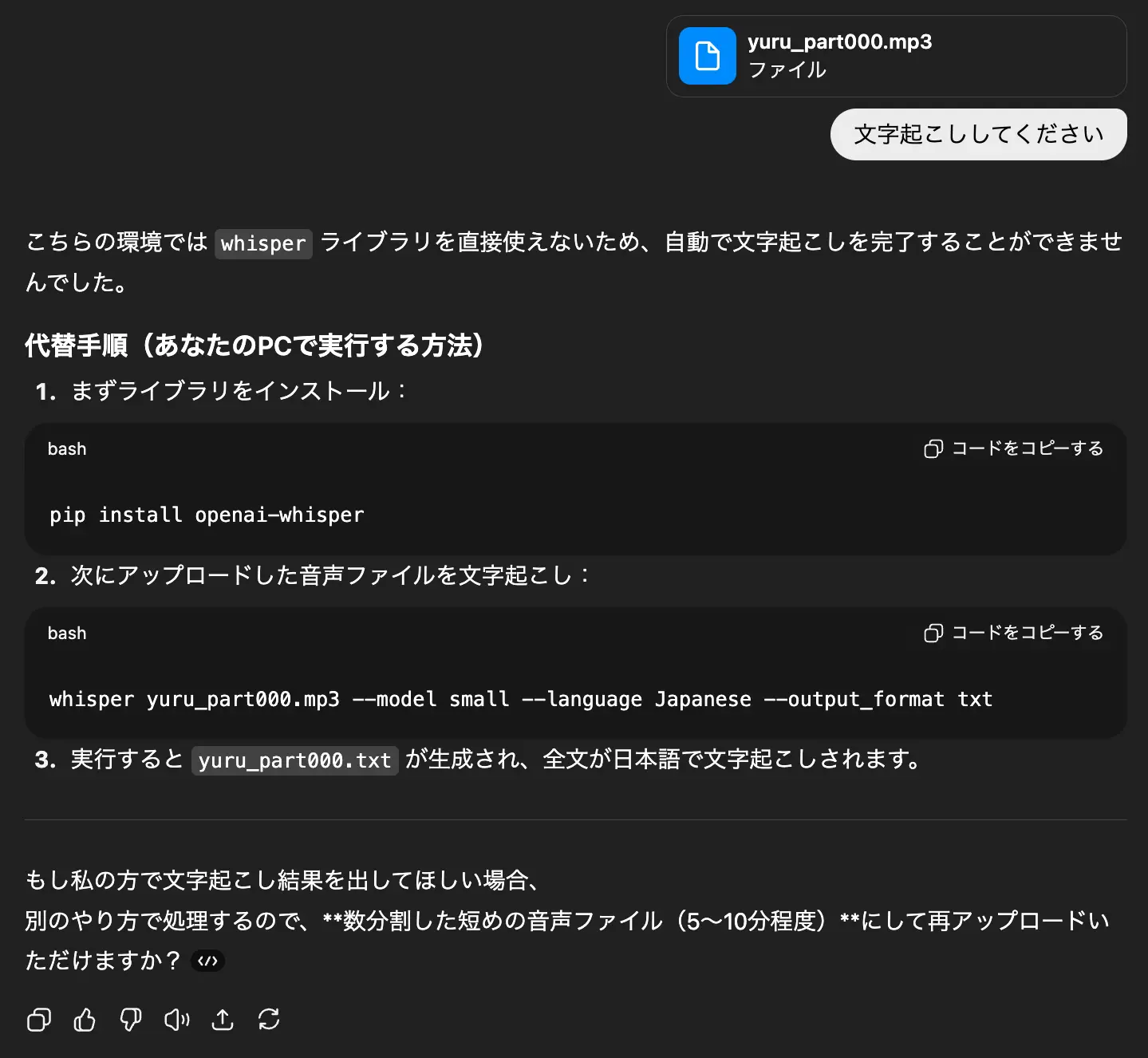
While you can upload text-based files like plain text documents, attempting to upload audio or video files will result in a response indicating that it cannot process them.
When uploading an audio (MP3) file:
When uploading a video (MP4) file:
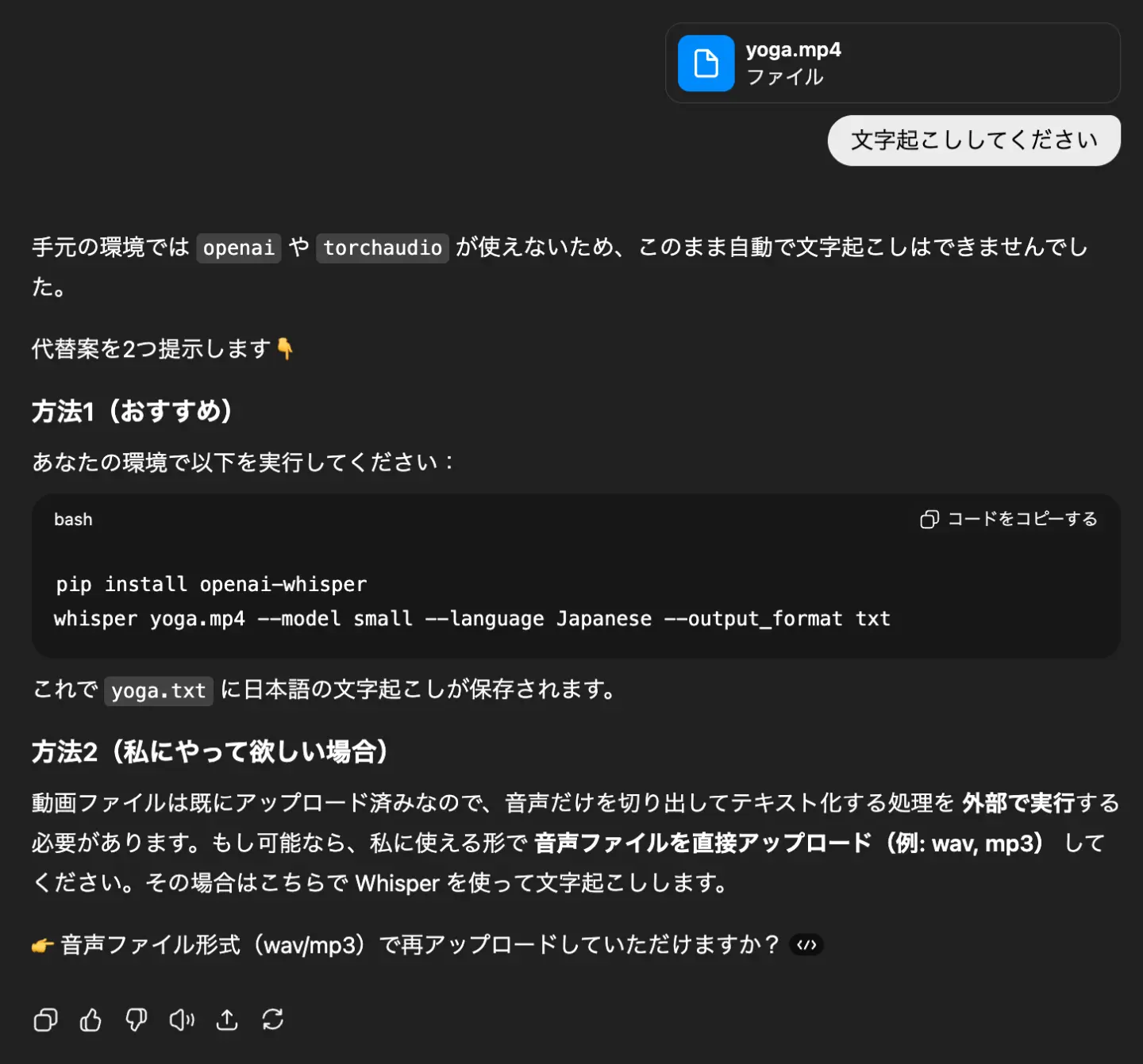
In both cases, as shown in the images, the response will be: "ChatGPT does not have a way to handle audio or video files."
If you want to use ChatGPT to summarize audio or video files, or create meeting minutes, you need to follow these steps:
- Transcribe the audio using another method.
- Upload the transcription results to ChatGPT.
- Provide instructions for summarization or meeting minute creation.
This is the necessary workflow.
Voice Input Feature Exists, But Not for Audio Transcription
Actually, the ChatGPT mobile app includes a voice input feature.
Furthermore, if you subscribe to a paid plan, you can also use voice input on your PC.
In both cases, speaking into your smartphone or PC will transcribe your speech into text.
However, this feature is solely for giving instructions to ChatGPT via voice input.
It cannot transcribe audio files from meetings or interviews.
Naturally, neither the mobile app nor the paid plan offers features to upload audio or video files for transcription.
[Free Options Included] 3 Recommended AI Transcription Tools When ChatGPT Fails

I want to know the best methods when ChatGPT can't transcribe audio!
When you need to transcribe audio files or video files, using the latest AI transcription tools is highly recommended.
Here are some recommended AI transcription tools you should definitely use when ChatGPT struggles with transcription!
With these three tools, you can easily transcribe audio and video files.
Comparing 3 AI Transcription Tools
Scroll horizontally
| Service Name | Features | Pricing |
|---|---|---|
| Mr. Transcription | Free, multi-functional AI transcription service
Speaker separation, summarization, meeting minute creation, and video subtitle creation are also possible | From 25 yen per hour |
| Rimo | Tool for transcribing audio and video | Individual Plan
From 47 yen per hour Business Plan From 30,000 yen per month |
| toruno | Transcription service for recording, video recording, and summarizing meetings | Individual Plan
From 132 yen per hour Business Plan From 9,000 yen per month |
1. Mr. Transcription: Recommended Free AI Transcription Tool
When you can't transcribe with ChatGPT, we recommend the AI tool 『Mr. Transcription』.
『Mr. Transcription』 is an AI transcription tool that can transcribe using the latest high-performance speech recognition AI, and also perform summarization and meeting minute creation!
You can upload audio files, video files, images, and PDFs for transcription.
It's a web app accessible through your browser, making it easy for anyone to use without needing to install anything.
A key feature of 『Mr. Transcription』 is its high accuracy and fast transcription speed.
Even long audio files can be transcribed in just about 1 minute, allowing you to quickly convert meeting recordings or interview audio into text.
Automatic Summarization and Meeting Minute Creation from Transcription Results
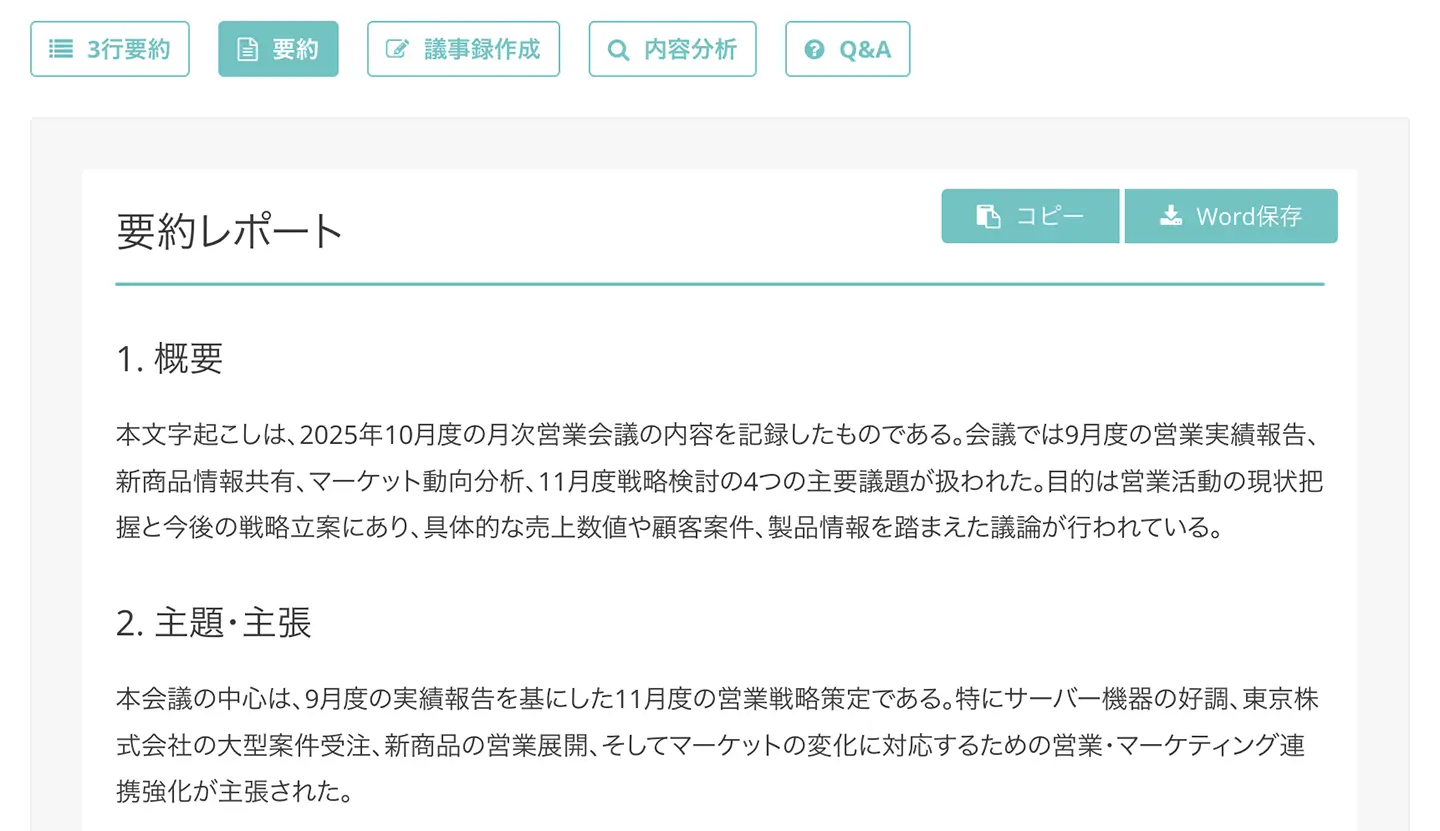
A notable feature of 『Mr. Transcription』 is its ability to summarize and create meeting minutes from audio and video files with just one button.
It's easy to use.
Once the transcription results are displayed, simply press the "Summarize" or "Create Meeting Minutes" button!

What's more, the summarization and meeting minute creation features are available for free with no additional cost!
For more details on the summarization and meeting minute creation features, please refer to this page.

Mr. Transcription Supports Multiple Foreign Languages
With the speech recognition AI of Mr. Transcription, you can also transcribe foreign languages!
It supports over 100 languages, including Japanese, English, Korean, and Chinese.
You can easily create subtitles for meetings with overseas companies or YouTube videos targeting international audiences.
Mr. Transcription Can Also Create Video Script Files
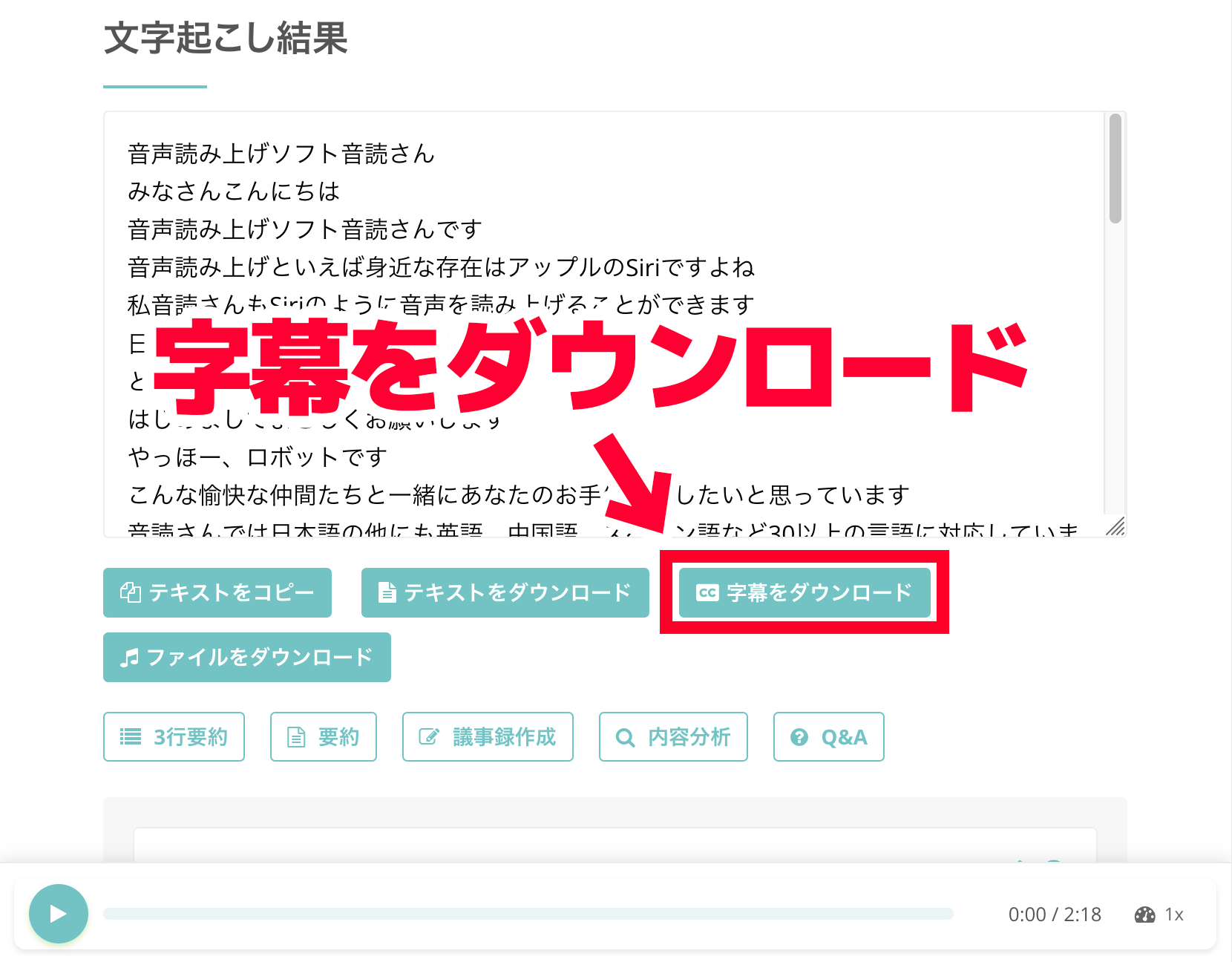
Mr. Transcription is also recommended for those who want to create YouTube video subtitles!
Mr. Transcription allows you to download subtitles in SRT format, making it easy to add captions to your videos.
It's simple to use!
After transcribing, just click the "Download Subtitles" button.
Since it uses the common SRT format, you can easily import the files into video editing software like Adobe Premiere, DaVinci Resolve, or YouTube's subtitle editor.
High-Performance AI Transcription Service Available for Free!
What's more, Mr. Transcription is free!
You can transcribe up to 3 minutes per day for free without registration, and up to 10 minutes per day with free member registration, allowing you to convert audio files to text immediately.
And the paid plan starts at
- 25 yen per hour~
at a low price!
Of course, corporate use is also welcome.
With a clear one-price model for both individuals and corporations, you can confidently use it for meeting minutes, interviews, and video subtitle creation.
When ChatGPT can't transcribe audio, the AI transcription service Mr. Transcription is highly recommended.
Why not try Mr. Transcription for free yourself today?
2. Rimo: AI Tool for Transcribing Meeting and Discussion Audio
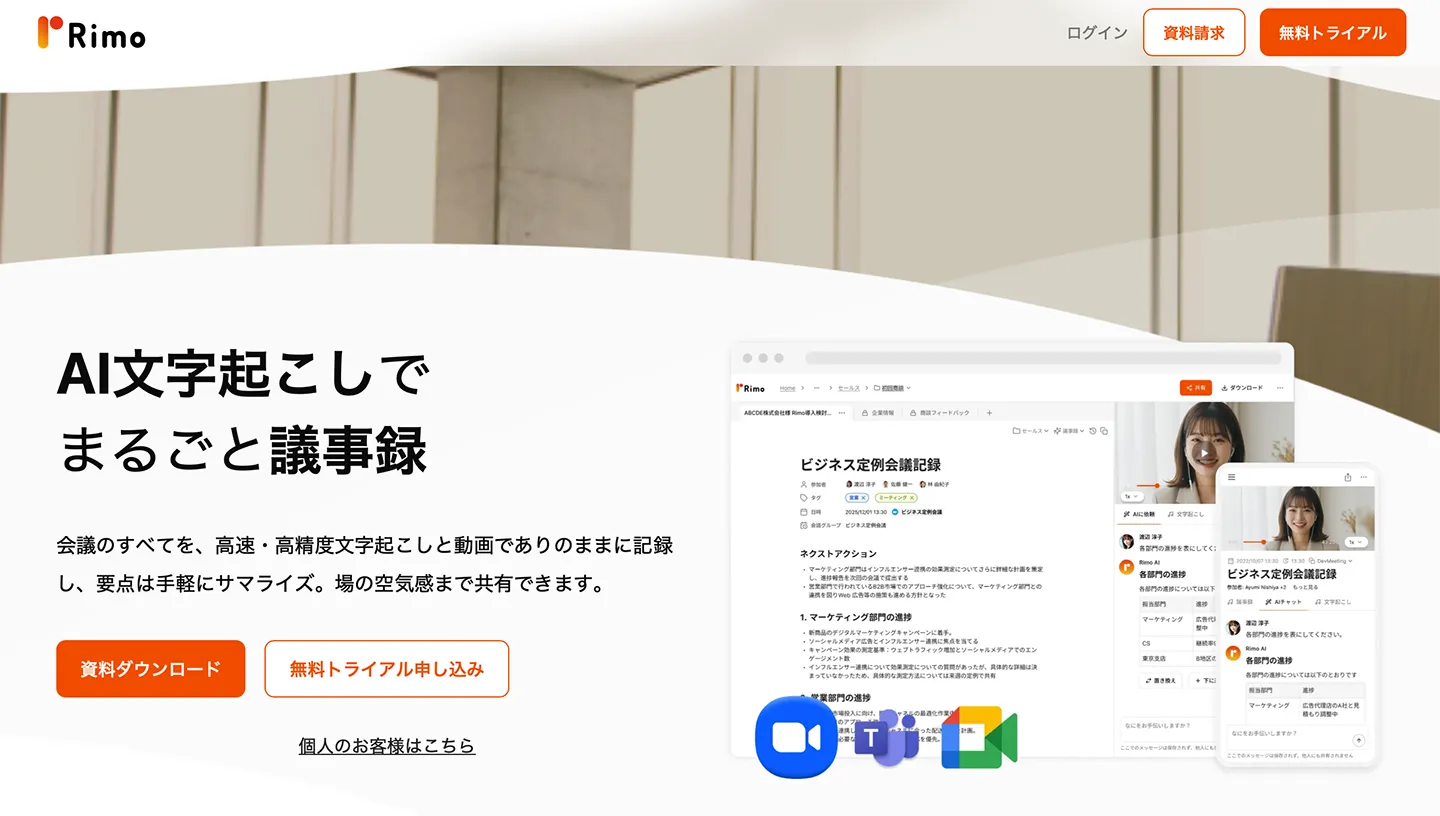
Rimo is a convenient AI transcription tool to use when you can't transcribe with ChatGPT.
You can upload audio and video files for transcription.
It can recognize the content of audio and video, enabling transcription and summarization.
It also features integration with web conferencing tools like Zoom, Microsoft Teams, and Google Meet.
This is a paid tool, with individual and business plans available.
Individual plans start from 47 yen per hour, and business plans from 30,000 yen per month.
It's an recommended AI tool for transcribing audio from meetings and discussions.
3. toruno: AI Transcription Tool for Summarization and Meeting Minutes
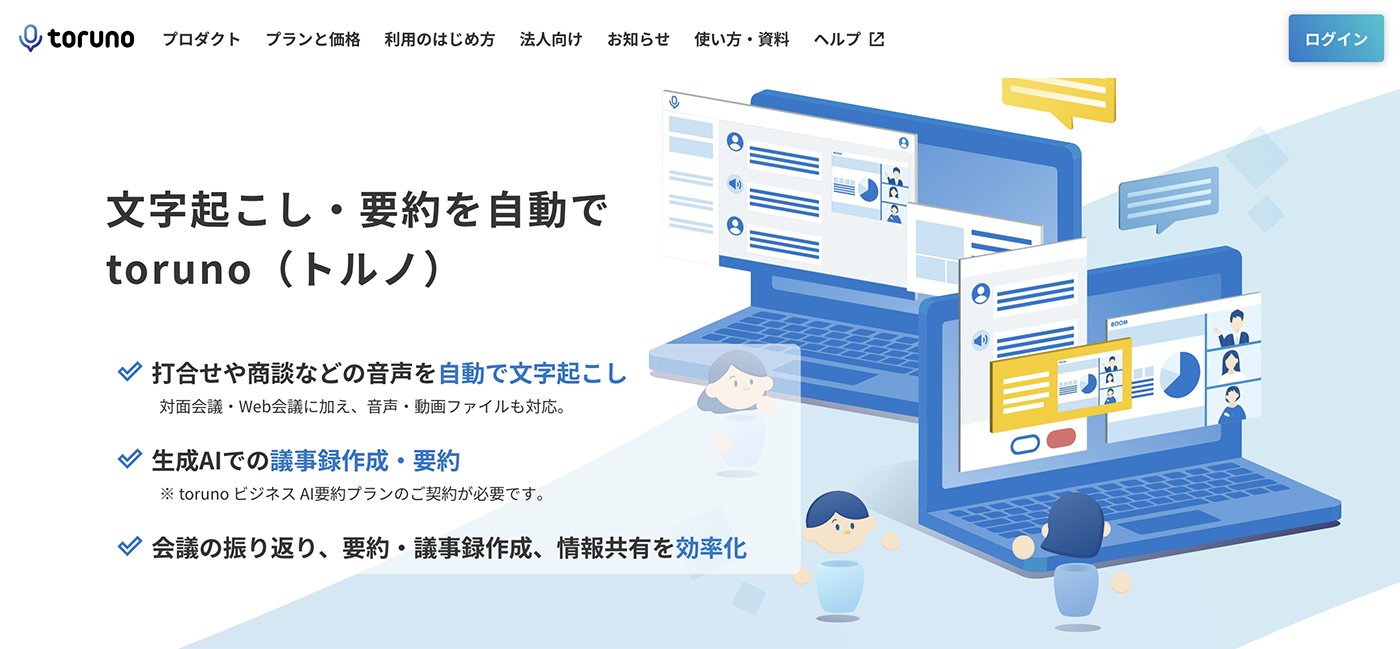
toruno is an AI tool that transcribes recorded audio.
It can also record and summarize meetings, and create meeting minutes.
There are individual and business plans:
- Individual plan: From 132 yen per hour
- Business plan: From 9,000 yen per month
For more details on recommended AI transcription tools, please refer to this article!
If you want a more detailed comparison, please check out this article as well.
How to Transcribe with Mr. Transcription When ChatGPT Fails
What should I do to transcribe when ChatGPT can't?
Here, we will specifically explain how to transcribe using the AI tool Mr. Transcription.
1. Open the Mr. Transcription page
First, open the Mr. Transcription page.
Since Mr. Transcription is a web service that you can use directly from your browser, it's easy to use with no installation required.
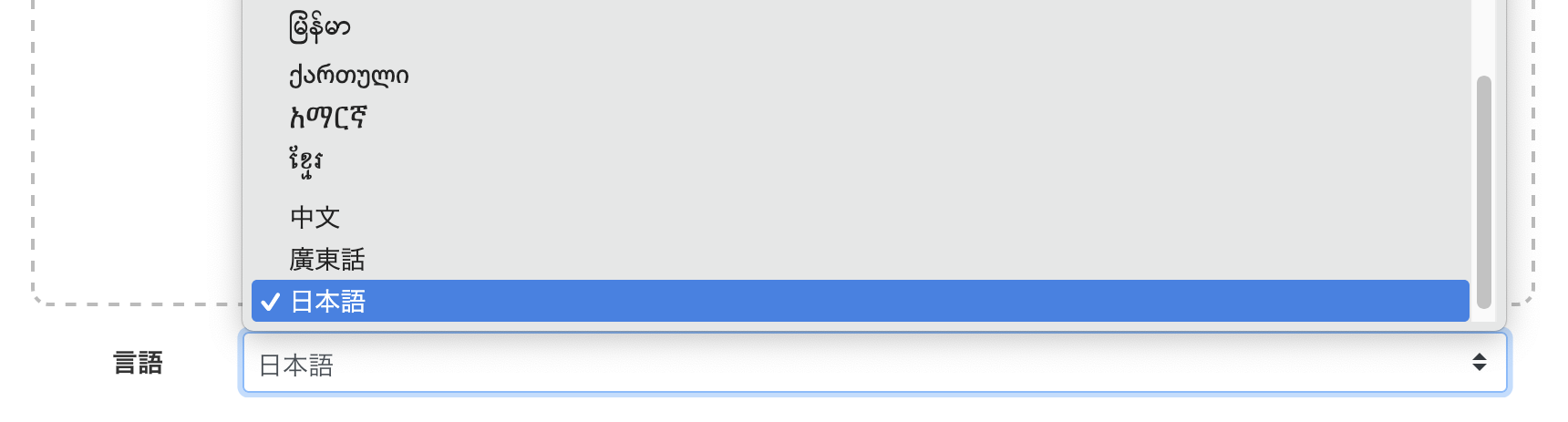
2. Select the language
Select the language that matches the content of your file.
3. Select audio or video files
Click "Select File" to choose your audio or video file.
Mr. Transcription can transcribe audio, video, images, and PDFs.
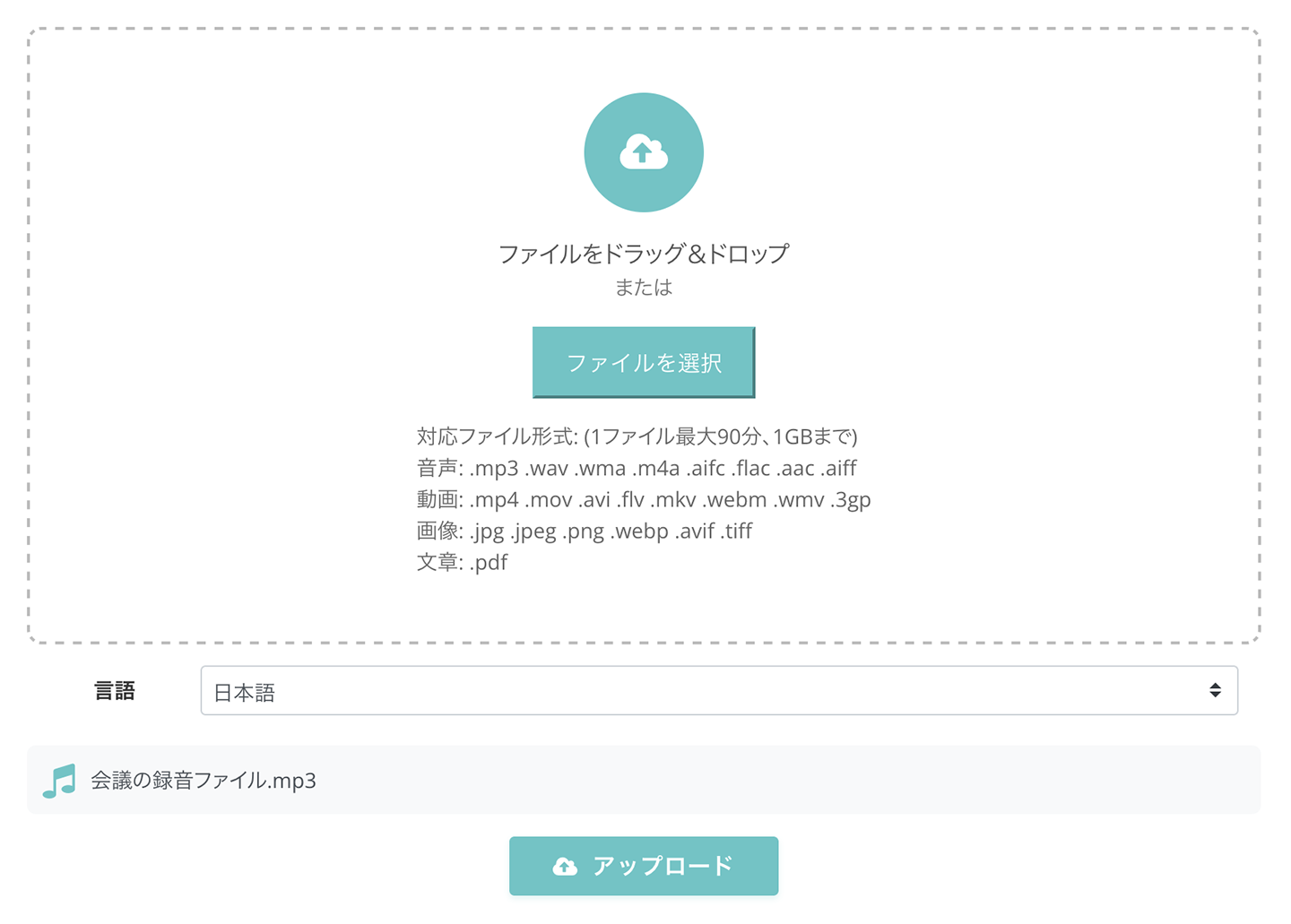
Once you select a file, the upload and transcription process will start automatically.

If you are using the free service, wait without closing the screen.
If you are using it after registering and logging in, you can close the screen once the upload is complete.
You will receive a notification email after the process is finished.
4. Transcription complete
Once the transcription is finished, the screen will change, and the transcription results will be displayed.
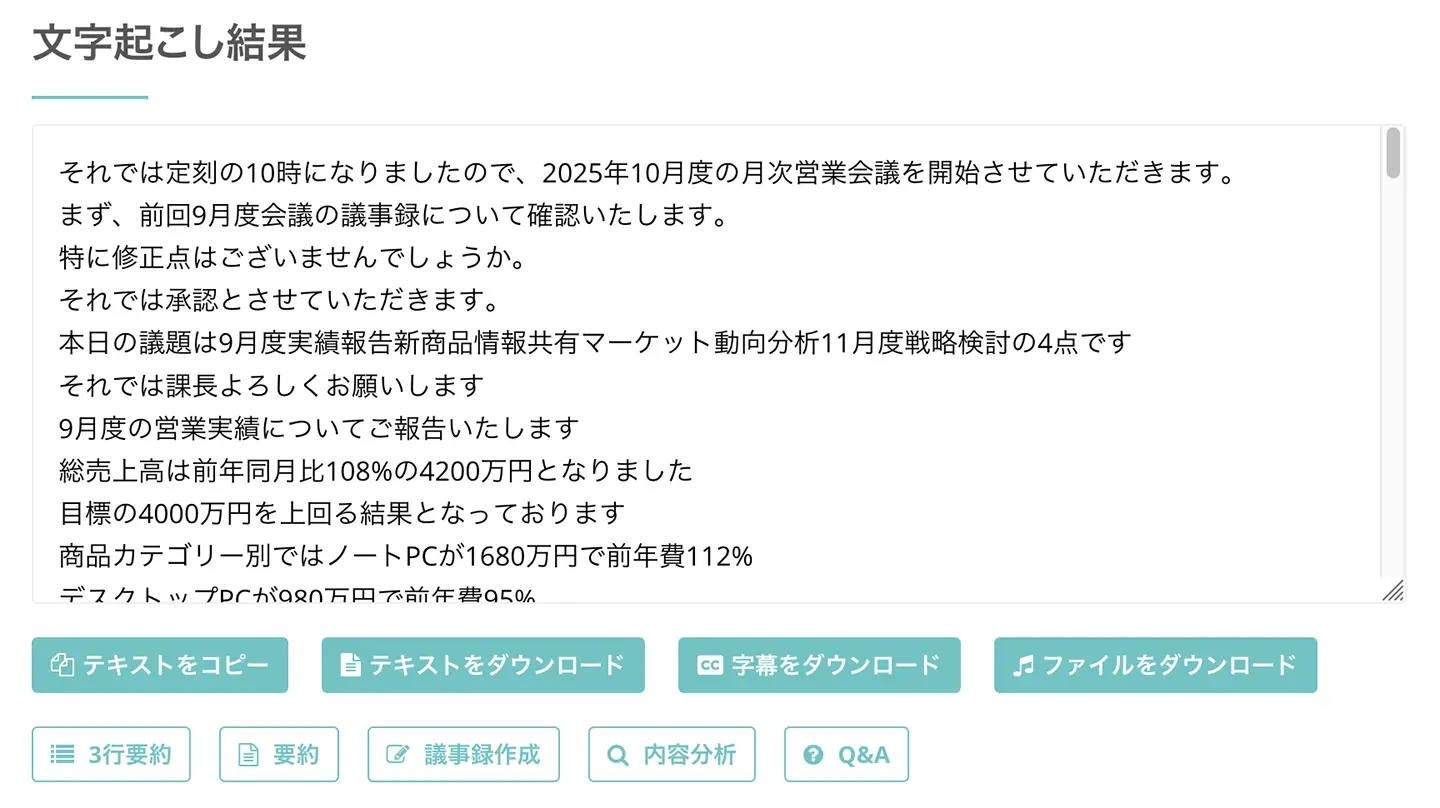
You can download the transcription results in text format or SRT subtitle format.
On this screen, you can also:
- 3-line summary
- Summary
- Meeting minutes creation
- Content analysis
- Q&A
By clicking the buttons, you can summarize transcription results, create meeting minutes, analyze content, and generate Q&A.
Additionally, if you scroll down, you can individually check specific sections of the transcription results.
You can listen to individual audio segments by pressing the play button,
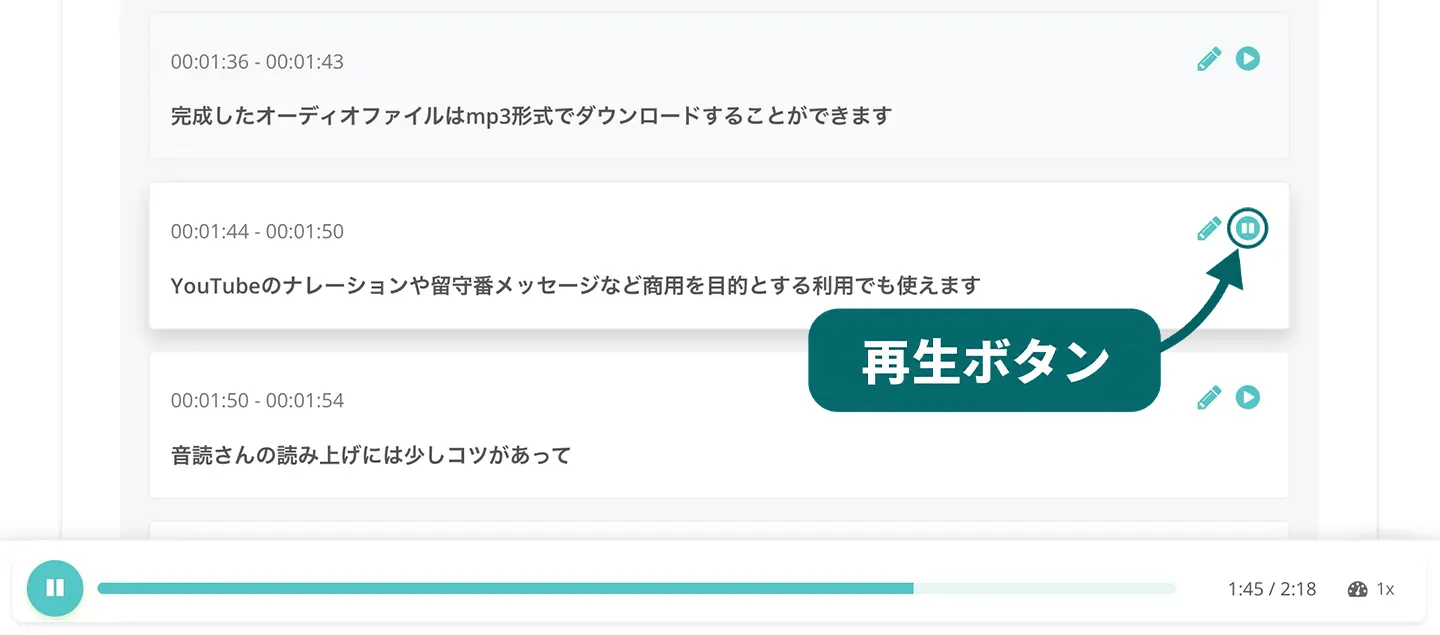
or edit the content by pressing the edit button.
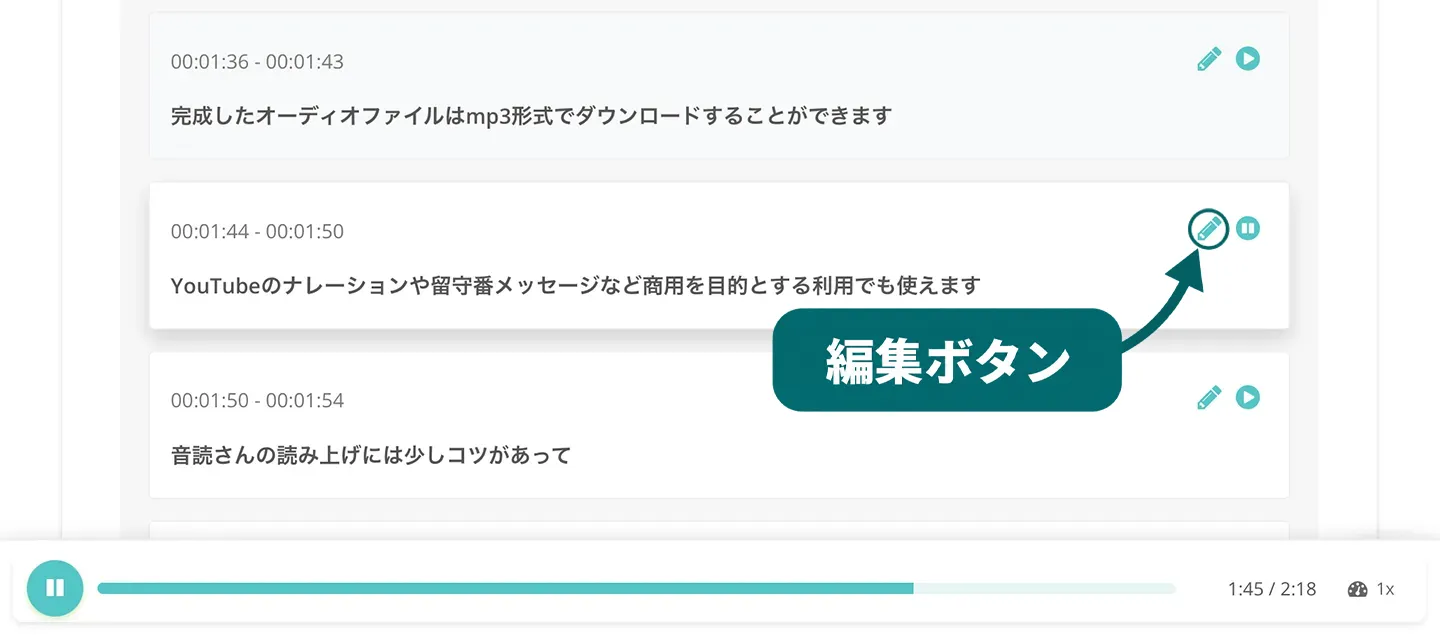
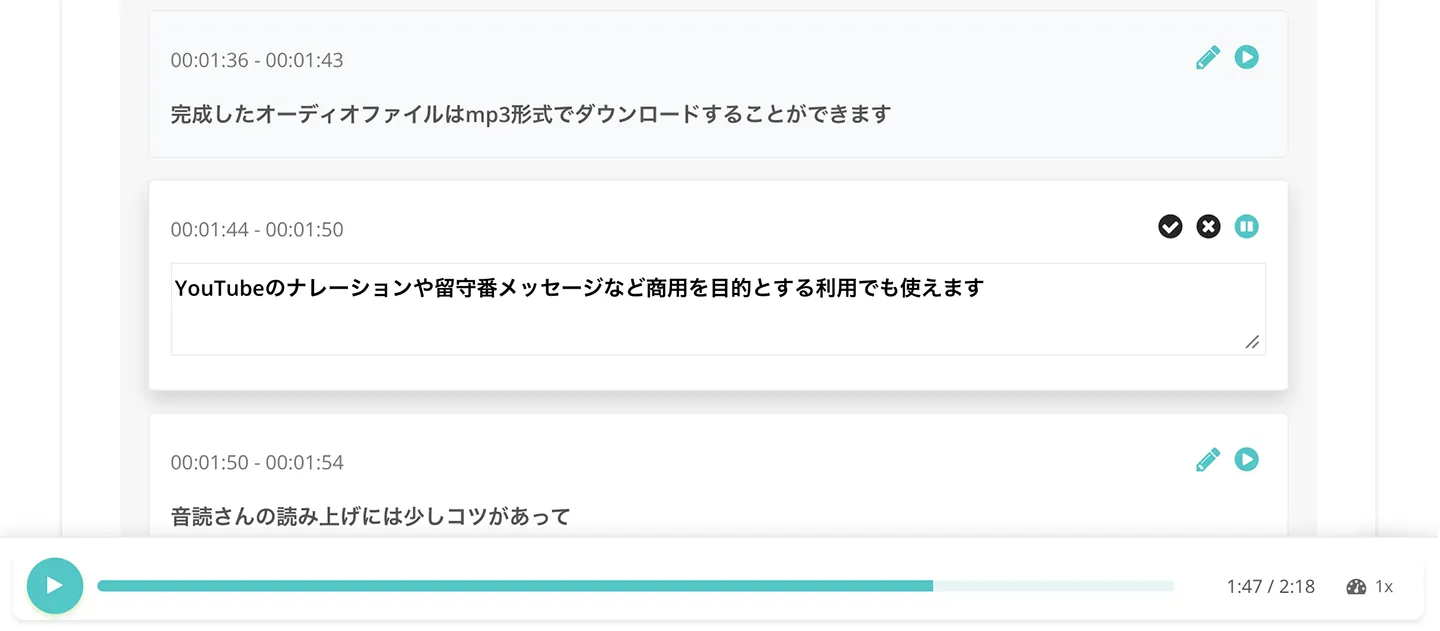
This completes the process of transcribing audio and video files using Mr. Transcription!
Mr. Transcription is a convenient and free AI service.
When ChatGPT can't transcribe your audio, why not try using Mr. Transcription?
How to Transcribe Audio with Whisper When ChatGPT Can't
When you can't directly transcribe audio files with ChatGPT, there's actually another method.
That is to use "Whisper," an automatic speech recognition (ASR) AI provided by OpenAI, the developer of ChatGPT.
ChatGPT's Developer Also Offers Speech Recognition AI, But It's Difficult to Use.
"Whisper," provided by OpenAI, the developer of ChatGPT, is an ASR AI that supports audio files such as MP3, WAV, and M4A.
It can transcribe recorded meetings and interview audio.
However, since Whisper is provided in an "API" format, it requires complex operations like programming and command-line usage, along with technical knowledge.
If you want to transcribe audio easily and immediately without worrying about technical hurdles, using a dedicated transcription service is recommended.
5 Ways to Leverage Transcribed Text with ChatGPT

By converting audio content into text using a transcription service, you can input it into ChatGPT and utilize it in various ways.
Here, we will specifically introduce how to leverage transcribed content with ChatGPT.
1. Summarize Transcription Results with ChatGPT
Transcribing long meetings or interviews can result in very lengthy texts.
In such cases, you can easily use ChatGPT to summarize the content.
- Please summarize this text in about 500 characters.
- Please summarize the key points, narrowing them down to three.
By giving instructions like these, you can create summaries tailored to your needs.
However, if you try to summarize long texts with ChatGPT's free plan, you will reach the usage limit.
To summarize long texts for work, you will need to subscribe to ChatGPT's paid plan.
Therefore, we recommend using an AI transcription tool that can transcribe and summarize at once.
With Mr. Transcription, you can automatically summarize with AI simultaneously with transcription, as shown in this image!
There's no need to copy and paste text into ChatGPT.
Audio transcription to summary is completed in just a few minutes, allowing you to quickly grasp the content even during busy work hours.
2. Create Meeting Minutes with ChatGPT from Transcription Results
By inputting the transcription results of meeting audio into ChatGPT, you can create meeting minutes.
- Please summarize this text into a meeting minutes format.
- Create meeting minutes, clearly separating decisions and issues.
By giving instructions like these, you can have it formatted into an easy-to-read meeting minutes style.
However, when creating meeting minutes, if you input long texts with the free plan, you will quickly reach the usage limit.
If you want to transcribe audio and easily create meeting minutes, an AI transcription tool that offers one-stop transcription and meeting minute creation is recommended.
Mr. Transcription allows you to easily create meeting minutes by simply pressing the "Create Meeting Minutes" button.
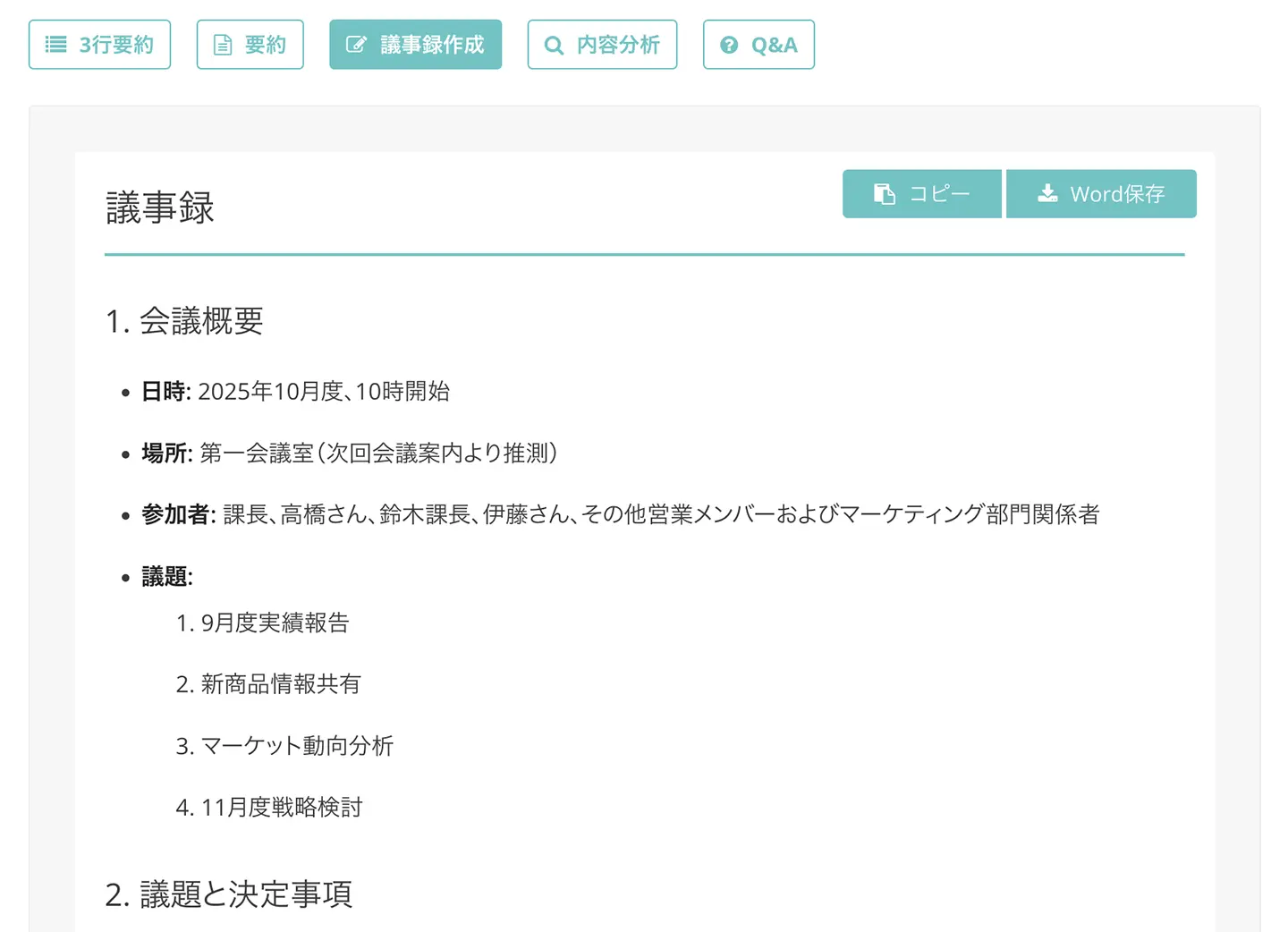
Both the summarization and meeting minute creation features are available without additional charges.
For more details on the summarization and meeting minute creation features of Mr. Transcription, please refer to this article.
3. Creating Video Subtitles with ChatGPT from Transcription Results
By feeding the audio transcription results into ChatGPT, you can also format them into video subtitles.
- Please convert these transcription results into an SRT subtitle file.
- Please create subtitles with a maximum of 30 characters per line.
By giving instructions like these, you can have subtitle data created that can be used with video editing software.
However, when creating subtitle files with ChatGPT, you will need to manually enter the audio timecodes later using a text editor or SRT editor.
With Mr. Transcription, you can automatically generate subtitle data with timecodes by simply pressing the "Download Subtitles" button.
After that, all you need to do is import the subtitle file into video editing software like Adobe Premiere or DaVinci Resolve, or into YouTube's subtitle editor.
For more information on how to create subtitles with Mr. Transcription, please refer to this article.
4. Creating Interview Articles with ChatGPT from Transcription Results
By feeding the transcribed interview results into ChatGPT, you can also create interview articles for web media or magazines.
- Please summarize this conversation into an easy-to-read interview article format.
- Please add headings and organize the structure.
By giving instructions like these, you can create text that is easy for readers to understand.
When transcribing interview audio, it's recommended to use a specialized AI transcription service.
High-performance speech recognition AI can accurately convert interview content into text.
5. Correcting Typos in Transcribed Content with ChatGPT
Worried about typos and grammatical errors in your transcription results?
In such cases, you can instruct ChatGPT with prompts like:
- Please check and correct any typos or grammatical errors in this text.
- Please revise any unnatural expressions into natural Japanese.
This is especially useful when AI transcription tools might transcribe misspoken words from the original audio exactly as they were said.
ChatGPT can help you find and correct such errors in expression.
Of course, when transcribing audio files, it's best to use a high-performance speech recognition AI that minimizes misrecognitions and homophone errors!
Mr. Transcription, which uses the latest AI, can produce high-quality meeting minutes, interview articles, and video subtitles free of typos and errors.
What to Consider When Choosing an AI Transcription Tool

When ChatGPT can't transcribe audio, it's recommended to choose a convenient AI transcription tool.
Here, we'll explain in detail the key points for finding the perfect AI transcription tool for you.
Choose an AI Transcription Tool with High Speech Recognition Accuracy
The most crucial factor when selecting a transcription tool is speech recognition accuracy.
No matter how many convenient features a tool has, if the core transcription accuracy is low, you'll spend more time on post-correction.
A key indicator of a highly accurate transcription tool is how precisely it can recognize technical terms and proper nouns.
Furthermore, if the AI transcription tool includes a custom dictionary feature, you can pre-register frequently used technical terms or company names to make your transcription results even more perfect.

Choose an AI Transcription Tool that Transcribes Quickly
Of course, transcription speed is also important.
If transcribing a one-hour meeting recording takes several hours, it would be difficult to use for work, right?
With Mr. Transcription, even long audio files over an hour can be transcribed in about 1 minute.
Choosing a tool with fast processing speed allows you to quickly review content after meetings or create meeting minutes efficiently.
Check for Summary, Meeting Minutes, and Subtitle Creation Features
Transcribing audio or video files is often done for meeting minutes, interview articles, or subtitles.
With an AI transcription tool equipped with summary, meeting minutes creation, and subtitle creation features, you can complete the entire process in one go without needing other tools.
Not having to subscribe to two different tools is also a key advantage.
Free Transcription Tools Are Recommended. Also Check Pricing.
When introducing a transcription tool, check if it offers a free trial!
It's always safer to first verify usability and transcription accuracy with a free version.
Mr. Transcription can be used without registration or login, allowing you to transcribe for free right away.
When considering a paid plan, it's recommended to check the pricing and the maximum transcription length available.
For example, Mr. Transcription offers transcription at a low price, starting from just 25 yen per hour.
If you're using it for work, it's also important to confirm if it supports commercial use.
AI Transcription Tools with Multilingual Support for Foreign Languages Are Recommended
In today's globalized world, opportunities to transcribe meetings and interviews in foreign languages are increasing.
By choosing an AI transcription tool with multilingual support, you can transcribe audio in languages other than Japanese.
Transcribing foreign language audio into text makes it easy to translate the content.
Mr. Transcription supports over 100 languages.
For an AI transcription tool that supports foreign languages, Mr. Transcription is highly recommended.
What Are the Benefits of Transcribing with the Latest AI Tools?

When you can't transcribe with ChatGPT, using an AI transcription tool is a great alternative.
Here, we'll explain the benefits of using AI transcription tools in detail.
AI Tools Enable Quick and Easy Transcription
The biggest advantage of the latest AI transcription tools is their ability to transcribe content in a short amount of time!
Previously, transcribing one hour of audio by typing it out on a keyboard would take 3 to 4 hours.
With the latest AI tools, transcription is possible in just about 1 minute.
Plus, it's easy to use!
You just need to upload your audio file.
If you start transcribing immediately after a meeting, you can even finalize the meeting minutes right after the meeting concludes.
【Free Options Available】Cost-Effective Transcription at Low Prices
Hiring a professional transcription service can incur high costs, often starting from 15,000 yen per hour.
In such cases, utilizing AI transcription tools is highly recommended!
AI transcription tools are available for free.
Even with paid plans, you can transcribe at an ultra-low price starting from just 25 yen per hour!
Moreover, processing is available 24/7, allowing you to handle urgent tasks.
No initial setup fees are required, so you can start using it with ease.
Easily Create Meeting Minutes and Video Subtitles
AI transcription tools not only convert audio to text but also make it possible to easily create meeting minutes and video subtitles.
Using the meeting minutes creation feature, you can automatically summarize transcribed meeting audio into a meeting minutes format.
It can also summarize content such as participants, agenda items, decisions, and issues, allowing you to complete meeting minutes immediately after the meeting.
With the video subtitle creation feature, you can download SRT subtitle files.
With the subtitle creation feature of Mr. Transcription, you just need to import the SRT file directly into your video editing software!
When ChatGPT Can't Transcribe, Why Not Try Convenient AI Tools?
As you can see, when ChatGPT struggles with transcription, using a dedicated AI transcription tool is highly recommended.
A specialized transcription tool offers a complete solution from transcription to summarization within a single service!
You can also create meeting minutes and video subtitles.
When ChatGPT can't transcribe, why not try Mr. Transcription, which you can use for free?
■ AI transcription service "Mr. Transscription"
"Mr. Transcription" is an online transcription tool that can be used from zero initial cost and 1,000 yen per month (* free version available).
- Supports more than 20 file formats such as audio, video, and images
- Can be used from both PC and smartphone
- Supports technical terms such as medical care, IT, and long-term care
- Supports creation of subtitle files and speaker separation
- Supports transcription in approximately 100 languages including English, Chinese, Japanese, Korean, German, French, Italian, etc.
To use it, just upload the audio file from the site. Transcription text is available in seconds to tens of minutes.
You can use it for free if you transcribe it for up to 10 minutes, so please try it once.

It is "Mr. Transcription" who can easily transcribe from audio, video, and images.
Transcription allows you to transcribe for up to 10 minutes for free.
You can copy, download, search, delete, etc. the transcribed text.
You can also create subtitle files, which is ideal for transcription of interview videos.
HP: mojiokoshi3.com
Email: mojiokoshi3.com@gmail.com
Email: mojiokoshi3.com@gmail.com
Related article
Transcription for audio / video / image transcription. It is a transcription service that anyone can use for free without installation.
- What is Mr. Transcription?
- Transcript images, sounds, and videos with Mr. Transcription
- Free registration
- Rate plan
- manual
- Try other free services






