Qualified Invoice Issuer Registration Number Notification
Mr. Transcription: How Time Is Used Up and What to Do on Errors
Oct. 15, 2026

Mr. Transcription is a service that uses speech-recognition AI to transcribe audio, video, images, and PDFs.
This article explains how much time and how many images you can transcribe after purchasing Mr. Transcription.
It also covers how available time is calculated, how "processing" time works, and what to do when an error occurs.
Usage Time by Membership Type in Mr. Transcription
The transcription time available for each membership type in Mr. Transcription is as follows.
You can transcribe images as well as audio.
- Non-member: 0 yen
Audio: 3 minutes/day
Images: 3 images/day - Free member: 0 yen
Audio: 10 minutes/day
Images: 10 images/day - Basic Plan: 1,000 yen/month
Audio: 24 hours/month (about 0.7 yen per minute)
Images: 500 images/month - Value Plan: 2,000 yen/month
Audio: 60 hours/month (about 0.6 yen per minute)
Images: 1,200 images/month - Premium Plan: 3,000 yen/month
Audio: 120 hours/month (about 0.4 yen per minute)
Images: 3,000 images/month
What Happens When You Purchase Mr. Transcription?

When I purchase a paid plan for Mr. Transcription, when is my transcription time added?
Time Is Added First
If you pay by credit card or debit card, your "plan" and "available time" are updated about 1 to 3 minutes after purchase.
Example: You purchase the Basic Plan
→"24 hours" of transcription time appears in 1 to 3 minutes
If a redirect error occurs, for example because you closed the payment screen partway through, the update may not go through properly.
If you still can't see your plan several minutes after purchase, please contact us through the inquiry form. We will handle it manually (in that case, it will be processed within 24 hours).
For annual contracts, your plan is generally activated within 24 hours after we confirm your bank transfer.
If your username and the name on the transfer are different, we cannot confirm the payment. Please be sure to let us know through the inquiry form.
*If you are in a hurry, let us know the approximate date of your transfer and we can activate your plan even before the funds arrive.
The Validity Period Is One Month
For monthly members, the available time and number of images are valid for one month.
The exact date is shown in your purchase email or in the email titled "Your mojiokoshi subscription renewal is approaching."
For annual contracts, the validity period is one year. The expiration date is shown in the "Payment confirmation completed" email and in your settings.

Payment Timing, Plan Changes, and Notes for Mr. Transcription Paid Plans
This article explains the payment timing for Mr. Transcription paid plans, how to change plans, and points to watch out for.
What Happens After the Validity Period Ends?
After the renewal date, your available time and number of images are reset.
Time and images left unused last month are not carried over.
How Is Time Used Up on Mr. Transcription Paid Plans?

When I actually transcribe with Mr. Transcription, how is my available transcription time used up?
When using Mr. Transcription, one thing people wonder about is how the available transcription time is consumed.
From here, we explain in detail how time is used up.
When Transcription Is Processed Successfully
As an example, here is how time is consumed on the Basic Plan (24 hours).
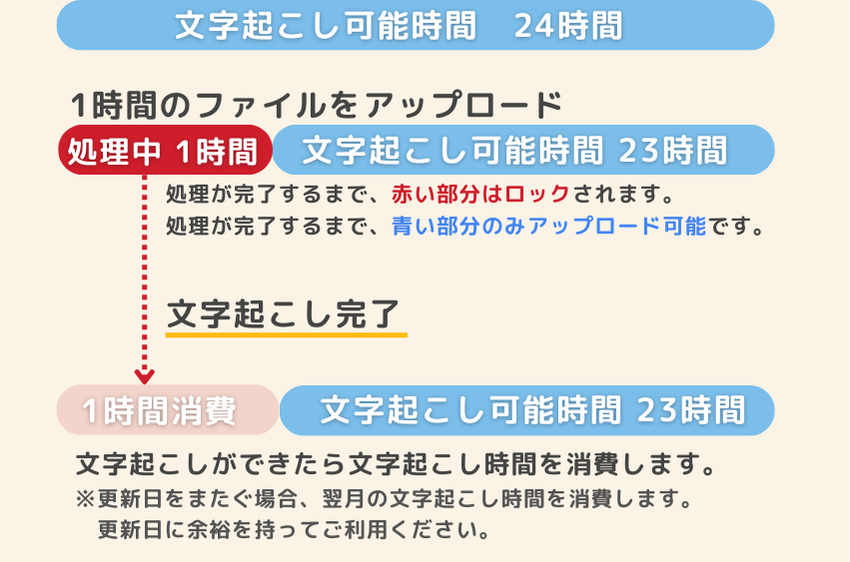
You upload a one-hour audio file and start transcription.

While the AI is processing, the one hour being transcribed is locked. The locked time is shown at the top of your history as "processing time."
During that time, you can upload only 3 hours' worth, which is shown at the top of your history as "available time."
When transcription completes successfully, the following happens automatically at the same time:
- The transcription result is added to your history
- The time (1 hour) is consumed (the processing time is used up)
These steps are carried out.
When Transcription Results in an Error
As before, take the example of uploading a one-hour audio file on the Basic Plan (24 hours) and starting transcription.
If transcription is not complete after twice the length of the audio file (2 hours in this case) has passed, it is treated as an error.
In the case of an error, you can "retry" or "delete the file" without using up your available transcription time.
Solution 1: Retry - Try Transcription Again
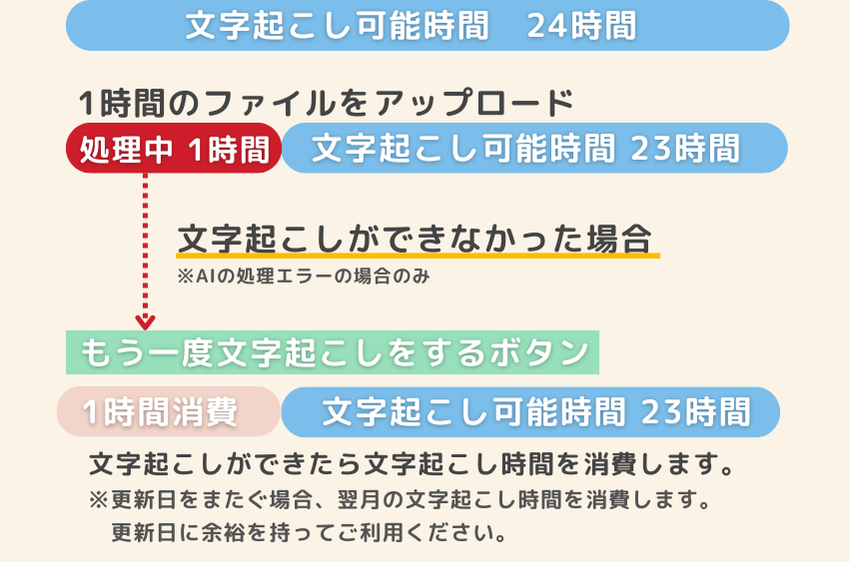
If transcription still hasn't finished after twice the length of the audio file has passed, you can retry.
When you open your history, a "Retry" button appears.

Alternatively, click "Edit" for the file in question and a "Try transcription again" button appears.
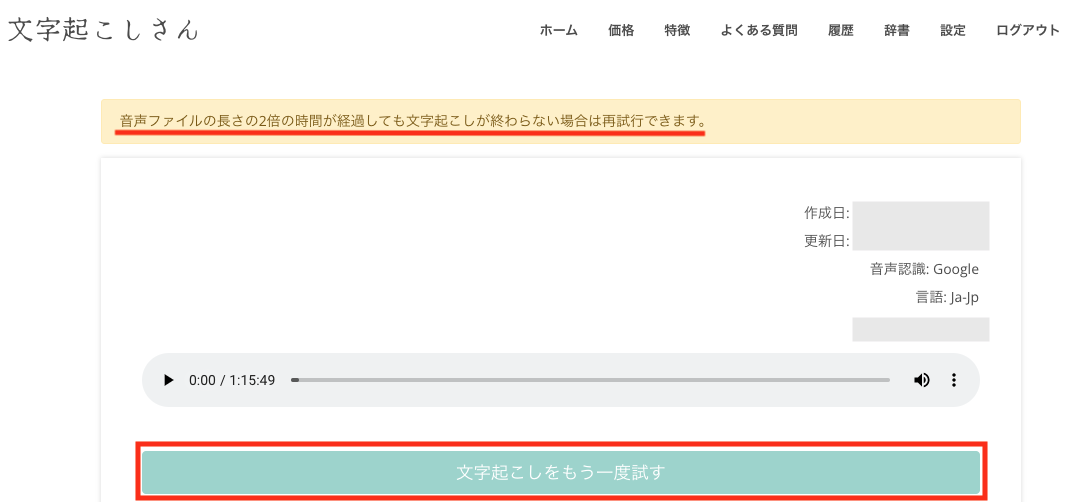
Click either one to try transcription again.
You can send the transcription request without uploading the file again and without using up additional transcription time.
Solution 2: Delete the File
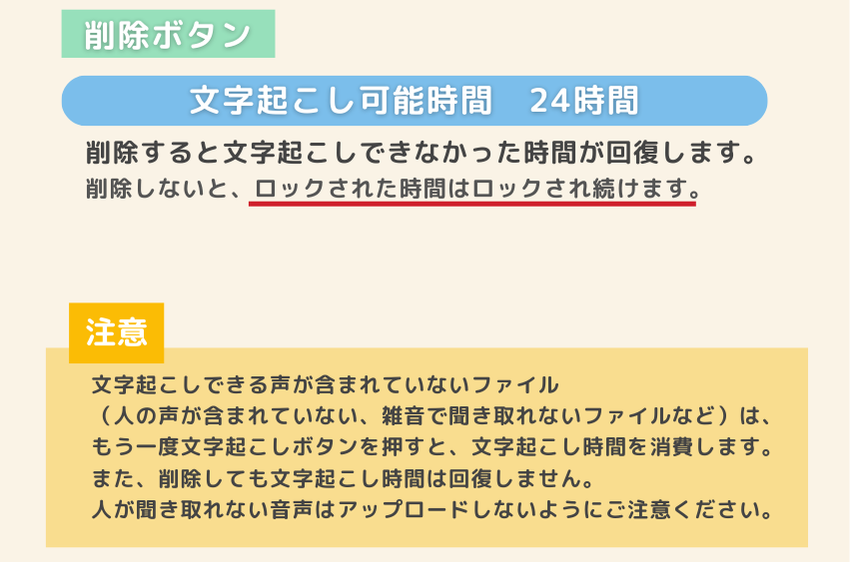
When you delete the file that caused the error, the locked "processing" time is released.
*If you delete the file after the renewal date has passed, the locked time will not be returned. Please avoid doing this across the renewal date.
If an error occurs, please
- Retry
- If that still doesn't work, delete the file
in that order.
Notes on Retrying and Deleting
If you press the transcription button to transcribe again a file that contains no transcribable speech (for example, a file with no human voice, or one where noise makes the speech impossible to hear), your transcription time will be used up.
Also, deleting the file does not restore the transcription time.
Please take care not to upload audio that people cannot make out.
【Audio That Cannot Be Transcribed】
- Audio with music, such as song lyrics
- Audio where heavy noise drowns out the voice
- Audio with no voice
- Audio in which a person would have trouble hearing the voice
No matter how many times you try, the AI cannot transcribe this kind of audio.
For more on audio that cannot be transcribed, please also see this article.

Audio Files That Don't Transcribe Well in Mr. Transcription [Real Examples]
AI transcription is better at some audio files than others. We introduce real examples and the reasons behind them. Knowing these examples and reasons helps you create audio files that are easier to transcribe with AI, so please use them as a reference.
Can I Cancel Transcription Partway Through?
I transcribed the wrong file by mistake. Can I cancel partway through?

Transcription cannot be canceled, whether it is still processing or already finished.
Processing starts as soon as you press the transcription button. Please make sure it is the right file before you press the button.
- You processed the same file more than once
- It was the wrong file
Even in cases like these, the AI starts transcribing from scratch every time you press the transcription button.
For that reason, transcription time is used up.
I Deleted a Transcription from My History. Can I Transcribe the Same File Again?

I deleted a file I had already transcribed from my history. When I try to transcribe the same file again,
the message "This file has already been uploaded. You can check the transcription result in your history." appears
and I can't transcribe it. What should I do?
[Solution]
Change the file name by even one character, then upload the file and transcribe it.
This error appears to prevent the same file from being transcribed repeatedly by mistake.
In the past, some users accidentally uploaded the same file many times and used up their time. We set this limit to prevent that from happening.
We apologize for the inconvenience. If you want to transcribe the same file again, change the file name by even one character so the system does not recognize it as "the same file," then upload it and start transcription.
Other Frequently Asked Questions
We have gathered frequently asked questions about Mr. Transcription here.

Mr. Transcription FAQ: Common Questions About Pricing, Free Usage, and Security
Frequently asked questions about the AI transcription site "Mr. Transcription." Pricing plans, free usage limits, security measures, how to cancel, and more are explained in a Q&A format. You can check all your questions before you start using the service.
- I see, so that's what happens when you delete!
- I wonder if security is okay?
We answer a wide variety of questions like these, so if anything is on your mind, please take a look.
■ AI transcription service "Mr. Transscription"
"Mr. Transcription" is an online transcription tool that can be used from zero initial cost and 1,000 yen per month (* free version available).
- Supports more than 20 file formats such as audio, video, and images
- Can be used from both PC and smartphone
- Supports technical terms such as medical care, IT, and long-term care
- Supports creation of subtitle files and speaker separation
- Supports transcription in approximately 100 languages including English, Chinese, Japanese, Korean, German, French, Italian, etc.
To use it, just upload the audio file from the site. Transcription text is available in seconds to tens of minutes.
You can use it for free if you transcribe it for up to 10 minutes, so please try it once.

It is "Mr. Transcription" who can easily transcribe from audio, video, and images.
Transcription allows you to transcribe for up to 10 minutes for free.
You can copy, download, search, delete, etc. the transcribed text.
You can also create subtitle files, which is ideal for transcription of interview videos.
HP: mojiokoshi3.com
Email: mojiokoshi3.com@gmail.com
Email: mojiokoshi3.com@gmail.com
Related article
Transcription for audio / video / image transcription. It is a transcription service that anyone can use for free without installation.
- What is Mr. Transcription?
- Transcript images, sounds, and videos with Mr. Transcription
- Free registration
- Rate plan
- manual
- Try other free services






