Transcription Efficiency: 7 Tips to Boost Your Workflow Now!
Audio Files Mr. Transcription Struggles With: Real Examples
Oct. 15, 2026

Mr. Transcription is an AI transcription service in which AI does the transcribing. It uses the latest AI speech recognition engine.
With AI transcription services, there are audio files that they handle well and audio files that they handle poorly.
In this article, we introduce audio files that AI transcription handles poorly, with real examples and the reasons.
By knowing the examples and reasons, you can create "audio files that are easy to transcribe with AI transcription," so please use this as a reference.

Audio files that AI transcription services handle poorly
- No voice is recorded in the file (there are stretches of continuous noise, or it is silent)
- Audio that is quiet, or recorded with a distant microphone so that it is hard to hear
- Audio drowned out by heavy noise
- Audio that is blurred by room echo
- Audio containing music, such as song lyrics
- Audio with a strong dialect
- Audio that is hard for a person to hear
Because such audio files cannot be transcribed accurately, we do not recommend using Mr. Transcription for them.
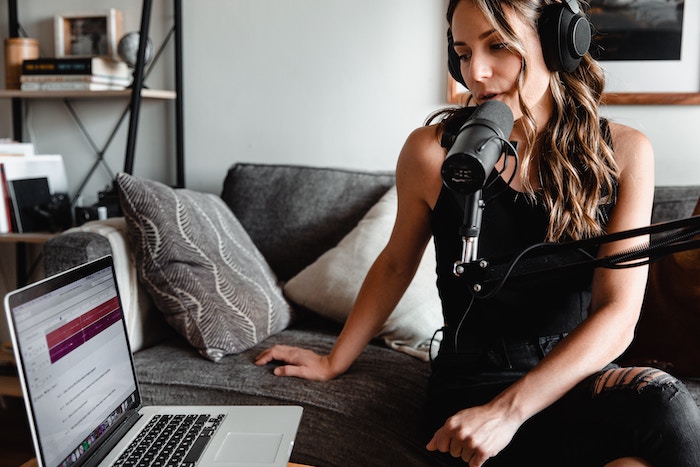
AI Transcription: 6 Recording Tips for Highly Accurate Transcription
To get highly accurate AI transcription, a few techniques at the time of recording are important. This article introduces the best recording tips for AI transcription. High-quality microphone, microphone in the right position, set up a quiet recording environment, speak clearly, one person at a time...
Even if you report an error for an audio file that AI transcription services handle poorly, the report will be rejected, and the minutes cannot be refunded.
Most error reports in particular involve problems with the content of the file. Let's look at an actual example.
1. No voice is recorded in the file (there are stretches of continuous noise, or it is silent)
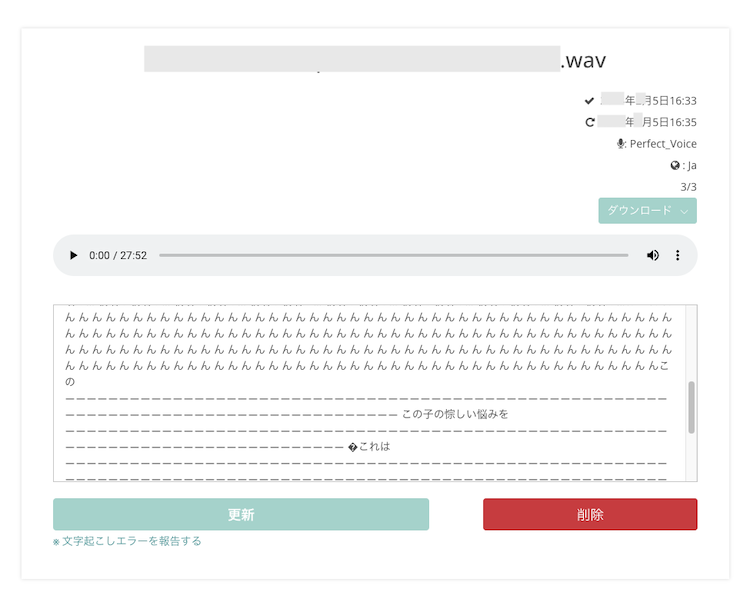
Some people upload an audio file without checking its content.
In that case, the recording may turn out to have failed in one of these ways:
- the file may have no recording at all and be completely silent
- the microphone may have cut out partway through, leaving only noise in the middle with no voice
These situations can happen.
The image above shows the result of uploading and transcribing a file in which only noise can be heard.
Mr. Transcription transcribes with AI. The AI tries to transcribe as much as it can, even the noise.
In particular, this problem is more likely to occur with files that have noise or silence of 1 minute or more at the beginning.
If the result is "Aaaaaaa" or "Mmmmmm" or other output, or the same phrase transcribed over and over, or any other incomprehensible transcription result, check the content of the file.
Cutting the noise or silence at the beginning can prevent this problem.
If you transcribe a file like the ones above and use up minutes, those minutes cannot be refunded.
Of course, if the recording of the audio file itself failed and it is silent, it cannot be transcribed.
Before trying transcription, check the audio file yourself and confirm that "the audio was recorded properly," and then try AI transcription.
Example: not noticing that the microphone input was not working
2. Audio that is quiet, or recorded with a distant microphone so that it is hard to hear

Apart from recordings that failed, this is the most common case when we check audio files that resulted in errors.
Even if transcription is possible, accuracy will be low, so we do not recommend AI transcription for audio in which the speaker's volume is low or the microphone is far away and does not pick up the voice properly.
Example: recording a lecture with a smartphone from a seat at the back of the lecture hall
3. Audio drowned out by heavy noise
Background noise is a formidable enemy of AI transcription services!

In audio with noise, the speaker's voice is often drowned out, and it is often "hard to hear even for a human."
Wind noise is easy to overlook while recording, but it is also a formidable enemy.
There is no way AI can transcribe accurately something that is "hard to hear even for a human."
Example: recording in a crowded place such as a café while out, with the sound of dishes or music (background music)
The microphone is close to the mouth, and the sound of breathing causes wind noise
4. Audio that is blurred by room echo
Room echo is surprisingly hard to notice when you listen with your own ears in everyday life.
In recorded audio, echo tends to sound muffled, or make the voice sound as if it is far away.
Echo is especially likely to occur in square rooms and rooms with few objects.
Example: recording a conversation among several people seated at different spots in a meeting room with a single IC recorder
Recording a presentation given in a meeting room, where the sound is blurred by room echo
5. Audio containing music, such as song lyrics

AI transcription services cannot transcribe songs.
Some people think of downloading a song without lyrics from YouTube or elsewhere and transcribing it!
However, AI transcription is meant solely for transcribing conversation.
It cannot transcribe songs.
*Downloading songs to transcribe them is often problematic in terms of copyright as well, so please be careful.
6. Audio with a strong dialect
AI transcription handles dialects poorly.
As the name suggests, in AI transcription an "AI" does the transcribing. The AI is trained so that it can transcribe based on the standard language. For that reason, it handles transcription of dialects poorly.
It is not that AI cannot transcribe them at all, but no matter how good the recording environment is and how crisp and slow the speech is, the transcription may have gaps or may cover only a small part.
Example: recording audio for the minutes of a meeting in a rural area → the speaker has a fairly strong dialect
7. Audio that is hard for a person to hear
What is hard for a person to hear is even harder for AI to hear.

"AI" seems extremely versatile, and it seems like it would do a better job than humans.
Even so, depending on the environment, the accuracy of AI work drops sharply.
With AI transcription services, audio that a person finds "hard to hear" may result in lower transcription accuracy.
When a person transcribes, even if something is somewhat hard to hear, they can guess "it must be like this" from the context of the conversation and the flow before and after.
How can you get highly accurate transcription with an AI transcription service?
But I transcribed it with AI, and it doesn't come out properly
There are tips for highly accurate transcription with AI!
To get highly accurate AI transcription, it is important to adopt a few techniques when recording.
To make the best recording for AI transcription, we recommend paying attention to 6 points.
6 points for the best recording for AI transcription
- High-quality microphone
- Microphone in the right position
- Set up a quiet recording environment
- Speak clearly
- Speak one person at a time
- Run a recording test
AI Transcription: 6 Recording Tips for Highly Accurate Transcription
To get highly accurate AI transcription, a few techniques at the time of recording are important. This article introduces the best recording tips for AI transcription. High-quality microphone, microphone in the right position, set up a quiet recording environment, speak clearly, one person at a time...
Make good use of both AI transcription and human transcription
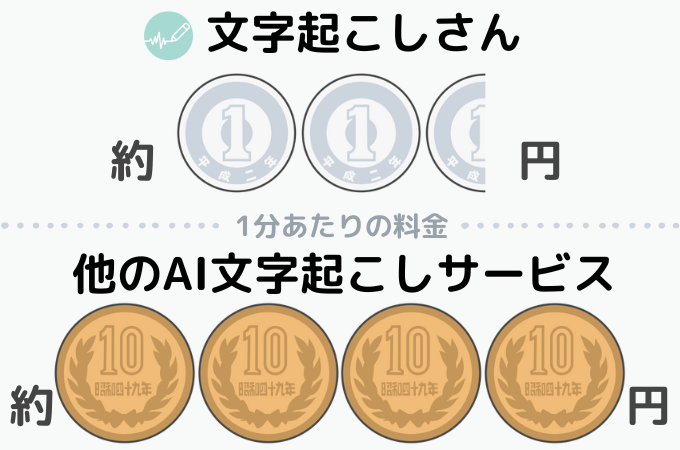
Compared with human transcription, AI transcription is overwhelmingly cheaper.
Among AI transcription services, "Mr. Transcription" in particular is very inexpensive and probably the cheapest in the industry.
Still, for audio files that AI transcription does not handle well, asking a person to transcribe them is more reliable.
But isn't it expensive to ask a person to transcribe?
If you are wondering about that, please also take a look at this article.

How Much Does Outsourcing Audio Transcription Cost? Tips for Ordering Cheaply
For those who want to outsource transcription cheaply, we have summarized the price ranges for audio transcription by AI, individuals, and professional companies. We also cover tips for avoiding failure when outsourcing and techniques for ordering the highest-quality transcription possible at a low price.
As introduced here, AI transcription also has strengths and weaknesses.
For audio files that AI transcription handles well, use "AI transcription."
For audio files that AI transcription handles poorly, take the following steps:
- Try transcribing with AI transcription first
→If that does not work, have it transcribed by "human transcription"
This is the approach we recommend.
Because AI transcription is inexpensive, even with audio files that AI transcription seems likely to handle poorly, you can sometimes get a good transcription by trying it with the attitude of "nothing lost if it fails, lucky if it works."
With the AI transcription service Mr. Transcription, you can transcribe up to 10 minutes per day for free after registering as a free member.
You can check the transcription accuracy, so please give it a try.
■ AI transcription service "Mr. Transscription"
"Mr. Transcription" is an online transcription tool that can be used from zero initial cost and 1,000 yen per month (* free version available).
- Supports more than 20 file formats such as audio, video, and images
- Can be used from both PC and smartphone
- Supports technical terms such as medical care, IT, and long-term care
- Supports creation of subtitle files and speaker separation
- Supports transcription in approximately 100 languages including English, Chinese, Japanese, Korean, German, French, Italian, etc.
To use it, just upload the audio file from the site. Transcription text is available in seconds to tens of minutes.
You can use it for free if you transcribe it for up to 10 minutes, so please try it once.

It is "Mr. Transcription" who can easily transcribe from audio, video, and images.
Transcription allows you to transcribe for up to 10 minutes for free.
You can copy, download, search, delete, etc. the transcribed text.
You can also create subtitle files, which is ideal for transcription of interview videos.
HP: mojiokoshi3.com
Email: mojiokoshi3.com@gmail.com
Email: mojiokoshi3.com@gmail.com
Related article
Transcription for audio / video / image transcription. It is a transcription service that anyone can use for free without installation.
- What is Mr. Transcription?
- Transcript images, sounds, and videos with Mr. Transcription
- Free registration
- Rate plan
- manual
- Try other free services






