How Secure Is Mr. Transcription? Servers and More, Explained
Renew Mr. Transcription: Guide & What Happens If Not Renewed
Nov. 17, 2026
Mr. Transcription's annual subscription does not auto-renew.
If you wish to renew your contract, you need to complete the renewal process yourself.
This time, we will explain how to renew your annual subscription and what happens if you don't renew it.
How to Renew Your Mr. Transcription Annual Subscription
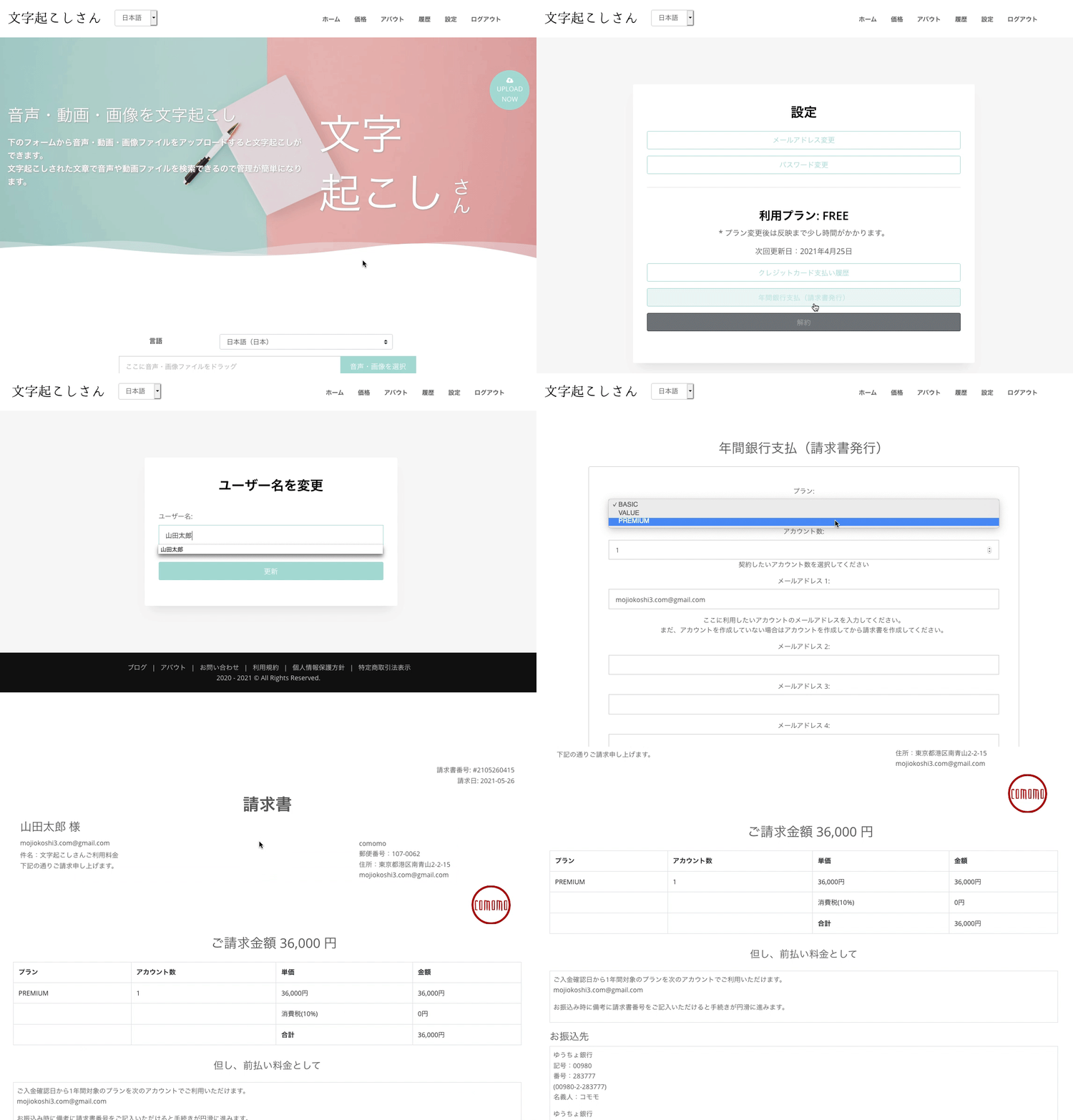
- Log in to Mr. Transcription
- From Mr. Transcription's settings, issue a quote and invoice under "Payments → Annual Bank Payment."
The quote and invoice are issued simultaneously. You cannot renew your contract without issuing an invoice. - Contact Mr. Transcription via inquiry to inform them of your "desired start date."
If payment is made without specifying a desired start date, the one-year plan will be applied on the day the payment is confirmed. - Please confirm the invoice details and transfer the requested amount to the specified account.
* Bank transfer fees are the responsibility of the customer.
* If your desired start date is after the payment date, please notify us by email at least 3 business days in advance. We may not be able to accommodate requests if communication and payment are not in the correct order.
(Example) Payment on March 20th → Desired start date is April 1st
Please notify us by email 3 business days before March 20th.
We may not be able to accommodate requests if you notify us on March 20th itself.
Template for "Desired Start Date" Inquiry
Subject: Annual Contract Renewal Request
I would like to request the renewal of my Mr. Transcription annual subscription.
Invoice Number:
Desired Contract Renewal Date: Month Day, Year
(Example: Expiration Date)Expected Payment Date: Month Day, Year
* Normally, the plan starts after payment is confirmed, but by providing the expected payment date, early use is possible with a desired date prior to payment.
Important Notes for Mr. Transcription Annual Subscriptions
- Normally, the plan is activated within 24 hours after payment confirmation.
- If the username and the bank transfer name differ, the plan will not be activated unless you contact us.
- There is no special discount for annual payments.
- Refunds for mid-term cancellations are not possible.
- Plan changes are not possible mid-term.
- Quotes and invoices that have not received payment or communication for more than 3 months will be deleted as expired.
- Bank transfers are not automatically renewed.
If you wish to continue in subsequent years, please issue an invoice again and make the payment.
In this case, the plan will also be activated within 24 hours after payment confirmation. Please note that this is not an expiration date renewal.
If you wish to renew on the expiration date or a desired date, please contact us in advance via inquiry.
About Annual Contract Pricing
[Standard Paid Plan Prices]
- Basic Plan: 1000 yen × 12 months = 12000 yen
Annual Audio: 288 hours
Image Count: 6000 images - Value Plan: 2000 yen × 12 months = 24000 yen
Annual Audio: 720 hours
Image Count: 14400 images - Premium Plan: 30000 yen × 12 months = 36000 yen
Annual Audio: 1440 hours
Image Count: 36000 images
For more details on annual contracts, please see here.
About Mr. Transcription Payment Methods and Receipts
Username is the Addressee
Your username will be the addressee on the invoice.
If you have registered an incorrect username, you can change it by:
- Clicking "Change Username"
- Entering your desired username
- Clicking "Register"
A quote is also issued simultaneously with the invoice, making it very easy to download even if you need a quote for internal approval.
If you accidentally create multiple invoices
Creating an invoice is as simple as clicking a button.
Because of this, you might accidentally create unnecessary invoices.
You cannot delete or cancel invoices yourself.
If you have accidentally created multiple invoices, please contact us via inquiry to request deletion.
Invoices and quotes that have not received payment or communication for more than 3 months will be deleted as expired.
If payment is made when multiple invoices exist
If payment is made when multiple invoices exist and no invoice number is specified, the invoice with the most recent date for the corresponding plan will be activated.
Bank Account Details
The designated bank for transfers is Sumishin SBI Net Bank.
Other bank accounts are currently being prepared.
You can transfer from other banks as there is a branch name and account number. Of course, transfers between Sumishin SBI Net Bank accounts are also easy.
Accounts other than Sumishin SBI Net Bank are currently under preparation. We appreciate your understanding.
Plan Activation Timing
After payment confirmation, the plan will generally be activated within 24 hours.
If the username and the remitter's name are different, we cannot confirm the payment. Please be sure to inform us via inquiry.
※If you are in a hurry, we can activate the plan even before payment is received if you inform us of the approximate payment date.
In that case, please issue an invoice and contact us via inquiry.
Please note that if payment is not confirmed within 7 days of the informed payment date, your account plan will be suspended.
What is "Status"?
Status indicates the payment situation after an invoice is issued.
- Awaiting Payment: An invoice has been issued, but payment has not yet been made.
- Unpaid: The payment due date has been communicated, and the plan is activated, but payment has not yet been received.
- Paid: Payment has been confirmed, and the plan is active.
Once the status is Paid, you can download the receipt.
After the plan is activated, you can download the receipt from the Invoice History.
If you do not renew your annual Mr. Transcription subscription
What happens to your Mr. Transcription account and created audio if you don't renew your annual subscription?
Account
Once your subscription expires, it will automatically revert to the free plan (10 minutes/day).
Deletion of Created Data
Your history and data will be automatically deleted 30 days after the contract expires.
Once deleted, the data is also removed from the server. Please note that data once deleted cannot be recovered.
If you wish to delete immediately, please use the delete function or bulk delete function.
How to use Mr. Transcription's delete function and bulk delete function, and points to note
■ AI transcription service "Mr. Transcription"
"Mr. Transcription" is an online transcription tool that can be used from zero initial cost and 1,000 yen per month (* free version available).
- Supports more than 20 file formats such as audio, video, and images
- Can be used from both PC and smartphone
- Supports technical terms such as medical care, IT, and long-term care
- Supports creation of subtitle files and speaker separation
- Supports transcription in approximately 100 languages including English, Chinese, Japanese, Korean, German, French, Italian, etc.
To use it, just upload the audio file from the site. Transcription text is available in seconds to tens of minutes.

It is "Mr. Transcription" who can easily transcribe from audio, video, and images.
Mr. Transcription allows you to transcribe for up to 10 minutes for free.
You can copy, download, search, delete, etc. the transcribed text.
You can also create subtitle files, which is ideal for transcription of interview videos.
HP: mojiokoshi3.com
Email: mojiokoshi3.com@gmail.com
Email: mojiokoshi3.com@gmail.com
Try audio/image transcription for free
Try it nowRelated article
Mr. Transcription for audio / video / image transcription. It is a transcription service that anyone can use for free without installation.
- What is Mr. Transcription?
- Transcript images, sounds, and videos with Mr. Transcription
- Free registration
- Rate plan
- manual
- Try other free services