
How to Issue Quotes and Invoices with Mr. Transcription
Transcribe iPhone Voice Memos: Illustrated Guide, Phone or PC
Oct. 16, 2026


I want to transcribe a recording I made with iPhone's Voice Memos. How do I do it?
iPhone's Voice Memos lets you record easily on your smartphone. Because no dedicated device such as an IC recorder is needed, you can record casually anytime, whether on the spur of the moment, at work, or in everyday life.
But Voice Memos has no "transcription" feature.
- You need a transcript for meeting minutes
- You recorded something as evidence but also want to keep it as text
- You can't tell which file is which, so you want to convert them to text
- You want a rough draft of a script for YouTube captions
There are surprisingly many situations like these where you want to transcribe a Voice Memos recording.
This time, I will show you how to easily transcribe iPhone Voice Memos on your smartphone using "Mr. Transcription," an AI transcription service.
Everything is done on the iPhone alone, so it's really easy. Please give it a try!

[Free] Recommended AI Transcription Service for iPhone Voice Memos

For converting audio files recorded with iPhone Voice Memos to text, we recommend "Mr. Transcription"!
"Mr. Transcription" is an AI service that uses the latest AI to convert audio, video, images, and PDFs to text with fast, highly accurate results.
Anyone can use it right away from a browser, with simple operation.
With Mr. Transcription's latest speech recognition AI:
- Even long audio is transcribed in only about 1 minute
- Supports 100 foreign languages
You can use it freely in all kinds of situations.
And "Mr. Transcription" is free!
No registration or login required: you can convert up to 3 minutes per day, and once you register an account, you get up to 10 minutes per day free, so when you want to transcribe iPhone Voice Memos audio, why not start with "Mr. Transcription"?
How do I save audio and data with iPhone Voice Memos?
Recording meetings and interviews is easy with iPhone Voice Memos

The easiest way to record audio at meetings, interviews, lectures, and so on is to use iPhone's Voice Memos.
On an iPhone, you can use the Voice Memos app that is installed by default, so anyone can record easily.
Compared with Voice Memos on Android smartphones, it is easier to use and can record in high sound quality.
Audio files recorded with iPhone Voice Memos can be easily converted to text with an AI transcription service.
How to record with iPhone Voice Memos
To transcribe Voice Memos audio, you need data recorded with Voice Memos.
First, let's review how to record with Voice Memos.
*This guide uses iOS 26 screens.
Launch "Voice Memos"
First, launch Voice Memos.
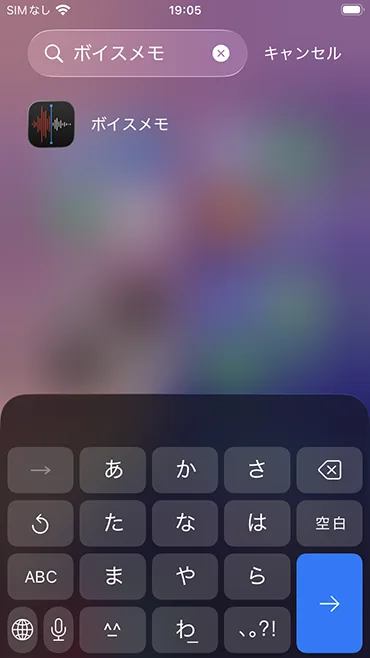
If you can't find Voice Memos, search for "Voice Memos" in the search box. The Voice Memos icon will appear, so tap it.
Tap the red record button at the bottom of the screen to record audio

Record new audio.
Tap the red record button (◉).

When you finish recording, tap the stop button (■) to complete the recording.

The audio file is saved.
You have now recorded audio with iPhone Voice Memos.
How to transcribe audio recorded with iPhone Voice Memos
Next, we will explain how to transcribe a Voice Memos recording file using Mr. Transcription.
*This guide uses iOS 26 screens.
1. Open Mr. Transcription in a web browser
First, open the "Mr. Transcription" website.
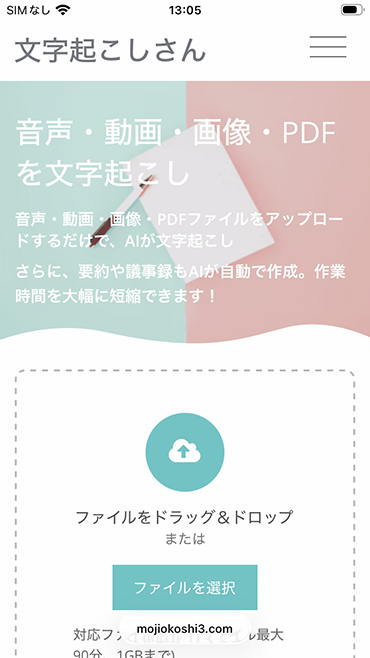
Upload the file you want to transcribe
Scroll down the page a little to the place where you upload files.

Tap the upload area and a menu appears, so tap "Choose File".
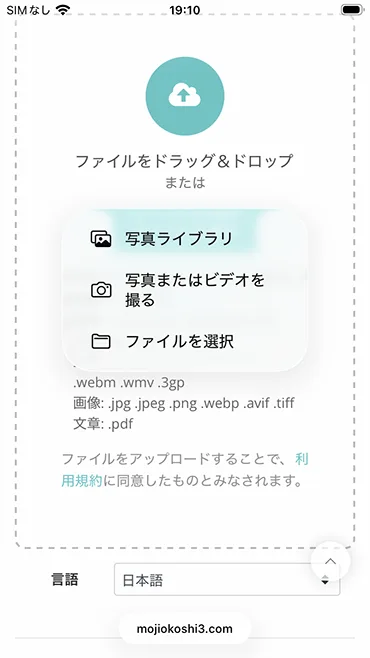
Select the audio file recorded with the voice recorder app.

The file is now selected.
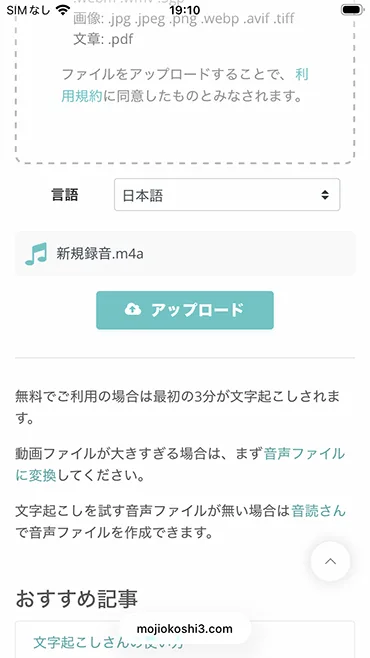
You're all set!
Tap the "Upload" button and the transcription will run.
With Mr. Transcription, you can transcribe up to 3 minutes per day for free without registration.
In addition, if you sign up for a free membership, you can use up to 10 minutes per day.
Check the transcription result

The transcription was completed.
If you scroll down, you can check the transcription result in more detail, like this.
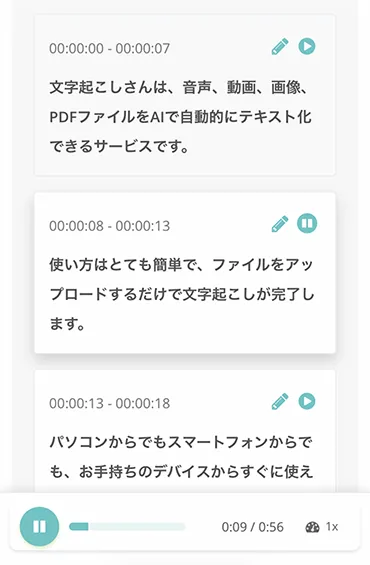
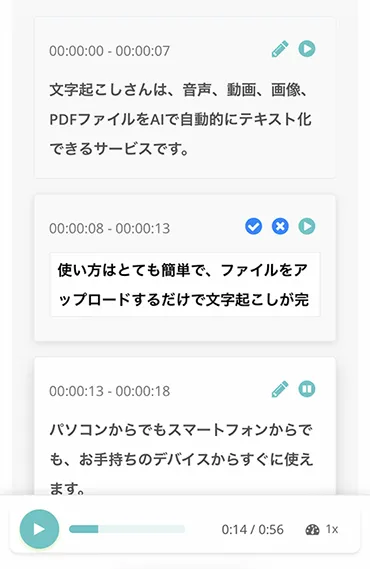
You can also play the audio section by section to check each part individually, and edit and save the transcription result.
With Mr. Transcription, you can conveniently transcribe iPhone Voice Memos audio using the latest AI transcription engine.
Even long audio files can be transcribed in only about 1 minute, and foreign-language transcription is supported too!
When you want to transcribe iPhone Voice Memos, why not use "Mr. Transcription"?
You can transcribe up to 10 minutes per day when using it for free.

If you like it, buy a plan and transcribe everything
If you want to transcribe beyond the free allowance, you can do so by subscribing to a paid plan.
Column: Transcribing long recordings costs money
With Mr. Transcription, you need to purchase a paid plan to transcribe beyond the free allowance (10 minutes per day).
There are many AI transcription services, but unfortunately, there is no web service that lets you transcribe long recordings completely free.
Even so, Mr. Transcription is quite inexpensive compared with other services.
Mr. Transcription starts at just 25 yen per hour for transcription!
If you ask a service where people do the transcription, it costs more, and the going rate seems to be about 15,000 yen per hour.
Make even better use of iPhone Voice Memos
With iPhone's Voice Memos, you can easily record anytime, anywhere with just one smartphone.
There is no recording time limit, and you can make anything from a short recording of a few dozen seconds to a long recording of several hours. The sensitivity is also fairly good.
You can even use it to discreetly record a heated confrontation.
But Voice Memos has no "transcription" feature. When you look for data later or check it as evidence, it is far better to have the "text" to see what it contains.

iPhone's Voice Memos is handy, but transcribing is a hassle…
That is exactly when you should make good use of Mr. Transcription.
It is the cheapest among AI transcription apps. You can transcribe at a bargain price of about 2.5 yen per minute.
There's no need for confusing technical work such as having to call an API.
Please take this opportunity to try Mr. Transcription.
■ AI transcription service "Mr. Transscription"
"Mr. Transcription" is an online transcription tool that can be used from zero initial cost and 1,000 yen per month (* free version available).
- Supports more than 20 file formats such as audio, video, and images
- Can be used from both PC and smartphone
- Supports technical terms such as medical care, IT, and long-term care
- Supports creation of subtitle files and speaker separation
- Supports transcription in approximately 100 languages including English, Chinese, Japanese, Korean, German, French, Italian, etc.
To use it, just upload the audio file from the site. Transcription text is available in seconds to tens of minutes.
You can use it for free if you transcribe it for up to 10 minutes, so please try it once.

It is "Mr. Transcription" who can easily transcribe from audio, video, and images.
Transcription allows you to transcribe for up to 10 minutes for free.
You can copy, download, search, delete, etc. the transcribed text.
You can also create subtitle files, which is ideal for transcription of interview videos.
HP: mojiokoshi3.com
Email: mojiokoshi3.com@gmail.com
Email: mojiokoshi3.com@gmail.com
Related article
Transcription for audio / video / image transcription. It is a transcription service that anyone can use for free without installation.
- What is Mr. Transcription?
- Transcript images, sounds, and videos with Mr. Transcription
- Free registration
- Rate plan
- manual
- Try other free services






