Free Transcription Apps That Also Translate: 5 Picks and a Trick
Mr. Transcription Errors: 7 Fixes When Transcription Fails
Nov. 12, 2026

Hello, thank you for always using Mr. Transcription.
I tried to transcribe a file that should be compatible with Mr. Transcription, but it failed.

This article explains the causes and solutions for such situations.
※Please note that audio, video, or image files other than supported formats cannot be transcribed or uploaded. Please also refer to this article!

Supported file types and sizes for Mr. Transcription. How to convert unsupported files to supported ones.
We'll guide you through Mr. Transcription's supported file types and what to do if your file is not supported.
When using Mr. Transcription for transcription, you might occasionally encounter errors where transcription fails even with a compatible file.
【The main reasons are】
- Transcription got stuck in "processing" due to timing or some other reason.
- You've reached the maximum transcription limit.
- The upload failed.
- An error occurred due to network environment or browser issues.
- The file name contains emojis.
- The file name is too long.
- The file contains no voice (e.g., continuous noise or silence).
And so on.
When transcription doesn't work due to these issues, there are very simple solutions.
Let's introduce each solution.
If transcription is possible but you experience issues such as:
- Transcription isn't accurate.
- Transcription results in repetitive, unintelligible characters like "aaaaa."
- Transcription has gaps or missing words.
Please refer to this article as well.
【AI Transcription】6 Tips for High-Accuracy Recording
To achieve high-accuracy AI transcription, several recording techniques are crucial. This article introduces optimal recording tips for AI transcription: using a high-quality microphone, placing the microphone correctly, ensuring a quiet recording environment, clarifying speaker's pronunciation, and more.
Cause 1: Transcription gets stuck in "processing" due to timing or other reasons
When you upload a file and start transcription, the transcription request communication may get stalled for some reason, causing the transcription to remain "processing" and not proceed.
If it gets stuck in "processing," it will not consume your available transcription time.
This error is less likely to occur with image files and more common with longer audio files.
If "processing" continues for more than twice the uploaded file's duration, please try "Try transcribing again."
If transcription gets stuck in "processing"
For example,
- Remaining transcription time: 4 hours
- Uploaded a 1-hour audio file and started transcription
If your account is in this state and transcription has not completed even after twice the audio file's duration (2 hours in this case) has passed, it's an error.
Solution 1: Retry / Try transcribing again

If transcription doesn't complete after twice the audio file's length has passed, you can retry.
When you open the history, a "Retry" button will appear.

Alternatively, clicking "Edit" for the target file will display a "Try transcribing again" button.
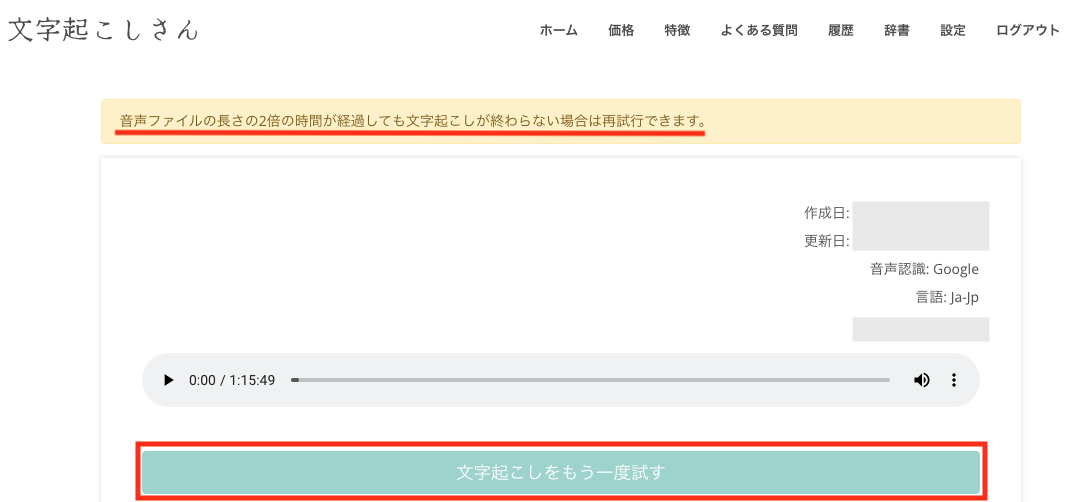
Click either one to attempt transcription.
This allows you to resubmit the transcription request without re-uploading the file or consuming additional transcription time.
Solution 2: Delete the file
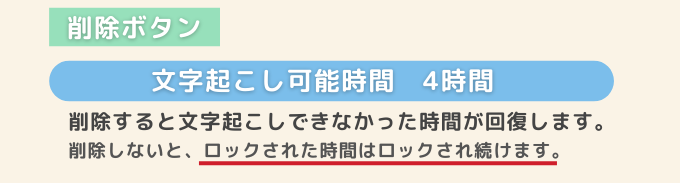
Deleting an errored file will release the "processing" time that was locked.
※Please note that if you delete a file across an update day, the locked time will not be restored. Avoid performing this operation across update days.
If an error occurs, please:
- Retry
- If that doesn't work, delete it
Precautions for retrying and deleting
Files that do not contain transcribable speech (e.g., no human voice, unintelligible due to noise) will:
Running the transcription process again consumes transcription time.
Also, deleting such files will not restore transcription time.
Please be careful not to upload audio that is difficult for humans to understand.
【Audio that cannot be transcribed】
- Music with lyrics
- Audio where speech is drowned out by severe noise
- Audio with no sound
- Audio where human speech is difficult to hear for a person
For such audio, the AI cannot transcribe it, no matter how many times you try.
Cause 2. You've reached your transcription limit
Mr. Transcription has a set transcription limit for each plan.
If you reach this limit, you won't be able to transcribe any more files until the next renewal.
- If you are not a member, register for a free membership.
- If you are a free member, subscribe to a paid plan.
- If you are a paid member, cancel your current plan once and then subscribe to your preferred plan again to increase your transcription capacity.
These steps can resolve the issue.
The available "minutes" for audio transcription and "number of images" are distributed daily to non-members and free members, and monthly to paid members.
Updates for paid members occur every 30 days.
Details of each plan are as follows:
- Non-member: Free
3 minutes of audio/day
3 images/day - Free Member: Free
10 minutes of audio/day
10 images/day - Basic: 1000 yen/month
24 hours of audio/month
1000 images/month - Value: 2000 yen/month
60 hours of audio/month
2500 images/month - Premium: 3000 yen/month
120 hours of audio/month
6000 images/month

Understanding Payment Timing, Plan Changes, and Important Notes for Mr. Transcription's Paid Plans
This article explains the payment timing for Mr. Transcription's paid plans, how to change plans, and important considerations.
Cause 3. Upload failed
A common sign of a failed upload is when the progress bar repeatedly moves to the right and then returns to the beginning.
Normally, once the upload is complete, the progress bar disappears, and you will see either:
- "Transcribed content"
or
- "For files longer than 10 minutes, you will be notified by email after transcription is complete."
We will explain the causes and solutions when the progress bar repeatedly moves to the right and then returns to the beginning.
Sometimes, due to issues like unsupported file size or format, timing problems, or a slow internet connection, you might encounter an error when trying to upload audio or image files to Mr. Transcription.
Additionally, for video files, Mr. Transcription's system first converts them into audio files before processing the transcription. If this internal conversion fails, it can also lead to an error.
1. Incorrect File Size or Format
This is the most common cause of errors.
- 【Image Files】
Supported file formats: .jpg .jpeg .png .webp
*If the text is sideways or upside down, transcription may not be possible, so please rotate the image to correct the orientation. - 【Audio Files】
Audio duration: For paid plans, up to 90 minutes (Basic), 3 hours (Value), or 5 hours (Premium) (unregistered users: up to 3 minutes per day; free members: up to 10 minutes per day)
Supported file formats: .mp3 .wav .wma .mp4 .aifc .flac .aac .aiff .aifc - 【Video Files】
Audio duration: For paid plans, up to 90 minutes (Basic), 3 hours (Value), or 5 hours (Premium) (unregistered users: up to 3 minutes per day; free members: up to 10 minutes per day)
Supported file formats: .mp4 .mov .avi .flv .mkv .webm .wmv .3gp
File size for audio and video: Up to 1GB for unregistered users and free members, up to 30GB for paid plans (videos are converted to audio before uploading, so even original files of several GB can be used)
Many users overlook this information. Please double-check the file you are trying to upload.
Mr. Transcription's Supported Files and Sizes. How to Convert Unsupported Files
We explain Mr. Transcription's supported file types and what to do if your file is not supported.
2. Upload Failure Due to Timing Issues
Sometimes, uploads fail due to timing issues, leading to a timeout where transcription never starts.
If you are in an environment with an internet upload speed of 80Mbps and the upload hasn't succeeded after 10 minutes, please try uploading again.
When re-uploading, please
- Reload (refresh) the Mr. Transcription page
and try again after the page has fully loaded.
3. Internet Connection is Too Slow
- Large image file size
- Audio files that are several hours long
In such cases, a slow internet connection can cause errors.
Even with small file sizes, an excessively slow internet connection can lead to upload timeouts or cancellations, resulting in errors.
Please take measures such as using a high-speed internet connection like fiber optic, or ensuring good signal strength if using Wi-Fi.
When re-uploading, please
- Reload (refresh) the Mr. Transcription page
and try again after the page has fully loaded.
4. Video File Conversion/Upload Failed
For video files, Mr. Transcription's system internally converts them to audio files. Sometimes, this process fails, leading to an error.
If you're using a video file, converting it to MP3 using an external website before uploading to Mr. Transcription often resolves the error.
If you encounter an error, try converting to MP3 and then uploading.
Recommended "Video to MP3 Converter Sites"
Reason 4. Browser-Related Errors
Errors can also occur due to browser issues.
Mr. Transcription's Recommended Browser
If you're consistently unable to transcribe, checking your browser is a good first step.
What type of browser do you usually use when accessing Mr. Transcription?
Mr. Transcription recommends Google Chrome as its primary browser.
If you're encountering errors, please try the following:
- Switch to Chrome
(However, if you're already using Chrome, try a different browser) - Use Chrome's Incognito window
Give these options a try.
How to Open an Incognito Window
What is an Incognito Window?
It allows you to browse the web without saving your browsing history or information entered into forms.
To use an Incognito window:
- Click "File" in the toolbar
- Select New Incognito Window
Alternatively,
- Press [Ctrl] + [Shift] + [N] keys
You can open it this way.
Please give it a try.
Cause 5. Emojis in the File Name
If your file name contains emojis, the upload will fail.
Please do not include emojis or other special characters.
Cause 6. File Name is Too Long
If the file name is excessively long, the upload will fail.
We recommend keeping file names to 15 characters or less.
Cause 7. No Voice Recorded in the File (Continuous Noise, Silence, or Music)
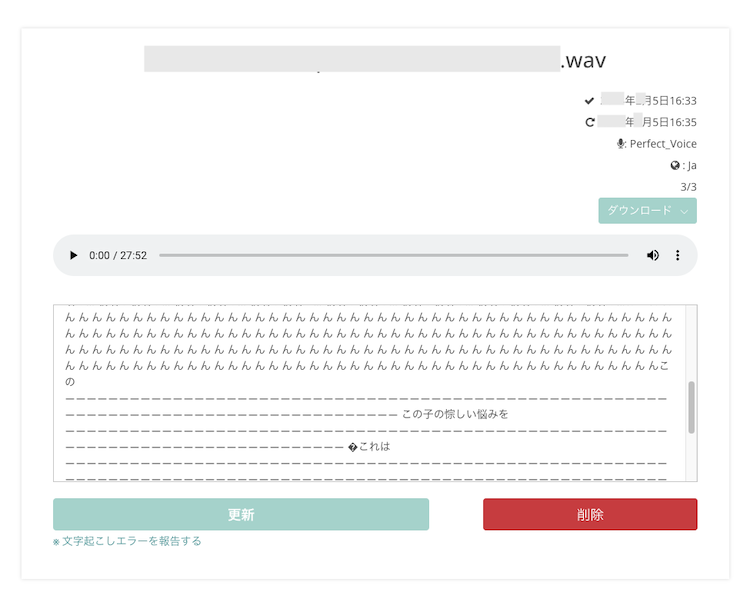
If you upload an audio file without checking its content, you might find:
The recording failed, resulting in "silent recording" or "microphone cut out during recording, only noise audible in parts, no actual audio."
Additionally, there might be situations where "music, noise, or silence continues for several minutes at the beginning or in the middle."
The image above shows the transcription result of a file that contained only noise.
Mr. Transcription uses AI for transcription. AI attempts to transcribe as much as possible, even if it's noise or music.
This problem is especially likely to occur if the file has more than 1 minute of noise or silence at the beginning.
If you see results like "aaaaaaaaaa," "mmmmmmmmmm," or other instances where the same phrase is transcribed repeatedly, leading to incomprehensible transcription, please check the file's content.
If you transcribe such files and consume your allocated time, the time cannot be refunded.
You can achieve successful transcription by using audio editing software like MP3 Cutter to cut out problematic sections before uploading.
Splitting MP3s is easy with online tools or installable free software.
For online options, MP3 Cutter is convenient and user-friendly.
Audio Files That AI Transcription Services Struggle With
- Audio that is too quiet, or where the microphone is too far away, making it hard to hear.
- Audio with excessive noise that drowns out the speech.
- Audio that is muffled due to room reverberation.
- Audio containing music, such as song lyrics.
- Audio files with no sound.
- Audio with strong dialects.
- Audio where human listeners also find the voices difficult to hear.
AI transcription has strengths and weaknesses when it comes to the audio files it transcribes.
By understanding these examples and reasons, you can create audio files that are easier for AI transcription to process, so please use this as a reference.

Audio Files That Mr. Transcription Struggles With [Examples Introduced]
AI transcription has its strengths and weaknesses when it comes to audio files. We'll introduce examples and reasons. By understanding these examples and reasons, you can create audio files that are easier for AI transcription to process, so please use this as a reference.
Please report errors to Mr. Transcription!
Reporting errors to Mr. Transcription helps us identify the cause of the problem.
By reporting errors, you can increase the free usage allowance for your account.
*Data that can be used to verify errors is only supported in Japanese.
When an error report for Mr. Transcription is submitted and approved,
- Audio/Video Transcription: 1 hour (valid until the next renewal date)
or- Image Transcription: 100 images (valid until the next renewal date)
will be credited to the reporting account.
- For non-members
We cannot investigate the cause of the error. Please register as a member. - For members
We can investigate the cause of the error.
To report an error:
- Log in to Mr. Transcription
- Settings → Report List
- Report List → Report
This will display the report form.
Please refer to the article below for detailed instructions on how to report errors.

【About Mr. Transcription Error Reports】Get free audio transcription time and image count
The way to increase your free usage of Mr. Transcription is to "report an error." When an error report for Mr. Transcription is submitted and approved, you will receive 1 hour of audio/video transcription (valid for 30 days) or 100 images for image transcription (valid for 30 days) credited to the reporting account...
The Mr. Transcription operations team can check error logs, which are records of "errors occurring under these circumstances."
Customers cannot view error logs.
If you wish to know the cause of an error, please contact Mr. Transcription customer support via error report.
However,
- Upload failed
- Transcription failed
- Unusable
We cannot confirm errors for issues where the situation is not clearly understood from the description.
When reporting, please fill in the required fields and provide all information to expedite the investigation and resolution of the error.
If detailed information is not provided, we will have to ask for the same information again in a reply email.
By investigating the cause of errors, you can use Mr. Transcription even more comfortably.
Mr. Transcription is most delighted to be of service to you, our users.
Please take this opportunity to contact Mr. Transcription customer support.
We will provide our full support.
We hope to continue being the best transcription software and service for you.
Thank you for your continued support of Mr. Transcription.
【Related Articles】
【Mr. Transcription】Explanation of transcription time consumption and error handling
What happens when you purchase Mr. Transcription? We explain the mechanism of "available" and "in-progress" time, and how to deal with errors.

Mr. Transcription FAQ|Frequently Asked Questions about Pricing, Free Tier, and Security
These are frequently asked questions about the AI transcription website 'Mr. Transcription'. We explain pricing plans, free tier limits, security measures, and cancellation methods in a Q&A format. You can check all your questions before using the service.
■ AI transcription service "Mr. Transcription"
"Mr. Transcription" is an online transcription tool that can be used from zero initial cost and 1,000 yen per month (* free version available).
- Supports more than 20 file formats such as audio, video, and images
- Can be used from both PC and smartphone
- Supports technical terms such as medical care, IT, and long-term care
- Supports creation of subtitle files and speaker separation
- Supports transcription in approximately 100 languages including English, Chinese, Japanese, Korean, German, French, Italian, etc.
To use it, just upload the audio file from the site. Transcription text is available in seconds to tens of minutes.
You can use it for free if you transcribe it for up to 10 minutes, so please try it once.

It is "Mr. Transcription" who can easily transcribe from audio, video, and images.
Mr. Transcription allows you to transcribe for up to 10 minutes for free.
You can copy, download, search, delete, etc. the transcribed text.
You can also create subtitle files, which is ideal for transcription of interview videos.
HP: mojiokoshi3.com
Email: mojiokoshi3.com@gmail.com
Related article
Mr. Transcription for audio / video / image transcription. It is a transcription service that anyone can use for free without installation.
- What is Mr. Transcription?
- Transcript images, sounds, and videos with Mr. Transcription
- Free registration
- Rate plan
- manual
- Try other free services