AI vs. Human Transcription: Services Compared
Mr. Transcription: Your Ultimate Guide (Registration to Export)
April 5, 2026

Mr. Transcription is a web application that uses AI to transcribe audio, video, images, and PDFs.
You can use it just by uploading files from your browser, so no installation is required.
You can start transcribing immediately on both computers (Windows/Mac) and smartphones (iPhone/Android).
This article explains how to use Mr. Transcription, from registration to transcription completion, with images.
What you'll learn in this article:
- What Mr. Transcription can do (supported files, AI summary, subtitle output, etc.)
- Transcription steps (completed in 3 steps)
- Pricing plans and free tier details
- How to register for a free membership and purchase a paid plan
What Mr. Transcription Can Do
Mr. Transcription is a cutting-edge AI service that can convert audio, video, images, and PDFs into text.
It also comes equipped with various convenient features.
Supported Files
A major feature is its support for video, images, and PDFs, not just audio files.
| Type | Supported Formats | Size Limit |
|---|---|---|
| Audio | .mp3 .wav .wma .m4a .aifc .flac .aac .aiff | Less than 1GB |
| Video | .mp4 .mov .avi .flv .mkv .webm .wmv .3gp | Less than 1GB |
| Image | .jpg .jpeg .png .webp | Less than 10MB |
| Document | Less than 50MB |
Since you can upload video files directly, there's no need to convert them to audio files.

Mr. Transcription's Supported Files and Sizes. How to Handle Unsupported Files
We'll guide you on Mr. Transcription's supported files and what to do if your file is not supported.
AI Summary & Meeting Minutes Creation
From the transcription results, AI can automatically create summaries and meeting minutes.
Even long meeting audio can be summarized with key points in one click.

[Free] AI Summary & Meeting Minutes Feature Now Available on Mr. Transcription! Detailed Usage Guide
AI summary and meeting minutes creation features have been added to Mr. Transcription! This feature allows you to easily summarize long transcribed texts from audio. Meeting minutes can also be created with a simple button click! This will make your daily work, studies, and information organization smoother...
SRT Subtitle File Output
You can download transcription results as SRT subtitle files.
This is very convenient for adding subtitles to videos.

[Free] How to Automatically Create YouTube Video Captions? Easy Subtitle Creation with AI Transcription
Learn how to automatically create YouTube video captions for free. This guide explains in detail, with images, how to generate SRT files using AI transcription and insert them into Premiere Pro, DaVinci Resolve, and YouTube.
100 Language Support
In addition to Japanese, it supports 100 languages, including English, Chinese, Korean, Spanish, and French.
It's also useful when you need to transcribe audio in foreign languages.
Dictionary Function (Specialized Term Registration)
By registering frequently used specialized terms and proper nouns in the dictionary, you can improve the accuracy of transcriptions.

[Feature] Announcing the Release of the Text Replacement Dictionary Function. Make Document Creation More Comfortable!
The new replacement dictionary function makes it easy to input boilerplate text and correct variations in notation. You can securely manage your personalized replacement rules for product names, technical terms, and internal company jargon. Please try this optimal function to streamline your document creation.
History Management
You can check your transcription results from the history (for free and paid members only).
You can also search for and re-download past transcription results.
How to Use Mr. Transcription [Completed in 3 Steps]
Using Mr. Transcription is very easy.
Transcription is completed in just 3 steps.

Step 1: Select a File

Once you open Mr. Transcription's top page, drag and drop the file you want to transcribe or click the "Select" button.
For drag and drop, you can place the file anywhere on the screen.
A preview will be displayed, allowing you to confirm the file's contents.
Notes on Uploading
Simultaneous upload of multiple files is not supported.
Please upload one file at a time.
Uploading files that exceed the supported file format or time limit will result in an error.
You can resolve this by reducing the file size or splitting the file.
For detailed instructions, please refer to "How to make unsupported files compatible".
Step 2: Select Language and Click "Transcribe"
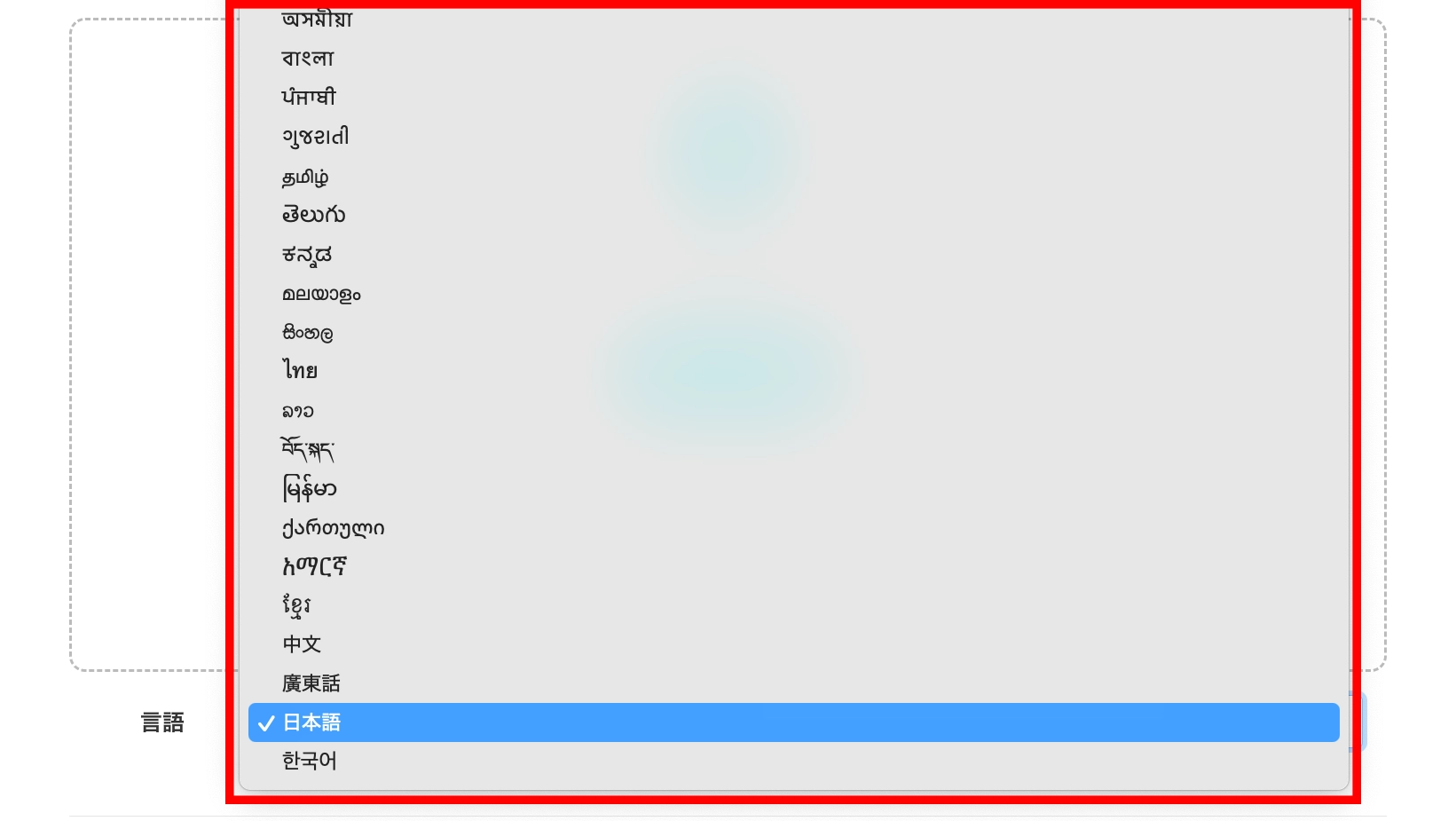
Select the language you want to transcribe from the dropdown menu and click the "Transcribe" button at the bottom of the screen.

Clicking the button immediately starts file upload and transcription.
Caution: Processing starts immediately when you click the transcribe button.
Please confirm it's the correct file before clicking the button.
Cancellation during processing is not possible, and processing the same file multiple times will consume transcription time.
Also, audio with multiple languages mixed in cannot be transcribed correctly.
Step 3: Check and Utilize Results
The estimated processing time for transcription is as follows:
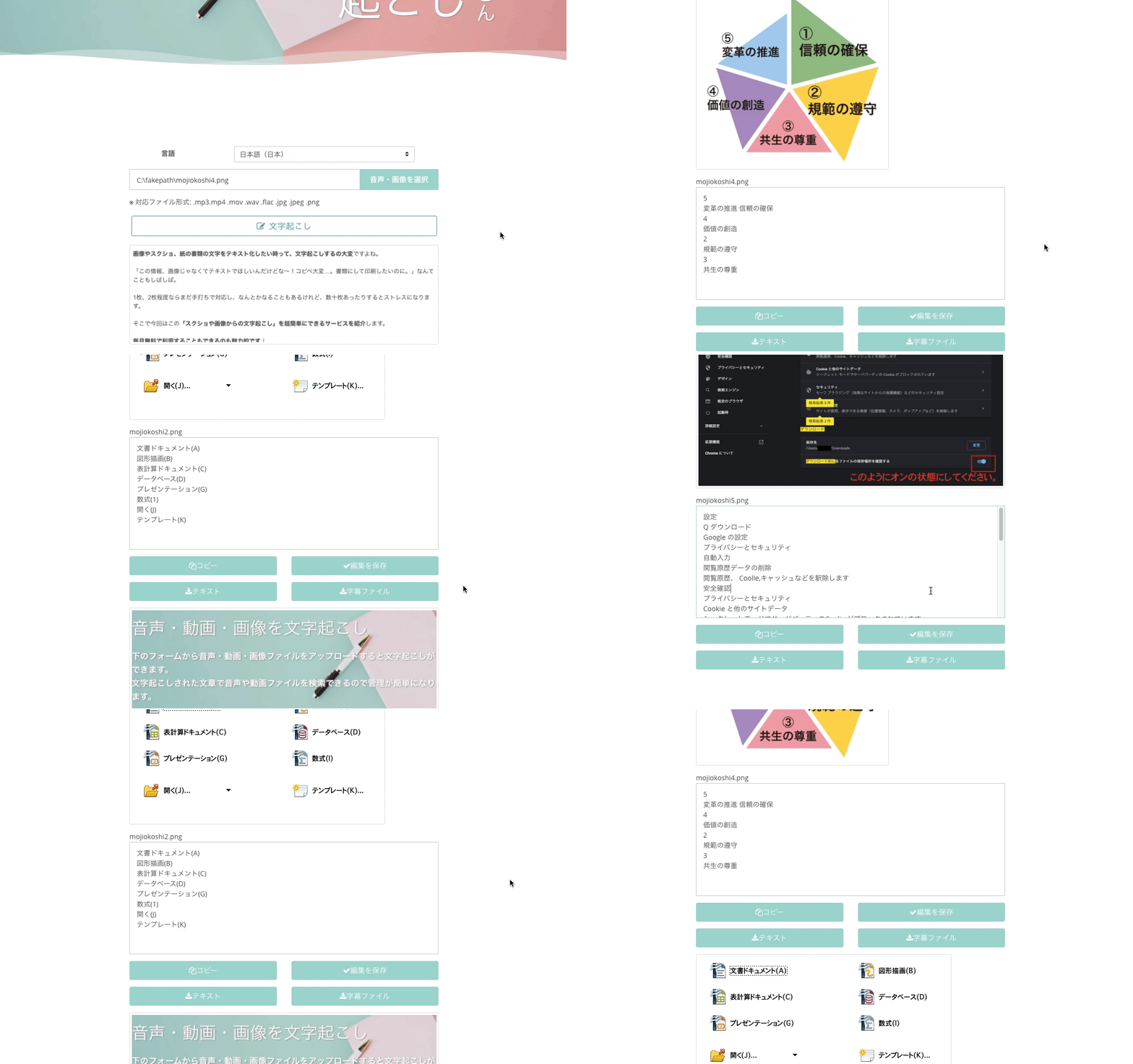
- For images: A few seconds to a few minutes
- For audio/video: Approximately 5 minutes for 60 minutes of audio data
Image Transcription Results
Audio Transcription Results
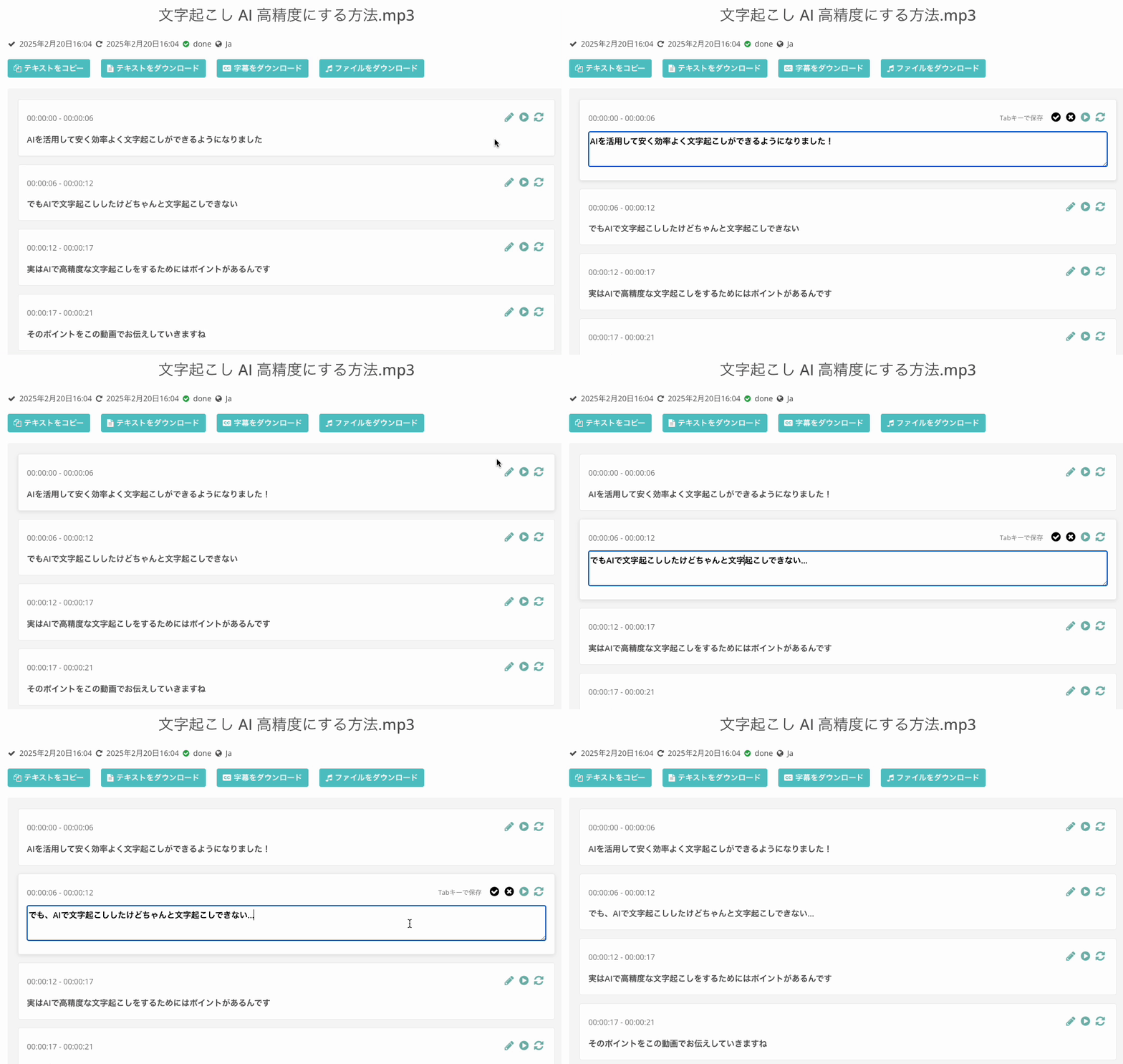
The transcribed text is displayed in blocks.
On the results screen, you can:
- Edit text: Correct transcription results on the spot
- Download text file: Save transcription results as a text file
- Download SRT subtitle file: Use for video subtitles
- Create AI summary/meeting minutes: AI automatically generates a summary from the transcription results
*About subtitle file specifications
Even if you edit the content on Mr. Transcription's web page, the edited content will not be reflected in the subtitle file.
If you want to edit the subtitle content, please use a notepad app or similar to directly edit the downloaded subtitle file.
If an error occurs or uploading fails, please check the troubleshooting guide on the following page.

Troubleshooting When an Error Occurs and Transcription Fails with Mr. Transcription.
This article introduces troubleshooting steps when an error occurs with Mr. Transcription and transcription fails. The main causes are: reaching the transcription limit, failed upload, or errors due to network environment or browser.
Audio Files That AI Transcription Struggles With
For the following types of audio files, Mr. Transcription may not yield satisfactory results:
- Audio that is too quiet, or where the microphone is too far, making it difficult to hear
- Audio with excessive noise that drowns out the speech
- Audio where speech is muffled due to room reverberation
- Audio containing music, such as song lyrics
- Files with no audio
- Audio with strong dialects
- Audio that is difficult for humans to hear clearly
To achieve highly accurate transcriptions, recording with good sound quality is also key.
For more details, please refer to "6 Tips for Recording for Highly Accurate AI Transcription".
■ AI transcription service "Mr. Transscription"
"Mr. Transcription" is an online transcription tool that can be used from zero initial cost and 1,000 yen per month (* free version available).
- Supports more than 20 file formats such as audio, video, and images
- Can be used from both PC and smartphone
- Supports technical terms such as medical care, IT, and long-term care
- Supports creation of subtitle files and speaker separation
- Supports transcription in approximately 100 languages including English, Chinese, Japanese, Korean, German, French, Italian, etc.
To use it, just upload the audio file from the site. Transcription text is available in seconds to tens of minutes.
You can use it for free if you transcribe it for up to 10 minutes, so please try it once.

It is "Mr. Transcription" who can easily transcribe from audio, video, and images.
Transcription allows you to transcribe for up to 10 minutes for free.
You can copy, download, search, delete, etc. the transcribed text.
You can also create subtitle files, which is ideal for transcription of interview videos.
HP: mojiokoshi3.com
Email: mojiokoshi3.com@gmail.com
Email: mojiokoshi3.com@gmail.com
Related article
Transcription for audio / video / image transcription. It is a transcription service that anyone can use for free without installation.
- What is Mr. Transcription?
- Transcript images, sounds, and videos with Mr. Transcription
- Free registration
- Rate plan
- manual
- Try other free services