Cancel Mr. Transcription: Easy Guide to Stop Auto-Renewals
Mr. Transcription Delete and Bulk Delete: How to Use and Notes
Oct. 16, 2026

With the “Delete” feature of Mr. Transcription, you can easily delete the data you have read aloud so far by yourself!
In this article, we will explain how to use the
- Delete feature
- Bulk delete feature
and what to keep in mind.
How to use the Delete feature and the Bulk delete feature
How to use the Delete feature
You can use the Delete feature of Mr. Transcription from your History page.
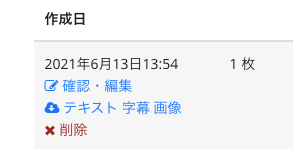
If you look at your History page, you will see the following items to the right of each text that was read aloud:
- Date
- Check/Edit
- Text
- Subtitles
- Image
- Delete
That makes six items in total.
Check/Edit: You can check the transcribed image and edit the transcribed text.
Text: You can download the transcribed text as a text file.
Subtitles: You can download the transcribed text as a text file.
Image: You can download the images used for transcription.
Delete: This deletes the text and the uploaded audio, video, and images from your history and from the server.
Click Delete
The transcription is displayed.
Click the red Delete button on the right.
This deletes the text and the uploaded audio, video, and images from your history and from the server.
A Delete button is shown for every transcription, so you can delete each one individually.
How to use the Bulk delete feature
If you want to delete all your transcriptions at once, please use the Bulk delete feature.
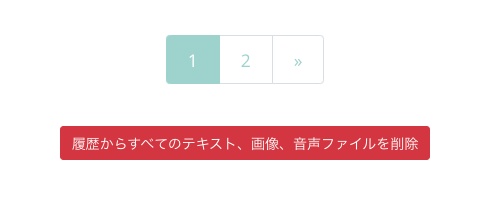
You can find the Bulk delete feature at the bottom of the History page
Delete all texts, images, and audio files from History
Use the red button labeled as above to delete everything at once.
Just like the Delete feature, all transcribed texts and all uploaded audio, video, and images are deleted from your history and from the server.
Two things to keep in mind about the Delete feature
There are two things to be aware of with the Delete feature.
- It does not affect your available character count.
- Because all data is deleted from the server, it cannot be restored.
1. It does not affect your available image count or audio minutes.
Even if you use the Delete feature to remove your past texts, images, and audio data from your history, your available image count and audio minutes will not be increased (restored).
Example:
Images available for reading aloud: 10
15 images deleted from history
→Your available image count stays at 10
2. Because all data is deleted from the server, it cannot be restored.
Even if you delete something by mistake, the transcribed text, images, videos, and audio data are already gone from the server.
For this reason, deleted data cannot be restored.
How long your data is kept on the server depends on your plan
Audio and transcribed text data are stored on our server for the following periods:
- Non-members: 1 day
- Free members: 30 days
- Paid members: until the member deletes their own history
After that, the data is deleted automatically.
The Delete feature is available to free members and paid members.
The AI engine is designed not to keep logs. Therefore, the AI engine cannot view your images, audio, videos, or text.
For stronger security
All pages of our service are encrypted with SSL/TLS, so third parties cannot see their contents.
In addition, the texts and audio you read aloud are stored on servers with a robust security system and can be viewed only by logged-in users.
Still, if you want to be as thorough as possible or have concerns about security, please make use of the Delete feature.

How secure is Mr. Transcription? Detailed answers on servers and more
Is it safe to upload data to Mr. Transcription? Could it be misused? Since files may contain confidential company information, it is natural to be cautious. How does Mr. Transcription handle security?
■ AI transcription service "Mr. Transscription"
"Mr. Transcription" is an online transcription tool that can be used from zero initial cost and 1,000 yen per month (* free version available).
- Supports more than 20 file formats such as audio, video, and images
- Can be used from both PC and smartphone
- Supports technical terms such as medical care, IT, and long-term care
- Supports creation of subtitle files and speaker separation
- Supports transcription in approximately 100 languages including English, Chinese, Japanese, Korean, German, French, Italian, etc.
To use it, just upload the audio file from the site. Transcription text is available in seconds to tens of minutes.
You can use it for free if you transcribe it for up to 10 minutes, so please try it once.

It is "Mr. Transcription" who can easily transcribe from audio, video, and images.
Transcription allows you to transcribe for up to 10 minutes for free.
You can copy, download, search, delete, etc. the transcribed text.
You can also create subtitle files, which is ideal for transcription of interview videos.
HP: mojiokoshi3.com
Email: mojiokoshi3.com@gmail.com
Email: mojiokoshi3.com@gmail.com
Related article
Transcription for audio / video / image transcription. It is a transcription service that anyone can use for free without installation.
- What is Mr. Transcription?
- Transcript images, sounds, and videos with Mr. Transcription
- Free registration
- Rate plan
- manual
- Try other free services






