1 Hour Transcription: How Long? Costs & Time Explained!
Free OCR for Vertical Newspapers, Magazines and Books (2026)
Oct. 12, 2026

I want to quote a vertical magazine in my materials, but typing it out by hand is a hassle...
I took a photo of a newspaper and transcribed it with an app, but the reading order of the vertical text was all jumbled and it was useless!

Have you ever struggled with this kind of problem at work, at school, or in your research?
When you want to use information from newspapers, magazines, and books, one thing that causes trouble is the vertical writing unique to Japanese.
Many transcription (OCR) apps and translation apps are built mainly for horizontal writing such as English, so they often struggle with vertical Japanese, especially with complex layouts like those of newspapers.
But now, there is nothing to worry about!
Thanks to advances in AI technology, anyone can now convert vertical text from newspapers, magazines, and books into text with high accuracy, easily and for free!
This article explains the latest way to transcribe vertical newspapers, magazines, and books with an iPhone or Android device!
We also introduce not just how to turn images into text, but how to summarize and analyze the transcription results of images and photos on the spot.
Why not use this article as a guide and conveniently transcribe Japanese newspapers, magazines, and books with an AI app?
[Free OCR] Recommended Way to Transcribe Vertical Newspapers, Magazines, and Books

If you want to transcribe (OCR) the vertical text unique to Japanese in newspapers, magazines, and books, we recommend Mr. Transcription, an image transcription (OCR) tool that supports vertical writing!
Mr. Transcription is a web app with the latest AI that can perform OCR on images with high accuracy.
You can use it right away on your iPhone (iOS) or Android smartphone.
Its biggest feature is that, in addition to AI for horizontal writing, it uses the latest AI dedicated to recognizing vertical writing to convert images to text.
Japanese text with multiple columns, which used to be difficult, can now be digitized smoothly.
It also supports summarizing and analyzing the transcription results!
Why not try Mr. Transcription for free for OCR of vertical text in newspapers, magazines, and books?
Why Is It Hard to Transcribe Newspapers, Magazines, and Books? The Weaknesses of Existing Apps
Why is OCR of newspapers and magazines so difficult?

Even when you try to digitize vertical Japanese text, the transcription often doesn't work well, does it?
In fact, there is a reason why existing transcription and OCR apps can't read Japanese well.
Why Transcription and OCR Apps Are Weak at Vertical Japanese Text
When you want to digitize newspapers, magazines, or books with OCR, the first things most people try are free tools such as Google Docs or the text recognition feature built into smartphones.
These apps are very useful for horizontal text, but they often fail to transcribe text from Japanese printed media.
Why does OCR fail?
The main reason is that the AI engines used for text recognition have been trained mostly on horizontal text.
Worldwide, many languages, starting with English, are written horizontally from left to right.
For that reason, the OCR engines in apps made overseas tend to look for lines in the horizontal direction when reading an image.
Even when they support vertical writing, AI apps made overseas have little vertical-writing training data, so their recognition accuracy has tended to drop.
Existing OCR Apps Also Struggle to Transcribe Multi-Column Text
Another reason is that Japanese newspapers and magazines often use a multi-column layout ("dangumi").
A multi-column layout is a layout, commonly used in newspaper and weekly magazine articles, in which the text is divided into two or more columns when printed.
It is used to make reading easier for people, but in fact, OCR apps are weak at multi-column layouts.
When multi-column text was transcribed with existing OCR apps, reading errors such as "the end of the first line is followed by the first line of the neighboring column" occurred frequently.
For that reason, it used to be necessary to photograph each column separately beforehand and run OCR on it.
OCR Is Difficult with the Complex Layouts of Newspapers and Magazines
Another reason existing OCR apps couldn't transcribe well is that the design (layout) of newspapers and magazines is complex.
In newspapers and magazines, headlines, photos, and captions are arranged in a complicated way so that the important content gets across immediately.
Unlike humans, existing OCR apps couldn't understand the flow and relationships between pieces of text.
As a result, the content of headlines and captions often got mixed suddenly into the body text.
Text from unrelated articles would also sometimes get mixed in abruptly.
But now, there is nothing to worry about!
With the latest AI apps, you can analyze the design (layout) of newspapers and magazines and transcribe each article accurately!
Of course, with the latest AI you can also run OCR on horizontal multi-column text, not just vertical text, with higher accuracy than before.
In addition, AI apps can also convert vertical files saved in PDF format into text.
For transcribing vertical PDF files, please also see this article: "How to Transcribe Vertical PDFs: Convert Books, Magazines, and Old Documents to Text for Free".
AI Apps Are Recommended for OCR of Newspapers, Magazines, and Books! [iPhone and Android Supported]

I want to know an easy way to OCR Japanese newspapers and magazines!
For transcribing newspapers, magazines, and books from now on, we recommend AI apps!
The latest AI text recognition engine analyzes images and photos so that vertical text can be OCR'd with high accuracy.
[Free] Features of "Mr. Transcription," the AI App with Vertical Writing Support
For OCR of vertical newspapers, magazines, and books, we recommend Mr. Transcription!
The feature of Mr. Transcription is that it uses the latest AI model trained on vertical Japanese text.
In addition to the existing AI engines, it is equipped with an AI text recognition engine dedicated to vertical transcription, so it analyzes the structure of vertical Japanese text and can accurately OCR even multi-column layouts and complex layouts.
Even for newspaper and magazine articles whose order came out scrambled in other apps, Mr. Transcription can digitize them in the same natural flow as when a person reads them.
Use It Right Away in the Browser of Your iPhone or Android Smartphone
- Installing a new app is a hassle
- It's a company smartphone, so I can't install apps freely
Even in such cases, Mr. Transcription is a safe choice.
Mr. Transcription is a web app, so you can use it right away without installing any app!
It is easy to use.
Just open the top page here in the browser of your iPhone (iOS) or Android smartphone and load your newspaper, magazine, or book!
If you create an account and log in, after transcribing on your iPhone or Android smartphone you can also open the history page on a PC and download the transcribed content.
On the history page, you can also use the summary function and the analysis function.
Why not try the latest AI app Mr. Transcription for free?
What's more, Mr. Transcription is free to use!
If you register an account, you can transcribe 10 images or photos for free every day and check the results on the history page.
For easy, high-accuracy OCR of vertical Japanese text, we recommend Mr. Transcription.
Why not first try Mr. Transcription, the latest AI app for iPhone and Android, for free?
[iPhone and Android] How to Transcribe Vertical Newspapers and Magazines with Your Smartphone
Now let's explain how to convert newspapers and magazines into text with Mr. Transcription!
1. Access the Mr. Transcription Page on Your iPhone or Android Smartphone
First, open the official Mr. Transcription website in the browser app of your iPhone (iOS) or Android smartphone.
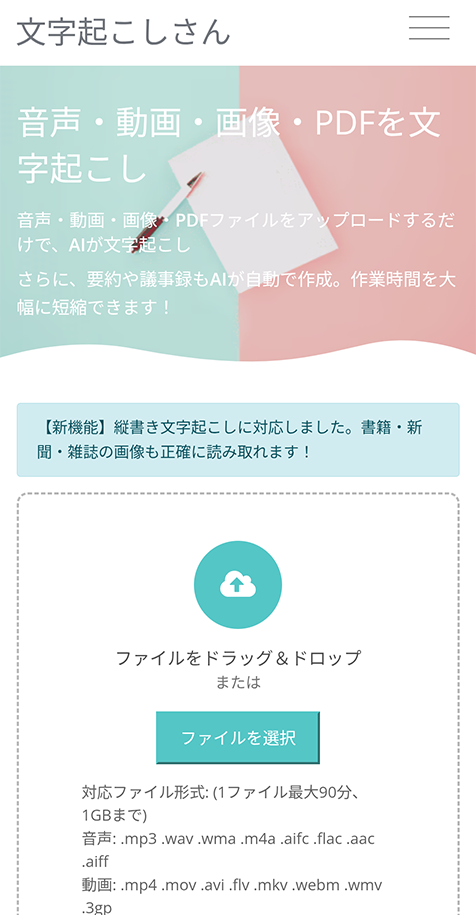
If this is your first time, we recommend signing up for a free membership.
Once you sign up for free, the number of images and photos you can transcribe for free increases, and you can check your transcription results on the history page.
2. Set the Language
If the language is set to something other than "Japanese," set it to "Japanese."
*Normally, it is set by default to match the language setting of your browser.
3. Photograph a Newspaper, Magazine, or Book with Your iPhone or Android Smartphone
Prepare the newspaper, magazine, or book you want to transcribe and tap "Choose File."
Then photograph the newspaper, magazine, or book.
How to Take a Photo on an iPhone (iOS)
*The explanation uses iOS 26 screens.
When you tap "Choose File" on an iPhone, a menu opens, so select "Take Photo or Video."
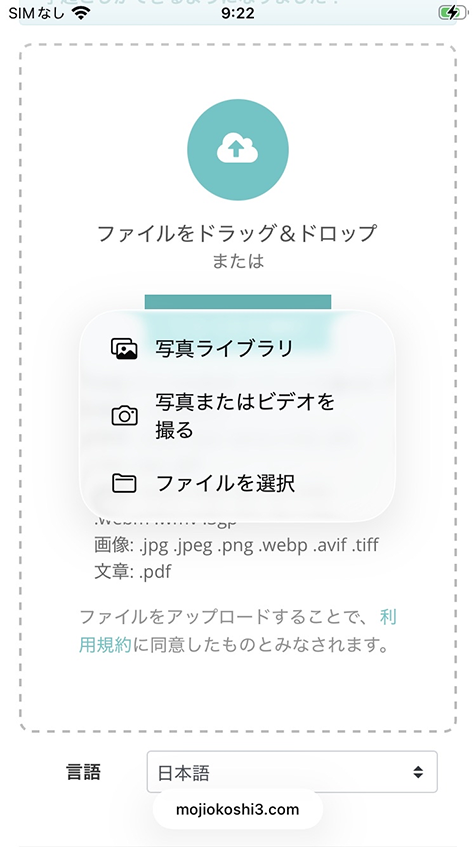
The camera app starts, so photograph the newspaper, magazine, or book.
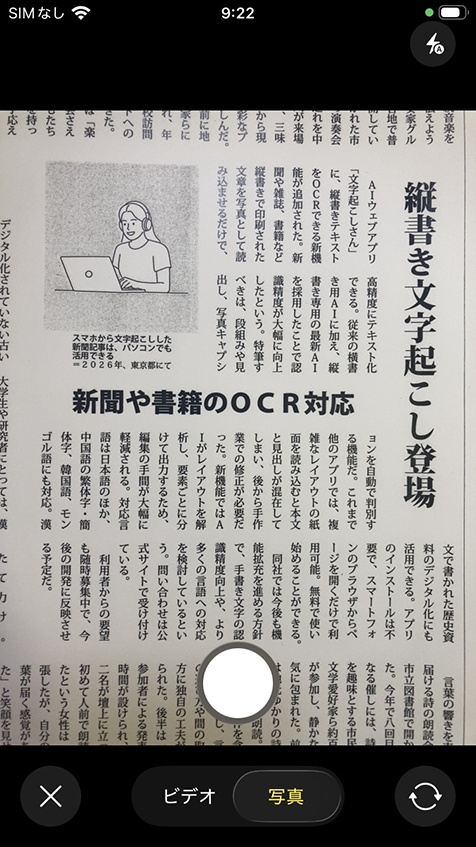
Check the photo, and if there is no problem, select "Use Photo."
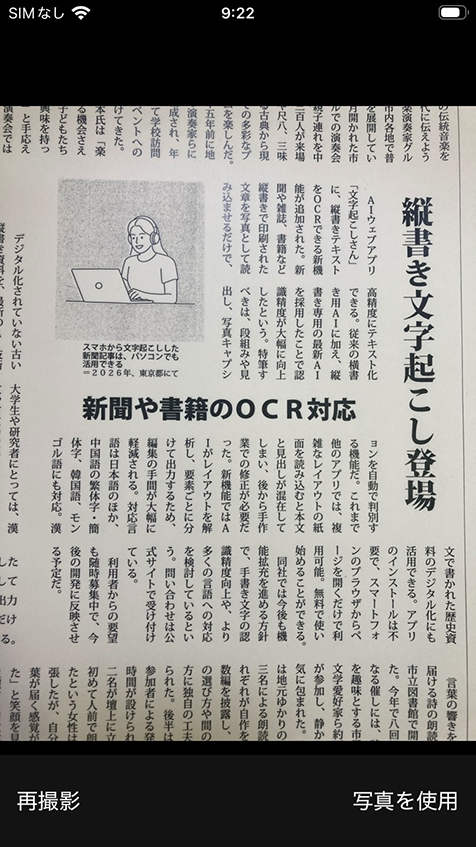
The photo you took is now selected.
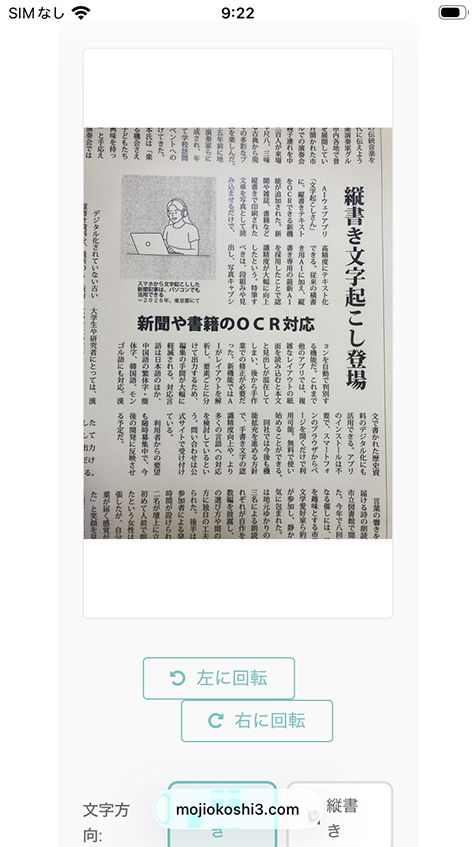
*If you tap "Photo Library" or "Choose File" in the menu, you can also select and transcribe photos and image files you have already taken.
How to Take a Photo on an Android Smartphone
*The explanation uses Android 12 screens.
On an Android smartphone, select "Camera" from the menu that opens when you tap "Choose File."
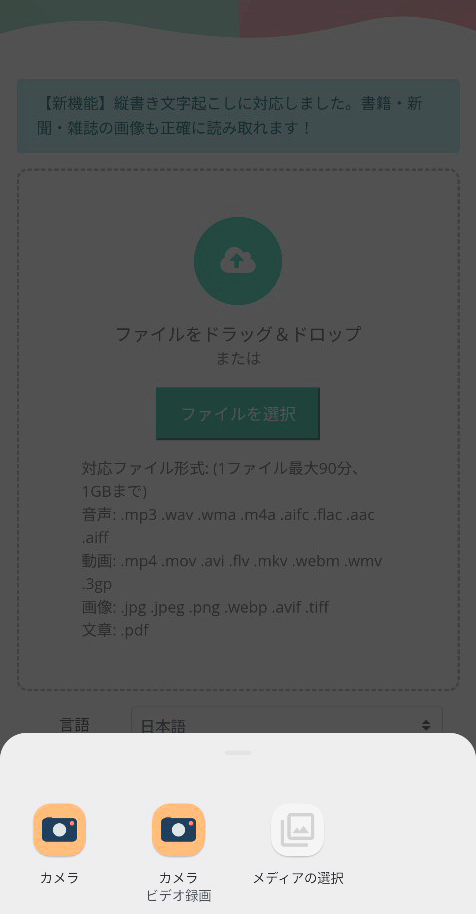
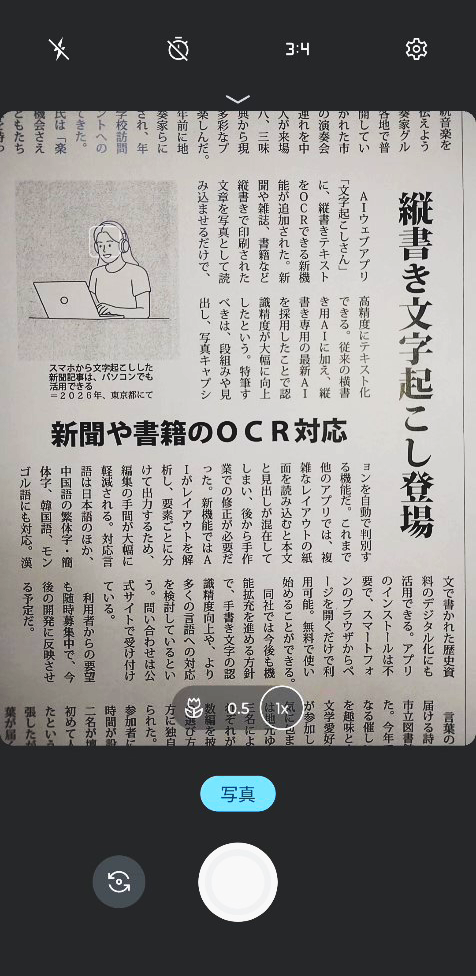
The camera app screen opens, so photograph the newspaper, magazine, or book.
After you take the photo, you return to the browser app screen with the image file selected.
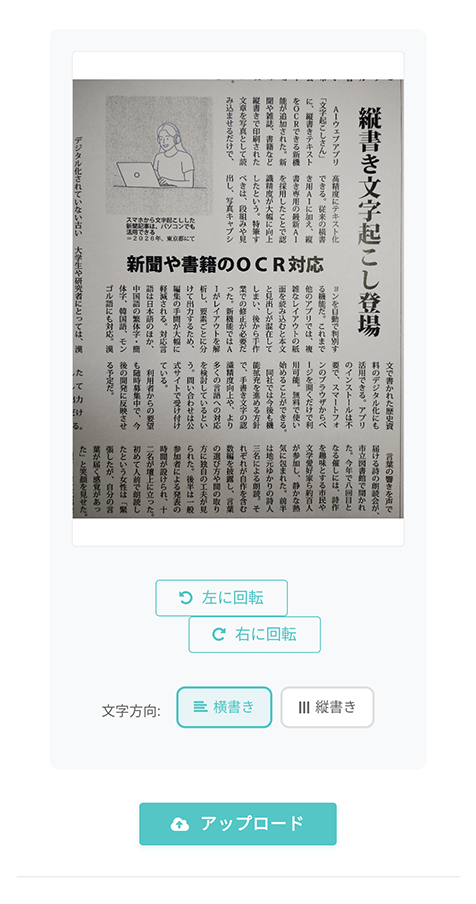
*You can also tap "Select Media" in the menu to select and transcribe photos and image files you have already taken.
In the second half of this article, we explain recommended ways to take photos for good transcription results, so please take a look.
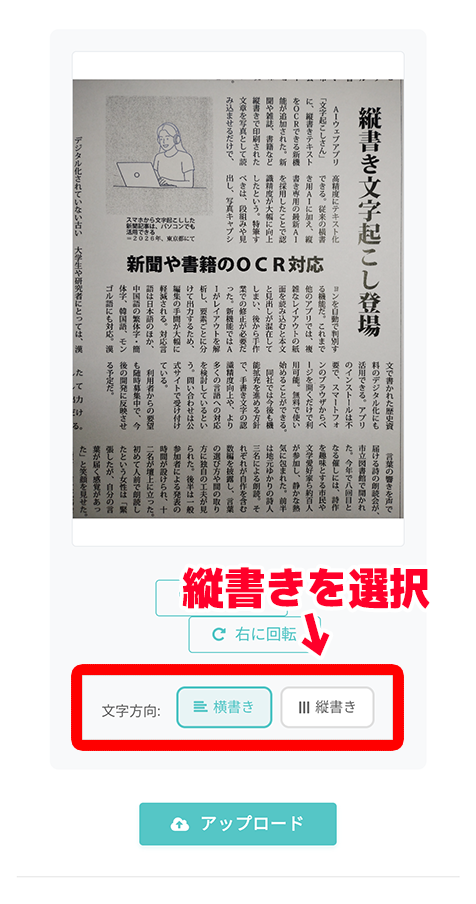
4. [Important] Select "Vertical"
This is the most important point!
After you select an image, a menu appears asking you to choose between
- Vertical
- Horizontal
writing.
When transcribing vertical text, tap "Vertical" in this menu to select it.
5. Upload the Photo or Image File and Transcribe It!
Now the preparation for transcription is complete.
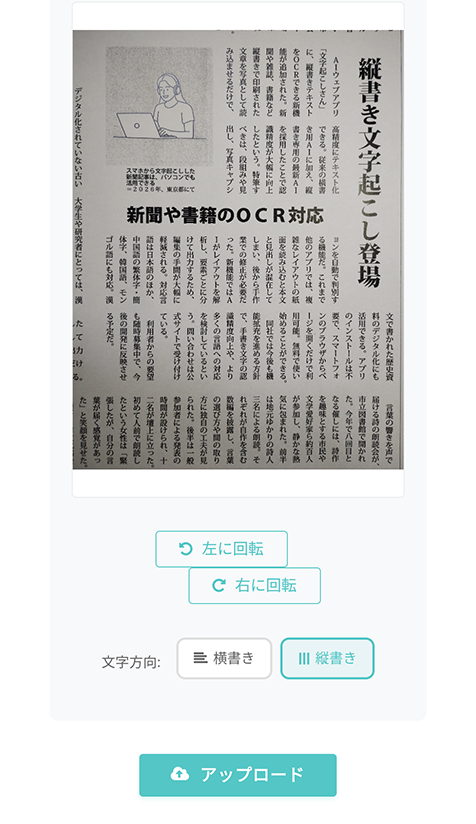
Tap the "Upload" button to upload the photo or image file.
When the upload finishes, transcription starts automatically.
With the high-performance latest AI engine, transcription finishes in no time!
The screen changes, and the transcription result is displayed like this.
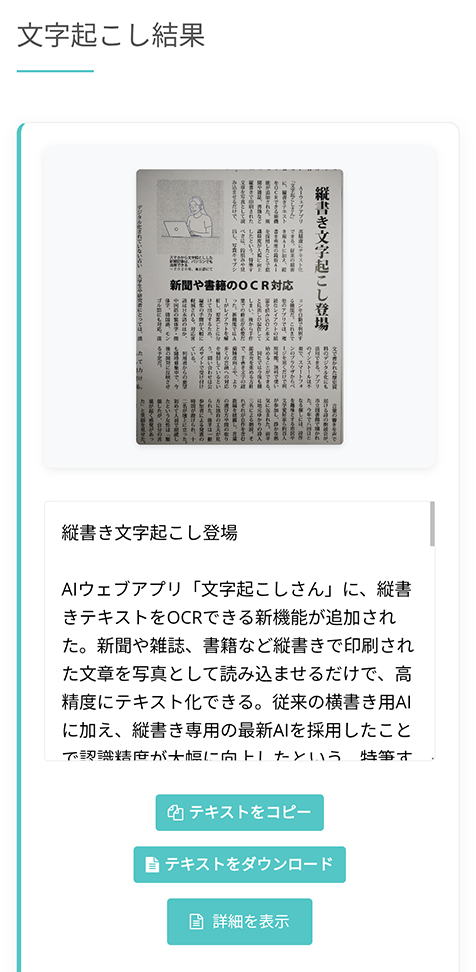
You have now transcribed (OCR'd) a vertical newspaper, magazine, or book.
The transcription result can be downloaded as it is, or loaded into the summary and analysis functions built into Mr. Transcription.
*Please note that if you use the service without logging in, the transcription result disappears when you close the page.
In this way, with the AI app Mr. Transcription, which supports vertical writing, you can OCR newspapers, magazines, and books with high accuracy.
Why not experience Mr. Transcription for free first?
How Can You Make Further Use of OCR'd Newspapers, Magazines, and Books? (Smartphone Supported)
With the latest AI app for iPhone (iOS) and Android smartphones, you can easily OCR newspapers, magazines, and books and put them to use.
It is widely useful for work, study, and research.
In addition, Mr. Transcription also has summary and analysis functions that work on smartphones!
From here, we introduce ways to digitize newspapers, magazines, and books and make even more convenient use of them.
[Smartphone Supported] What Are the Summary and Analysis Functions of Mr. Transcription?
The AI app "Mr. Transcription" offers not only transcription and OCR but also summary and analysis functions!
You don't have to go to the trouble of pasting the text into another AI tool; you can summarize and analyze the transcription results on the spot.
Mr. Transcription has five summary and analysis functions.
- 3-Line Summary
- Summary
- Meeting Minutes Creation
- Content Analysis
- Q&A
In this way, it offers functions that let you analyze OCR'd newspapers, magazines, and books as data in one stop.
Because you can summarize and analyze newspaper and magazine articles on the spot once you load them, you can easily grasp their content even when you are short on time at work.
How to Summarize and Analyze OCR'd Newspapers, Magazines, and Books (iPhone and Android Supported)
Using the summary and analysis functions is very easy.
First, press the "Show Details" button below the transcription result.
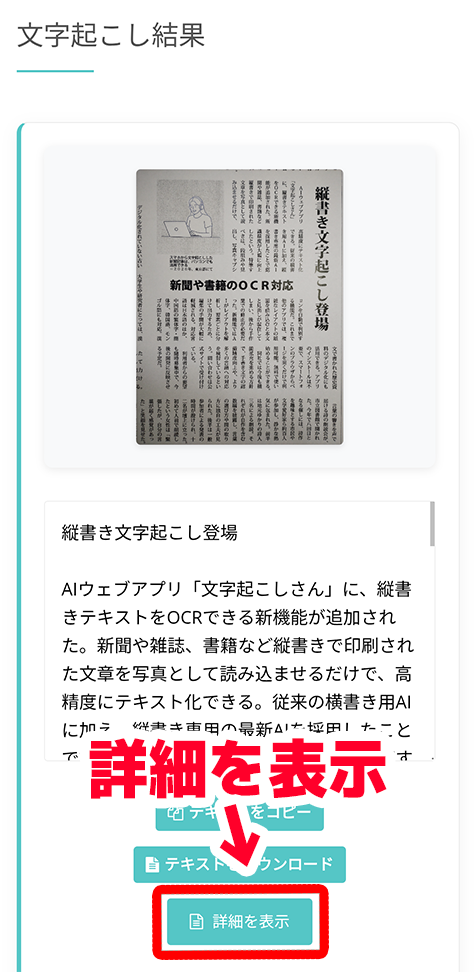
Then the detail page of the transcription result opens, like this.
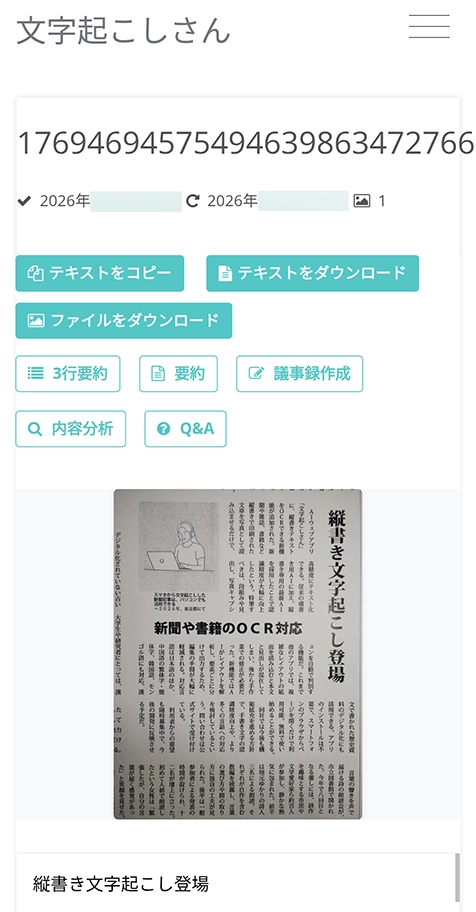
When you press a button on this page such as "3-Line Summary," "Summary," or "Content Analysis," processing starts.
The latest AI reads the content and analyzes it automatically, and the result is displayed immediately.
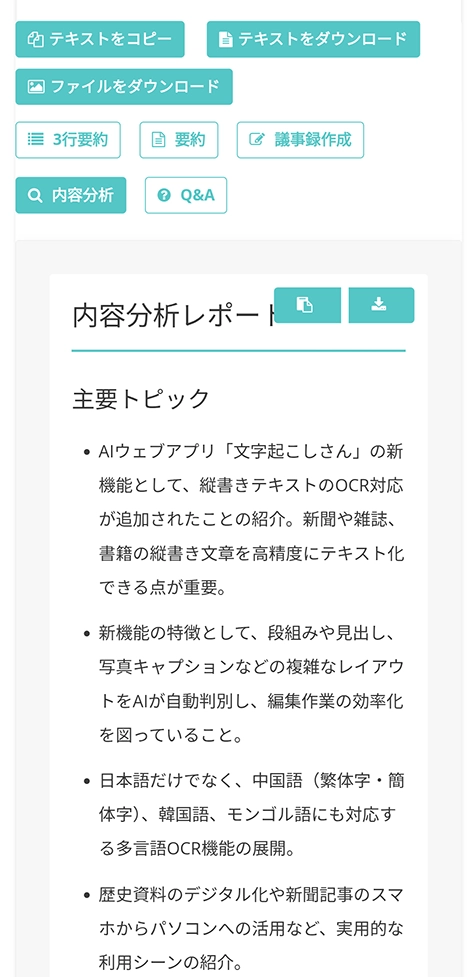
Because it also supports iPhone (iOS) and Android smartphones, you can comfortably run AI analysis on OCR results anytime, anywhere.
The summary and analysis functions are explained in detail in this article.
Please take a look.

[Free] AI Summary and Meeting Minutes Creation Arrive in Mr. Transcription! A Detailed Guide to Using Them
AI summary and meeting minutes creation functions have been added to Mr. Transcription! With this function, you can easily summarize long text transcribed from audio. You can also create meeting minutes easily just by pressing a button! This makes daily work, study, and organizing information run more smoothly...
How to Photograph Newspapers, Magazines, and Books for Clean OCR
When you OCR newspapers, magazines, and books with Mr. Transcription, how you take the photo also matters.
The latest text recognition AI can perform OCR even with some shadows, but for more accurate digitization we recommend taking a clear photo that is easy to read.
From here, we briefly explain how to take photos for smooth OCR.
Glare and Shadows Are the Enemies of OCR!
This is the most important point to watch for when taking photos for transcription and OCR.
It is "lighting."
When you photograph a newspaper, magazine, or book under ceiling lights, if you simply place it on a desk and take the photo, the shadow of your smartphone or hand will fall on it.
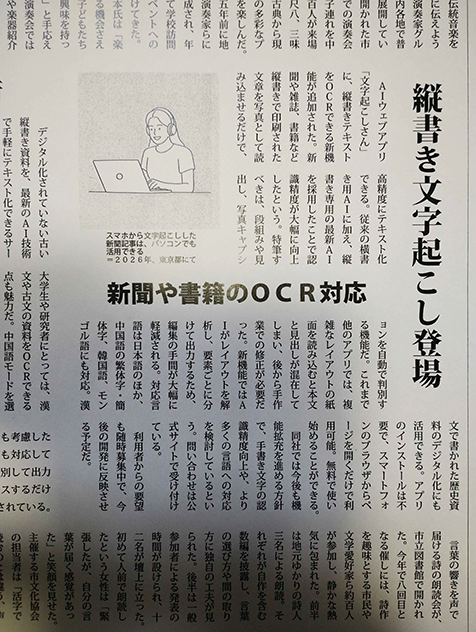
As in this image, bright and dark areas appear in the photo, which lowers the accuracy of text recognition.
There are two recommended methods for taking clean photos even without special photography equipment.
1. Photograph the Newspaper, Magazine, or Book at an Angle
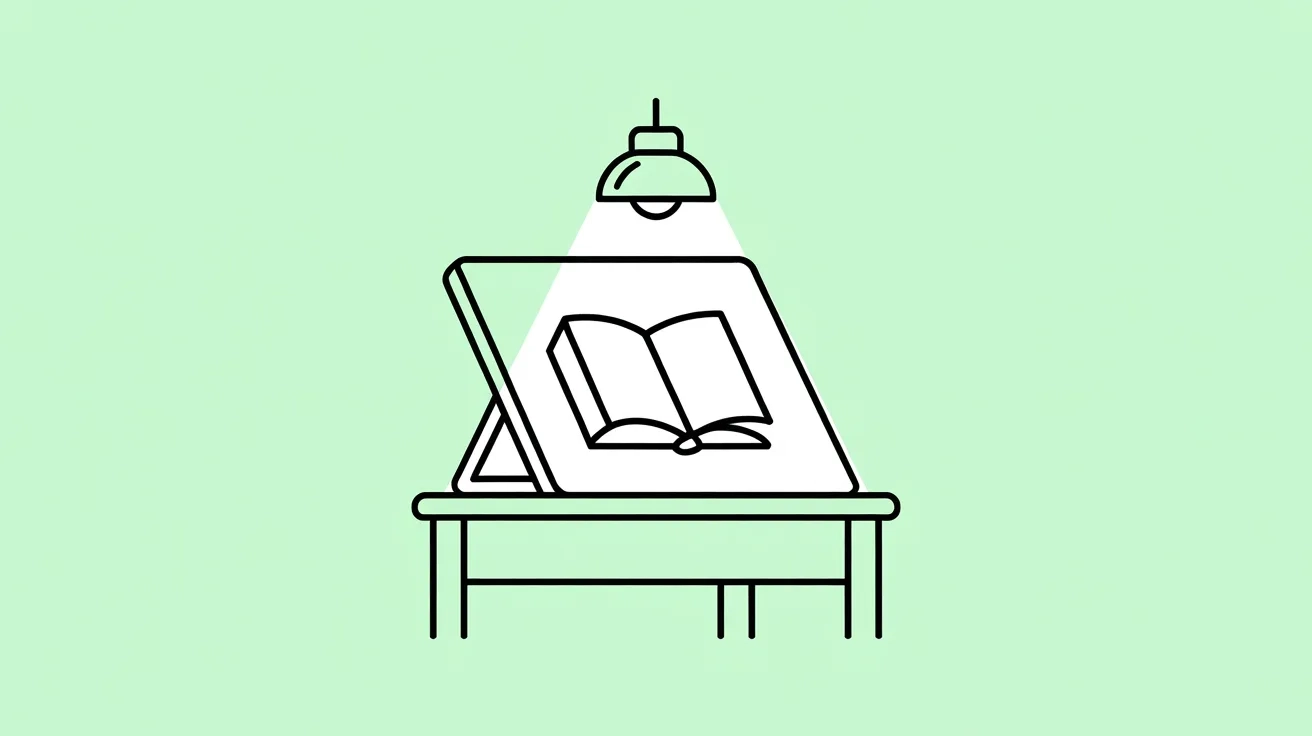
A recommended method that is easy to do even at home is to photograph the newspaper, magazine, or book at an angle.
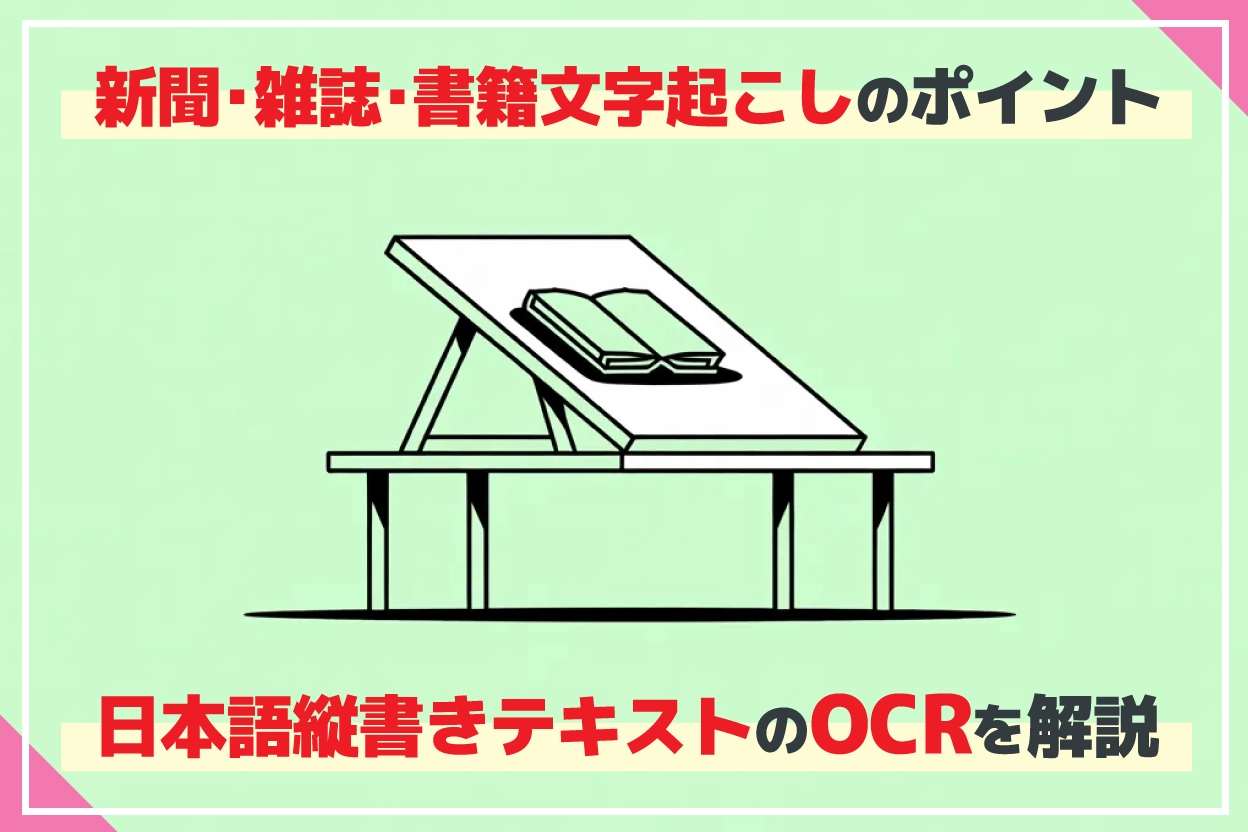
On a table, make an angled stand with a board or similar item.
Then place the newspaper, magazine, or book on it and photograph it with your smartphone.
Because the shadow of your smartphone no longer falls on it, you can take clean photos that are easy to OCR.
*You can also hold the newspaper, magazine, or book at an angle by hand and photograph it, or lean it against something and photograph it.
2. Take the Photo by a Window in the Daytime
Another method is to take the photo by a bright window in the daytime.
The sunlight coming in through a window is soft, bright light.
Unlike light from ceiling lights, it is less likely to cast shadows, so just by taking the photo as it is with the camera app of your iPhone or Android smartphone, you can easily get a photo that is easy to OCR.
Recommended Way to Photograph the Gutter (Binding) of Magazines and Books
When you photograph a thick magazine or book, the center binding (gutter) can curve and distort the characters.
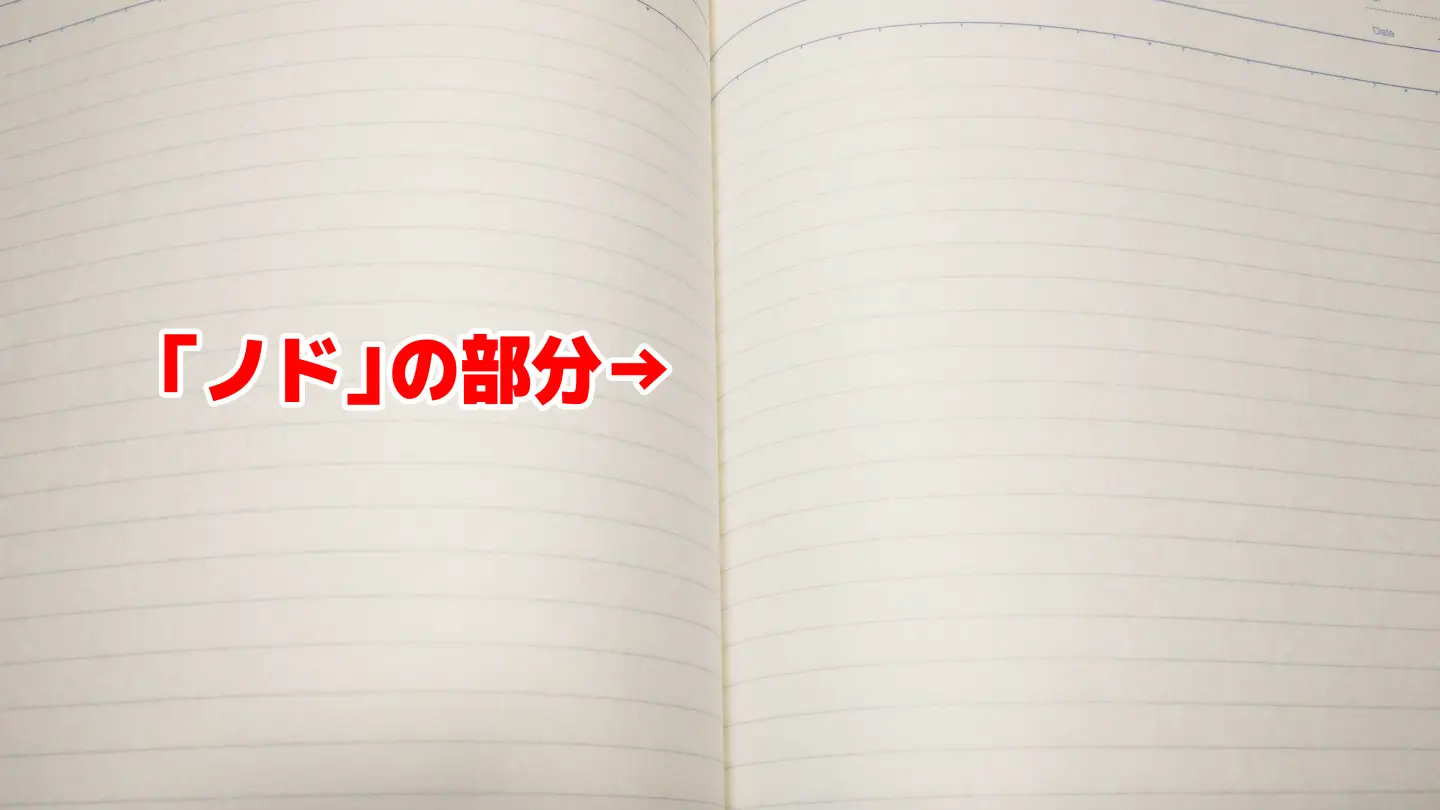
If the characters are too distorted, the AI engine may not be able to OCR them well.
To transcribe the gutter (binding) area well, we recommend pressing it down with your fingers or similar, as far as it doesn't damage the book, while taking the photo.
If you need even higher-accuracy OCR in a specialized field such as work or research, you can get a clean OCR result by pressing the book down with a transparent plate such as non-reflective glass.
We also recommend scanning the pages as images with a scanner and then loading them into Mr. Transcription.
Cover Unneeded Parts When Photographing
When you photograph a newspaper or magazine as it is, text from other articles around the target article can end up in the photo, can't it?
The AI text recognition engine of Mr. Transcription can transcribe article by article even when unrelated text appears in the photo.
However, to convert the text with even higher accuracy, we also recommend covering the unneeded parts when you take the photo.
The method is simple.
Just cover the parts of the text in the newspaper or magazine that you don't need to load with paper, and take the photo.
By having the AI load only the text you need, you can OCR with even higher accuracy.
The Vertical OCR of Mr. Transcription Supports Chinese, Korean, and Mongolian in Addition to Japanese
The vertical text transcription function of Mr. Transcription supports Chinese, Korean, and Mongolian in addition to Japanese!
- Transcribe classical Chinese in classical literature with the Chinese transcription function
- OCR vertical Korean newspaper articles from before the 1990s
- Read Mongolian inscriptions while traveling
With the latest AI, you can conveniently OCR languages other than Japanese in this way.
Mr. Transcription supports not only languages written vertically but also more than 100 languages worldwide, including English, French, Spanish, and German.
Every language can be converted to text and OCR'd as smoothly as Japanese, so we also recommend Mr. Transcription for transcribing foreign languages.
We also introduce ways to use the vertical transcription of Mr. Transcription in this article.
New Vertical Text Transcription Function Arrives! OCR of Newspapers, Magazines, and Books Is Now Even More Convenient!
A new function that can OCR vertical text in newspapers, magazines, and books with high accuracy using AI! It automatically recognizes columns, headlines, and captions. A guide to using Mr. Transcription, which transcribes for free just by taking a photo with your smartphone.
Vertical OCR of Mr. Transcription: Frequently Asked Questions (FAQ)
Finally, we answer frequently asked questions about transcribing newspapers, magazines, and books with Mr. Transcription.
Q. How much can I use it for free?
A. Mr. Transcription can be used right away for free.
Without registration or login, you can transcribe up to 3 images per day for free.
If you register an account, you can transcribe up to 10 images per day for free.
Q. Does the OCR support handwriting and old fonts?
A. Yes, it supports handwriting and old fonts.
For handwriting, accuracy varies depending on the writer's habits and how cursive the writing is.
For the printed type (fonts) used in newspapers and magazines, it can recognize Mincho and Gothic fonts, and even old fonts, with high accuracy!
Q. Can I use it for historical materials such as classical Japanese and classical Chinese?
A. Yes, you can.
For example, if you set the language to "Chinese," you can OCR classical Chinese texts like this.
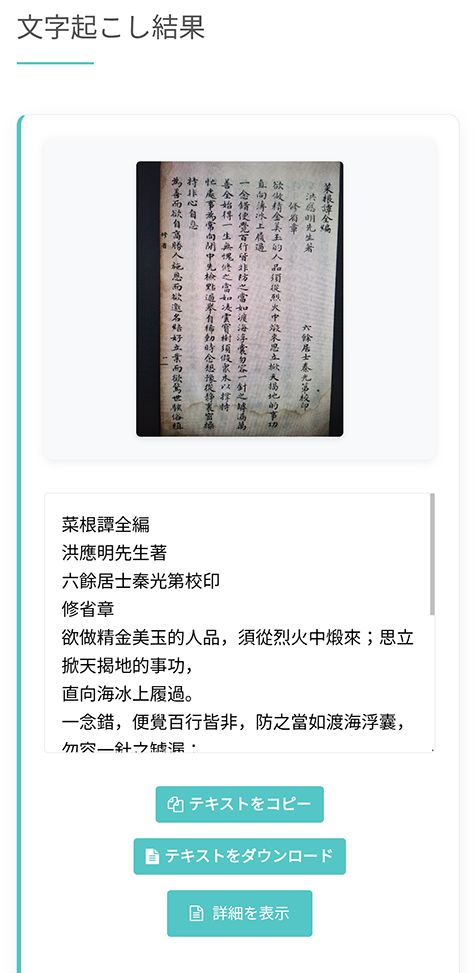
For materials from the Meiji and Taisho periods onward whose type is close to the printed type of today, you can take advantage of the strength in vertical writing support and also use it to convert Japanese research materials into text.
We recommend trying it for free first to test how well your own materials can be read.
Leave Vertical Japanese OCR of Newspapers, Magazines, and Books to "Mr. Transcription"!
Digitizing vertical Japanese text in newspapers and magazines used to be a very laborious task.
But thanks to advances in AI technology, anyone can now OCR easily and with high accuracy using just a smartphone!
Even multi-column text and complex layouts that existing OCR apps couldn't transcribe well can be analyzed automatically by the AI and digitized accurately with Mr. Transcription.
In addition, with the summary and analysis functions, you can summarize the content in one stop without opening other apps.
Why not first access it from the browser of your iPhone or Android smartphone and try Mr. Transcription for free?
■ AI transcription service "Mr. Transscription"
"Mr. Transcription" is an online transcription tool that can be used from zero initial cost and 1,000 yen per month (* free version available).
- Supports more than 20 file formats such as audio, video, and images
- Can be used from both PC and smartphone
- Supports technical terms such as medical care, IT, and long-term care
- Supports creation of subtitle files and speaker separation
- Supports transcription in approximately 100 languages including English, Chinese, Japanese, Korean, German, French, Italian, etc.
To use it, just upload the audio file from the site. Transcription text is available in seconds to tens of minutes.
You can use it for free if you transcribe it for up to 10 minutes, so please try it once.

It is "Mr. Transcription" who can easily transcribe from audio, video, and images.
Transcription allows you to transcribe for up to 10 minutes for free.
You can copy, download, search, delete, etc. the transcribed text.
You can also create subtitle files, which is ideal for transcription of interview videos.
HP: mojiokoshi3.com
Email: mojiokoshi3.com@gmail.com
Email: mojiokoshi3.com@gmail.com
Related article
Transcription for audio / video / image transcription. It is a transcription service that anyone can use for free without installation.
- What is Mr. Transcription?
- Transcript images, sounds, and videos with Mr. Transcription
- Free registration
- Rate plan
- manual
- Try other free services