7 Best OCR Apps to Extract Text from Images & PDFs (Free)
How to Translate Videos for Free: Transcription and Gen AI
Oct. 9, 2026

I want to know how to translate English videos for free! Which apps or websites should I use?

If you are looking for a way to translate videos, we recommend this: create an SRT file with an AI transcription app, then translate it with ChatGPT or Gemini!
Video sites such as YouTube often offer automatically translated subtitles, but their content is often wrong.
That is why we recommend using an AI transcription app together with a generative AI service to translate videos you have made or saved for free.
With the latest AI apps and websites, you can
- translate your favorite saved videos and watch them
- create videos for viewers abroad with free translation
Whether you want to watch an English or other foreign-language video, or translate a video you made yourself into a foreign language, you can easily translate the content of a video for free!
You can do everything from transcription to translation on an iPhone alone, so you can translate videos saved in your camera roll on the spot.
In this article, we introduce in detail how to translate videos using the latest AI apps and websites.
We also introduce apps and websites you can use on a PC, iPhone (iOS), and Android smartphone, so why not use this article as a reference and translate your own video for free?
Transcription plus generative AI is the recommended way to translate videos

Automatic video translation is handy when you want to watch foreign-language videos or add foreign-language subtitles to your own videos.
However, the video translation methods used until now had weaknesses.
YouTube's automatically translated subtitles are easy to use, but because they are generated automatically, they contain many mistranslations, and the meaning can change significantly.
Google Translate, on the other hand, translates mechanically one sentence at a time, so it does not reflect the surrounding context and tends to produce unnatural phrasing.
That is why we recommend creating an SRT file with the AI transcription app "Mr. Transcription" and translating it with generative AI.
Generative AI translates with the flow of the whole set of subtitles in mind, so the quality of the text is high.
Furthermore, "Mr. Transcription" is free to use on a Japanese website, and commercial use is also allowed.
You can create video subtitles on an iPhone alone.
[Free] The ideal AI transcription app for translating videos from now on
If you want to translate videos you made or saved for free, the AI web app "Mr. Transcription" is the best choice!

YouTube's automatic subtitles have so many mistakes...
Adding subtitles to a video yourself takes a lot of time and effort

Do you have these kinds of worries when creating or translating video subtitles?
In that case, just use "Mr. Transcription"!

"Mr. Transcription" is a free web app that uses the latest AI to convert video audio into text with high quality.
You can start using it right away, easily, in the browser on your PC or smartphone.
Because you can download files in SRT subtitle format, you can load them into video editing software or YouTube and easily add subtitles to your video.
It supports not only English but also Chinese, Korean, and more, with more than 100 supported languages.
As for pricing, it is free for up to 3 minutes per day without registration, and free for up to 10 minutes per day if you are a free member.
If you translate the SRT file, you can easily create videos in English and other foreign languages too!
If you are looking for a way to translate videos, why not first try "Mr. Transcription" for free?
[Free] To translate videos, create an SRT file with "Mr. Transcription" → translate it
To translate a video, all you need to do is create an SRT file with "Mr. Transcription" and translate it with generative AI.
Now let's go through the actual steps.
*This time we explain using an iPhone (iOS). "Mr. Transcription" is a web app that runs in a browser, so it works the same way on Windows and Mac.
Complete it on an iPhone alone! How to transcribe saved videos and camera roll videos
First, upload the saved or created video to the AI web app "Mr. Transcription" and create an SRT subtitle file.
Open the official "Mr. Transcription" website in a browser such as Safari on your iPhone.
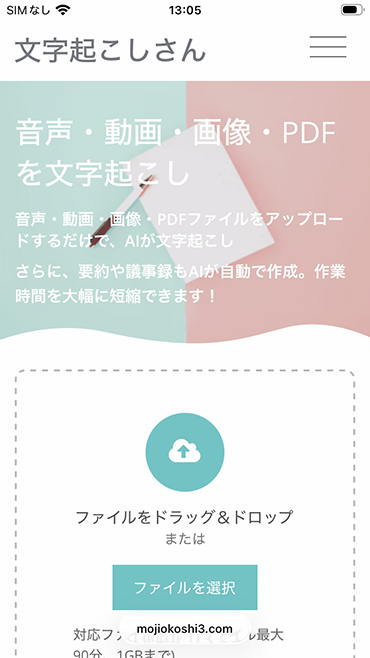
Select the language used in the video, such as "Japanese" or "English".
Tap the "Select" button on the top page and choose a video from your camera roll or a video saved in the "Files" app.
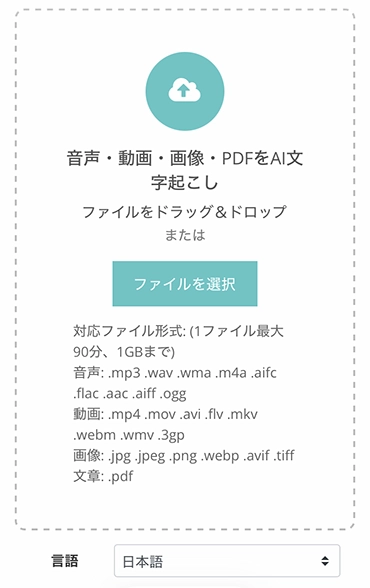
On an iPhone (iOS) or Android smartphone, the upload starts automatically once you select the file.
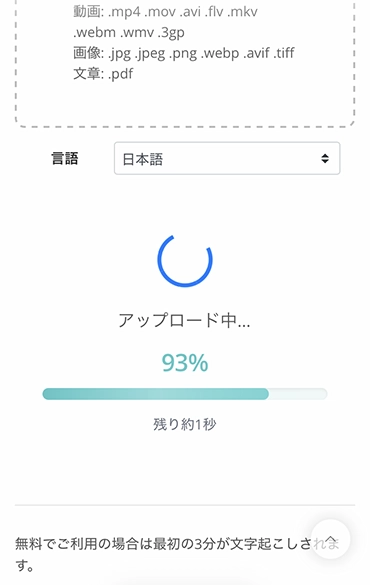
When the video upload finishes, the AI automatically starts analyzing the video's audio and converting it into text.
Short videos are transcribed right away.
Even long videos are transcribed in only about 1 minute.
*If you use the service without registering or logging in, keep the screen open and wait until processing finishes.
*If you register and log in, you will receive an email notification when processing is complete, so it is fine to close the screen.
When processing is complete, the screen changes and the transcribed text is displayed.
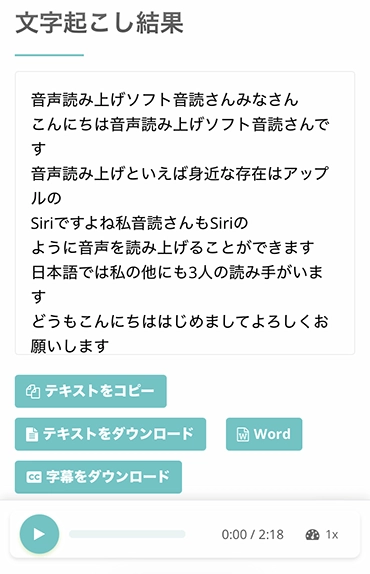
If you press the play button next to a statement, the video's audio plays from that statement's position.
Also, when you play with the player at the bottom of the screen, the displayed text switches to match the playback position.
You can download files on this screen.
If you press the "Download subtitles" button, you can save the video subtitles as an SRT file.
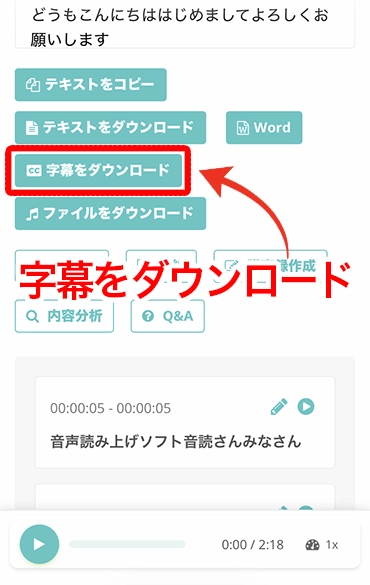
You can download the transcription result in any environment, whether iPhone, iPad (iOS), Android smartphone, Windows PC, or Mac.
When you open the downloaded file, it is in SRT file format like this.
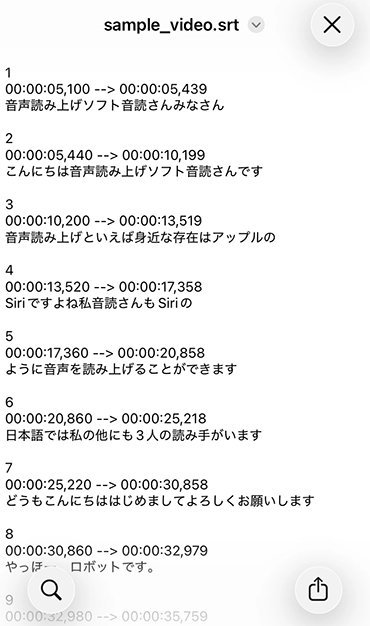
With that, you have created an SRT subtitle file for your video using the AI web app "Mr. Transcription".
The steps are the same on a PC: just drag and drop the video onto the top page to upload it.
We also explain SRT subtitle files for videos in this article.
Please take a look.
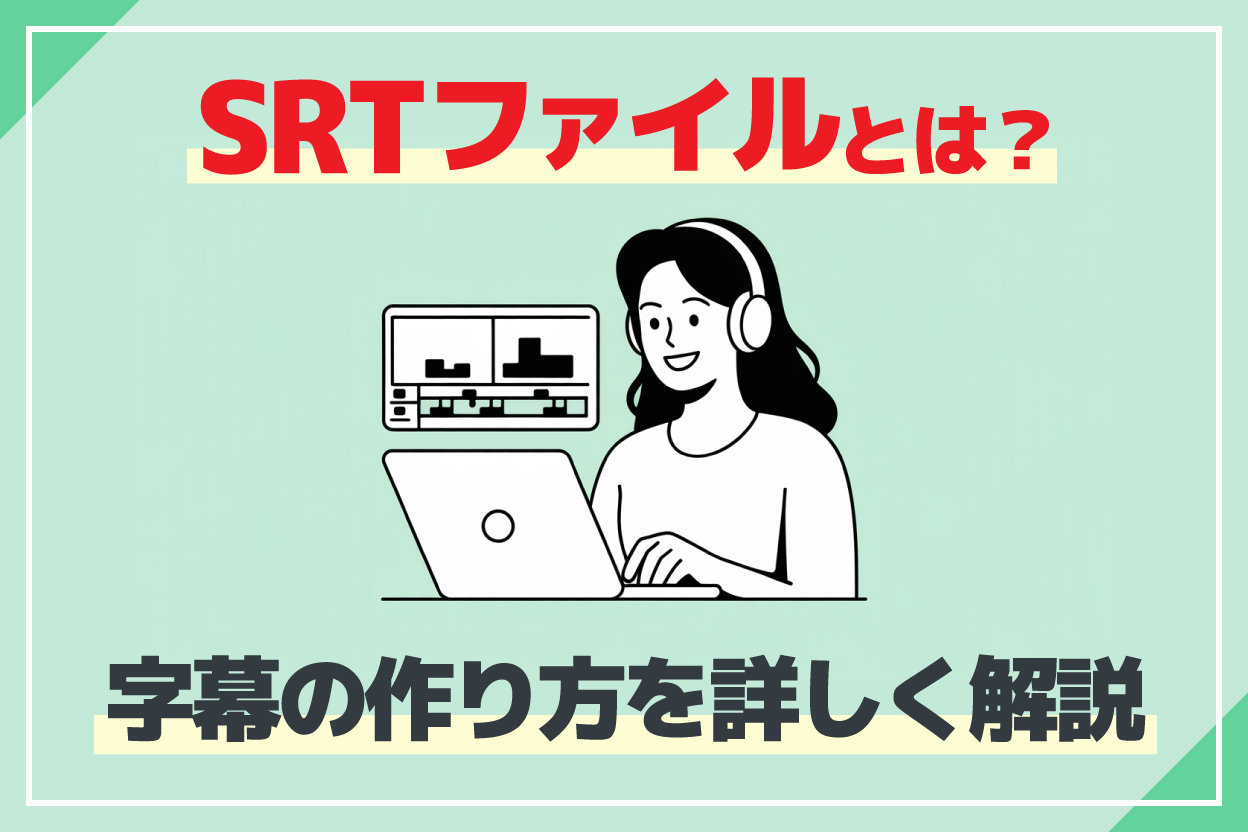
[Free] How to Make an SRT File: Create Video Subtitles in Just Your Browser
Learn how to make an SRT file, a subtitle file that records subtitle text and display times. With an AI transcription site, you can make one in just your browser. We also show how to use it in video editing software and on YouTube.
How to translate SRT files with a generative AI service [works on iPhone and Android smartphones too]
To translate an SRT video subtitle file, we recommend apps and websites of generative AI services.
Compared with earlier translation methods such as Google Translate, they translate with far higher accuracy.
Generative AI services recommended for translating video subtitles include Gemini, ChatGPT, and Claude.
Gemini and ChatGPT can be used for free.
*Please note that with long subtitle files, you may reach the usage limit of the free plan.
We recommend using the website when translating on a PC, and the app when translating on an iPhone (iOS) or Android smartphone.
Here, we explain how to use Gemini and ChatGPT.
[Free] How to translate an SRT file with the Gemini app or website
First, we explain how to translate an SRT file using Gemini, Google's generative AI service.
Translating an SRT file with Gemini is very easy.
First, open the Gemini app or website.
*The image shows the app on an iPhone (iOS).
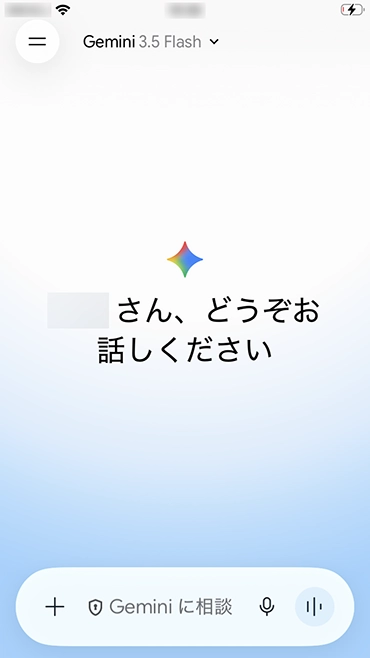
Next, select the SRT file.
On an iPhone (iOS) or Android smartphone, tap the "+" next to the text box in the app and select the file.
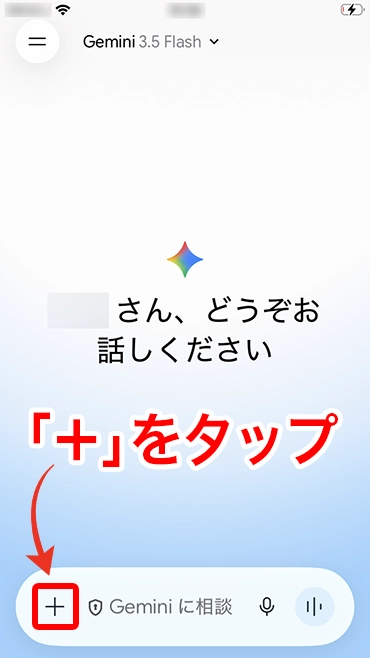
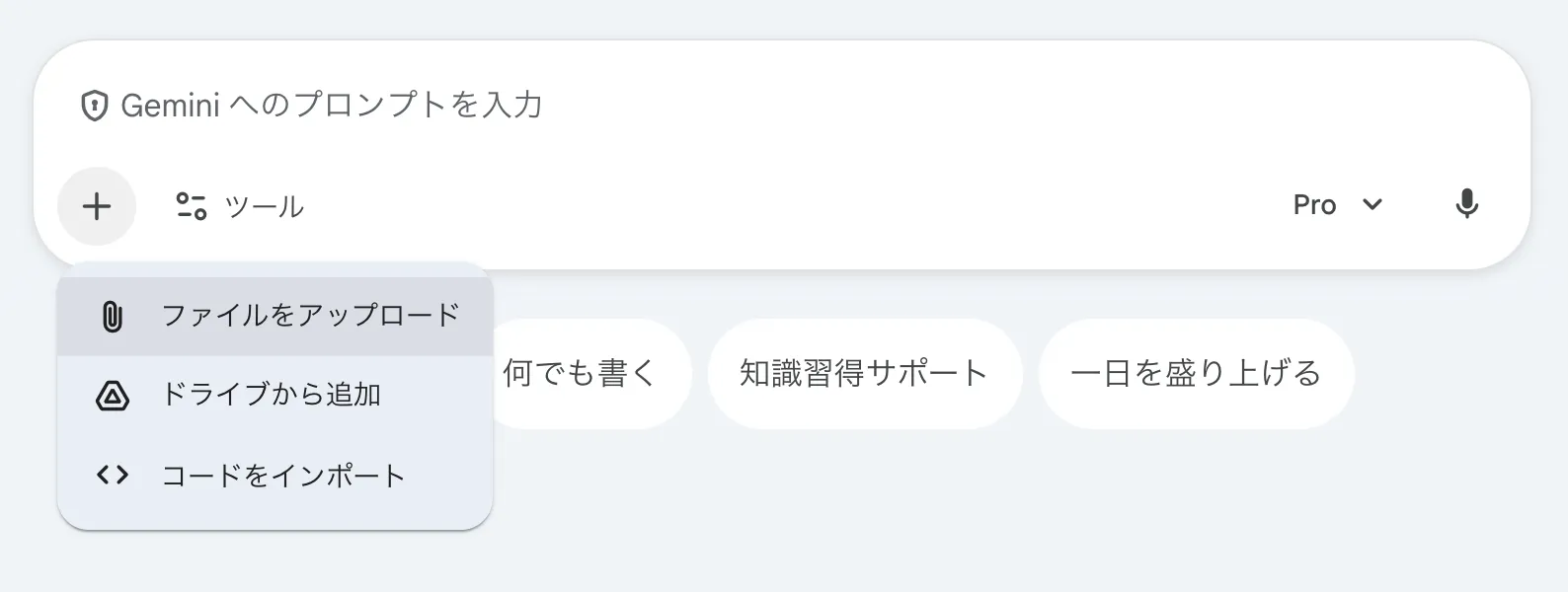
On a PC, click "+" on the Gemini website, or drag and drop the SRT file to select it.
After selecting the file, give an instruction such as
Translate the content into English and output it in SRT file format.
like this.

Then, as shown here, it translates only the subtitle text while keeping the SRT file's timecodes (the part that specifies when subtitles are displayed).
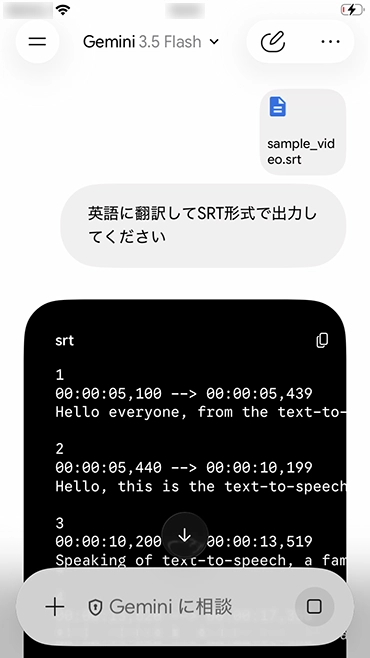
Copy the translation result, paste it into a text editor, and save it as an SRT file.
After that, just use this SRT file to add English subtitles in your video editing software!
[Free] How to translate an SRT file with the ChatGPT app or website
Next, we explain how to translate an SRT file with ChatGPT, which many people are used to.
The method is almost the same as with Gemini.
First, open the ChatGPT app or website.
*The image shows the ChatGPT app on an iPhone (iOS).
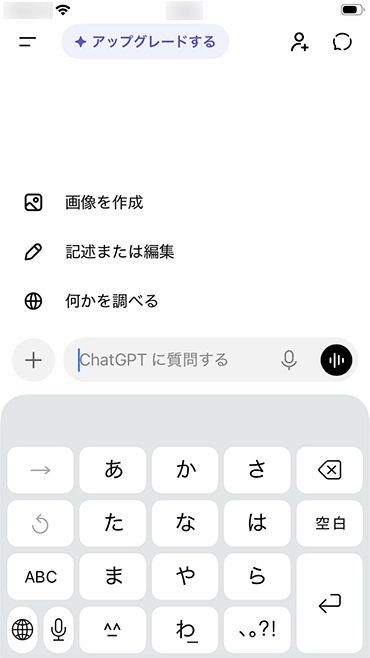
Tap "+" and select the SRT file.
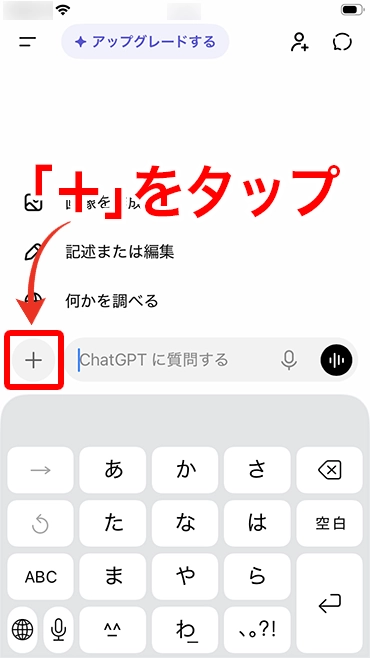
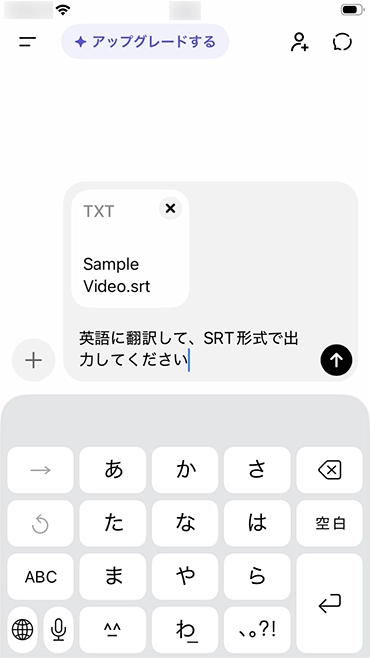
After selecting the SRT file, give an instruction asking it to translate the content into English.
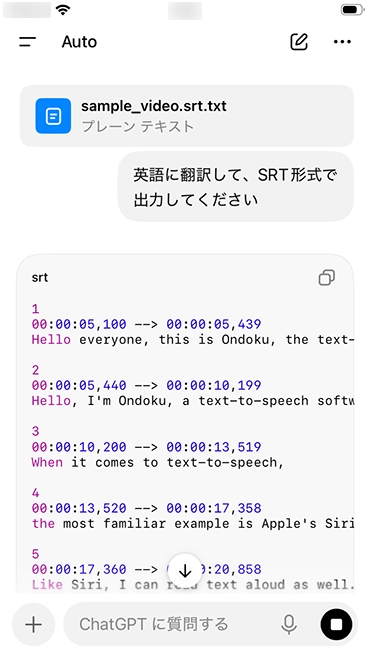
Then, as shown here, it translated the video subtitle file in SRT format while keeping the timecodes.
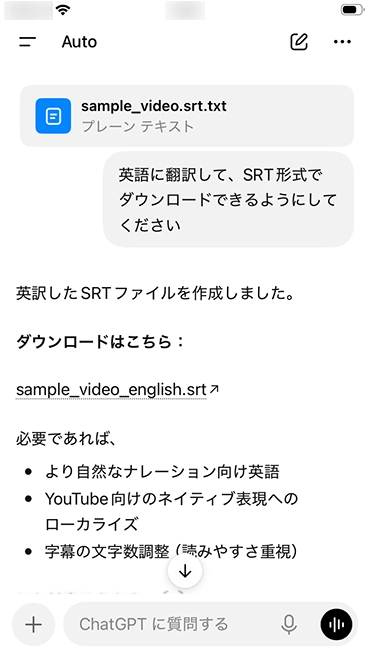
A key point is that ChatGPT can read SRT files even on the free plan.
If you also instruct it with "Please make it downloadable," it can output the result in a format you can save.
In this way, with the AI transcription web app "Mr. Transcription" and generative AI websites and apps such as Gemini and ChatGPT, anyone can easily translate video subtitle files for free.
The translation is of far higher quality than Google Translate, so if you are looking for a way to translate videos, why not first try "Mr. Transcription" for free?
[Free] Why AI apps and websites are recommended for translating videos

As you can see, with AI apps and websites you can translate videos for free very easily.
But why can they translate video subtitles with higher accuracy than YouTube's automatically translated subtitles or Google Translate?
Uploading a file allows highly accurate transcription
The biggest reason you can create high-quality subtitles without mistranslations is that AI apps and websites specialized in transcription can convert video audio into text with higher accuracy than the automatic subtitles of video sites such as YouTube.
The automatic subtitles on video sites such as YouTube convert video audio into text in real time.
In contrast, AI apps and websites specialized in transcription upload the video or audio file, analyze the entire file, and then convert it into text.
As a result, they can transcribe while understanding the flow of the whole video and the topics it covers.
If you are looking for a way to translate videos with high accuracy, we recommend creating an SRT file with a specialized AI transcription app or website.
Generative AI apps and websites can judge the whole context and translate [higher quality than Google Translate]
The same reason explains why generative AI apps and websites such as ChatGPT, Gemini, and Claude can translate SRT files with high quality.
If you have used translation apps or websites such as Google Translate, you have probably experienced mistranslations or translations into unnatural foreign-language text.
This is because tools such as Google Translate ignore the surrounding context and translate word by word or phrase by phrase.
But generative AI apps and websites such as ChatGPT, Gemini, and Claude are different.
When you upload an SRT file to a generative AI app or website and give an instruction, it first reads the entire SRT file, understands what topic the subtitles are about and how they flow, and then translates.
For that reason, it can translate subtitles into a foreign language in a style suited to the video's content, such as entertainment videos or corporate promotional videos.
In this way, by using the latest AI websites and apps, you can create very high-quality foreign-language subtitles that feel natural even to native speakers.
Tips for translating SRT files for free with generative AI websites and apps
Generative AI apps and websites such as ChatGPT, Gemini, and Claude are evolving rapidly, so even an instruction as simple as
Translate into English and output in SRT file format.
will translate the subtitles while keeping the SRT file format.
Still, there are times when you want to translate with even higher accuracy or translate to suit the content of a video you made or saved.
When translating a video you made or saved, we recommend adding a little extra effort to the instruction (prompt).
How to translate videos without breaking the timecodes (time information)
The most important thing to watch out for when translating an SRT file is not to break the timecode information.
An SRT file contains
00:00:10,000 --> 00:00:15,000
lines like this, which hold the information on when subtitles are displayed.
If an AI website or app deletes or rewrites this part during translation, the file will break and can no longer be loaded into video editing software.
To prevent this, we recommend emphasizing it firmly in the instruction (prompt).
- Always keep the timecodes and line structure unchanged
- Translate only the dialogue text
By adding instructions like these, you can translate more reliably while keeping the SRT file format.
How to translate videos to suit the purpose, such as entertainment or business
When you translate a video into English or another foreign language, an entertainment video and a business video made for work need to be translated in different styles.
Also, when you translate a saved foreign-language video into Japanese, you will want to keep the nuances of slang and dialects.
In such cases too, if you devise how you instruct the generative AI website or app, you can translate in just the style you want!
For example, when translating from Japanese into English for business use, add
This is the subtitle file for a promotional video for a new product to be launched in the U.S. market. Please translate it in a style appropriate for a promotional video.
When translating an English entertainment video into Japanese, add
If there is slang, please render it freely in natural colloquial language like that used by young people in Japan.
content like this.
With generative AI services such as ChatGPT, Gemini, and Claude, you can easily adjust the tone of the translation to suit the video's content and target audience.
Frequently asked questions about translating videos
Can video files be translated for free?
Yes, video files and subtitles can be translated for free.
"Mr. Transcription" is free for up to 3 minutes per day without registration, and free for up to 10 minutes per day if you are a free member.
Gemini and ChatGPT, which are used to translate SRT video subtitle files, also have free plans, so translating a short video costs nothing.
*With long subtitle files, you may reach the usage limit of the free plan of generative AI.
How accurately can video subtitles be translated?
Generative AI services such as Gemini and ChatGPT translate while understanding the context of the entire SRT file, so they can produce natural foreign-language text with higher accuracy than Google Translate.
If you describe the content of the video and the audience in detail when instructing the generative AI service, the result becomes even more natural.
Can I translate a video on an iPhone alone?
Yes, you can translate a video on an iPhone alone.
Just access "Mr. Transcription" in Safari on your iPhone, create an SRT file, and translate it in the Gemini or ChatGPT app.
You can translate videos from your camera roll and downloaded videos as they are, too.
Can YouTube videos be translated too?
For a YouTube video you uploaded yourself, you can transcribe the original video file to create an SRT file, then translate it with generative AI to add foreign-language subtitles.
How to add English subtitles to a YouTube video is explained in detail in the article "How to Add English Subtitles to YouTube Videos".
Will the SRT subtitle format break?
No. Thanks to improved performance of generative AI services, the SRT format is kept even with a simple instruction such as "Translate into English and output in SRT file format."
If you are unsure, adding something like "Always keep the timecodes and line structure unchanged" is also recommended.
A detailed way to write the prompt is explained in the section "How to translate videos without breaking the timecodes (time information)" in this article.
Related articles useful for translating videos
If you want to add English or other foreign-language subtitles to a YouTube video, this article explains in detail how to translate an SRT file with AI to create subtitles.

[Free] How to Add English Subtitles to YouTube Videos: AI-Translate an SRT File in Just Your Browser
Learn how to add English or other foreign-language subtitles to a YouTube video for free, in just your browser. We show with images how to make a Japanese SRT file with an AI transcription site, translate it with generative AI, and add it to YouTube.
If you want to watch other people's YouTube videos translated in real time, we recommend this article.
How to Translate YouTube Subtitles: Translate Videos into Japanese with Chrome's Auto Captions [No Extension Needed]
Learn with images how to translate YouTube video subtitles into Japanese. With Chrome's auto captions and real-time translation, you can translate English videos without an extension. We also cover what to do when captions do not appear or cannot be translated.
If you are looking for an app that can transcribe English audio and video, we also recommend this article.

8 Recommended Apps for Transcribing English Audio [Video Supported, Free Options Available]
A comparison of 8 apps and services that can transcribe English audio and video. We also explain how to use them for English meeting transcripts and English study. Free tools are introduced as well.
Saved videos and YouTube too! Summary of how to translate videos
This article explained in detail how to translate saved videos and videos you made.
From now on, we recommend using generative AI websites and apps to translate videos!
By using the AI transcription web app "Mr. Transcription" together with generative AI services such as ChatGPT and Gemini, anyone can easily translate video subtitles with high quality.
It works in any environment, including iPhone and iPad (iOS), Android smartphones, Windows PCs, and Mac.
With generative AI services, you can translate English and other foreign languages for free at far higher quality than earlier methods such as Google Translate.
You can translate camera roll videos on an iPhone alone, so you do not need a PC.
If you are looking for a way to translate videos, we recommend first trying "Mr. Transcription" for free.
Why not try it right now with your own video file?
■ AI transcription service "Mr. Transscription"
"Mr. Transcription" is an online transcription tool that can be used from zero initial cost and 1,000 yen per month (* free version available).
- Supports more than 20 file formats such as audio, video, and images
- Can be used from both PC and smartphone
- Supports technical terms such as medical care, IT, and long-term care
- Supports creation of subtitle files and speaker separation
- Supports transcription in approximately 100 languages including English, Chinese, Japanese, Korean, German, French, Italian, etc.
To use it, just upload the audio file from the site. Transcription text is available in seconds to tens of minutes.
You can use it for free if you transcribe it for up to 10 minutes, so please try it once.

It is "Mr. Transcription" who can easily transcribe from audio, video, and images.
Transcription allows you to transcribe for up to 10 minutes for free.
You can copy, download, search, delete, etc. the transcribed text.
You can also create subtitle files, which is ideal for transcription of interview videos.
HP: mojiokoshi3.com
Email: mojiokoshi3.com@gmail.com
Email: mojiokoshi3.com@gmail.com
Related article
Transcription for audio / video / image transcription. It is a transcription service that anyone can use for free without installation.
- What is Mr. Transcription?
- Transcript images, sounds, and videos with Mr. Transcription
- Free registration
- Rate plan
- manual
- Try other free services






